Participant
April 19, 2023
Question

Print settings preview page size wrong

  • April 19, 2023
  • 2 replies
  • 459 views

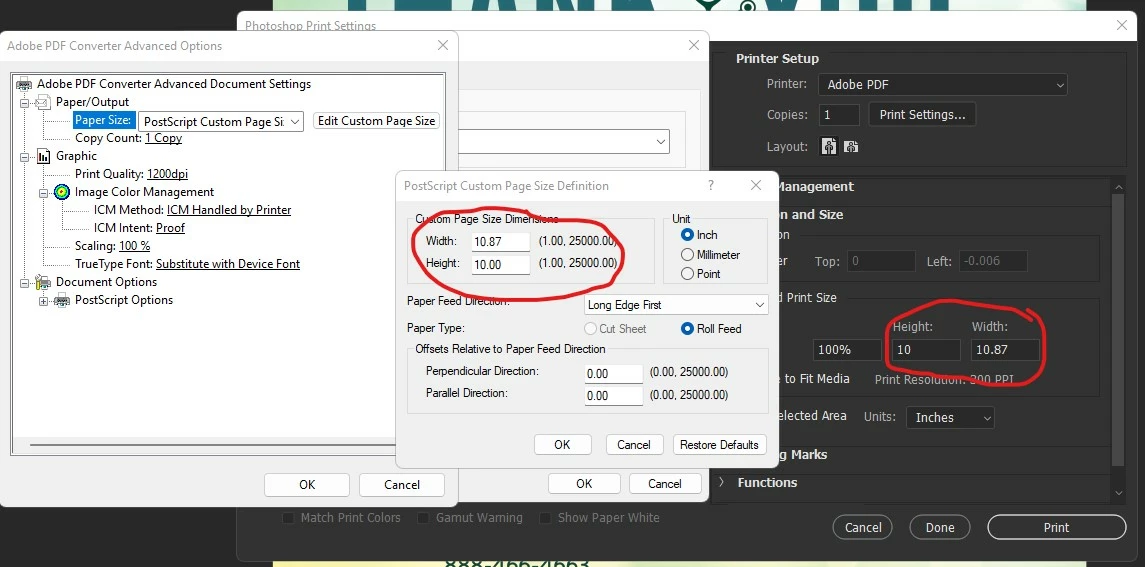
When I need to print to PDF (I know I can also save to PDF but I often need a much smaller file), I enter the dimensions of the file into Acrobat as exactly what they image size is. But Photoshop often changes the dimensions by a small amount for no apparent reason.


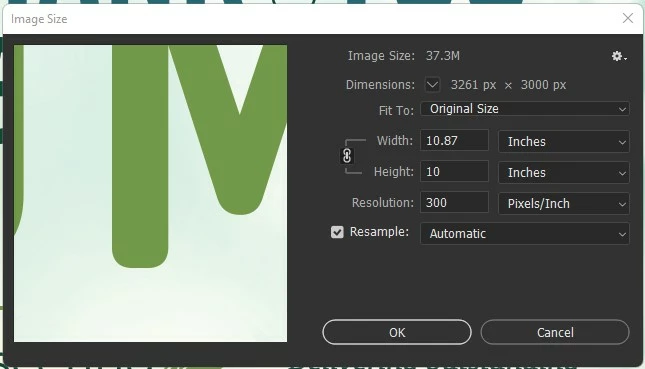
For example. I have an ad that is 10.87 inches wide by 10 inches tall.

In the Acrobat PDF settings, I set a custom page size to 10.87 x 10. But in the preview window in Photoshop, it shows 10.861 x 10. I cannot get it to be 10.87 no matter what even though the correct dimensions show up in all dialog boxes. Then when I hit print, I get the pop up that "The image is larger than the paper's printable area; some clipping will occur."


See screenshots attached.
This topic has been closed for replies.

2 replies

Participant
April 19, 2023

When I hold down the space bar and go to the print dialog box, it resets the preview page size to 8.5 x 11 and changes the dimensions to 41.666 x 45.291. When I go in and update the page size again, it still gives the wrong preview size by a smidge.

I'll see if I can reset preferences when I get a chance.

CShubert
Community Manager
Community Manager
April 19, 2023

Hi @Nascentia5EF7 


Curious if you hold the space bar down when going to File/Print - that will reset just the print dialog box instead of the entire program, does this fix your issue?


If not:


Let's make sure we're in a default state and there are no stale settings somewhere: 

Restore your preferences using this manual method:  

https://helpx.adobe.com/photoshop/using/preferences.html#Manually 

Does it work correctly? 

If that doesn't solve it, you can quit Photoshop and put the Settings folder back.