

Print size stuck at letter sized paper. Won't print larger.
I have a serious problem that have presented itself out of the blue.
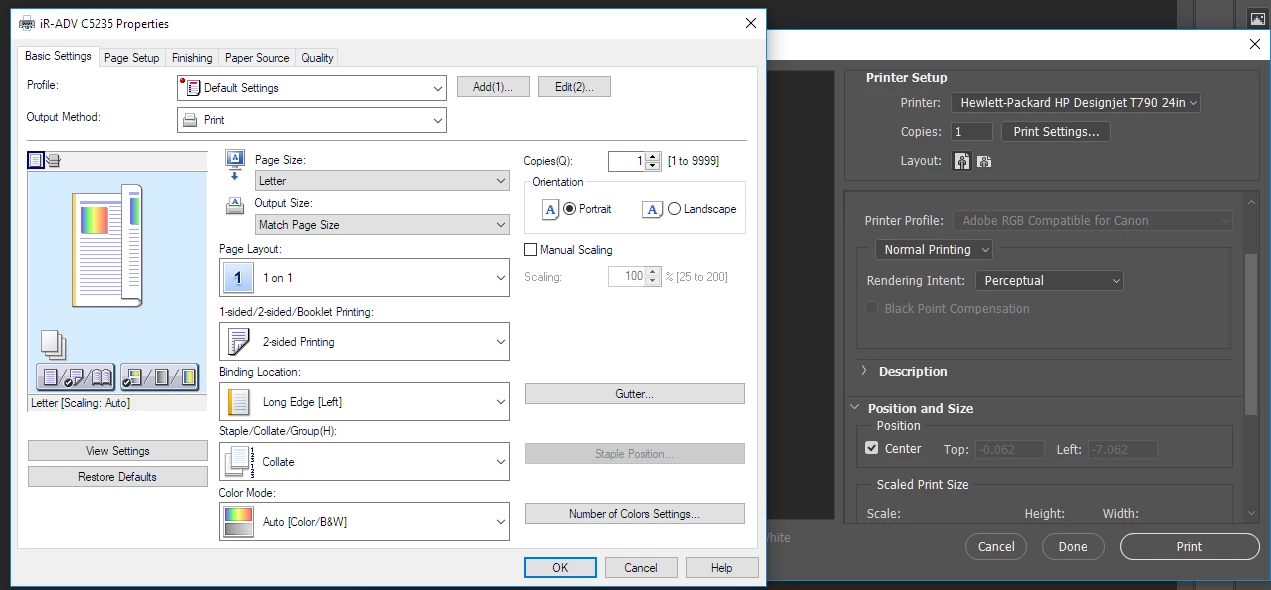
When trying to change paper size for print I can change it in printer control panel by clicking Print Settings button, however, after applying changes and going back to Photoshop print window, size stays the same and my image shows cropped. Changing layout between vertical and horizontal also does nothing, picture won't even budge. It's like Photoshop refuses to talk with printer altogether, even though rest of computer seems to get along just fine with it
I haven't used this printer in a while, but it worked fine before with PS CC.
I've established it prints fine from HP Instant Print app for example, but I don't get the same degree of control over color there as I do in Photoshop.
I have a different printer capable of printing in sizes up to 11x17 (Canon iR5235ADV) and PS changes print area size for this one just fine.
Edit:
Now I've found out that after switching to Canon printer to see if sizes will scale, when going back and selecting T790 from printer list and clicking Print Settings PS will bring up Canon ir5235 print setting window. I am at loss for words....
Printer: HP DJ T790
PC:
Windows 10 (Fall Creators update installed few days ago)
Latest HP driver for printer
i73770K
32GB RAM
 AdChoices