
Inspiring
March 20, 2020
Question

Printer dialog box forces 180 ppi to 72 ppi

  • March 20, 2020
  • 1 reply
  • 816 views

Hi All,


I hope that all of you are well.


Here is my problem. I have created an image in Photoshop 21.1 at 180 ppi. When I tried to print it in PS 21.1.1,  I first got to a screen that said "There was an error opening your printer. printing functions will not be available until you have selected a printer and reopened any documents." I then reopened file in a new session and hovered my arrow above File>Print. This "reset" the print settings and opened the Print Dialog Box. Since all the settings had been "reset" I had to select the printer, color management & etc to my preferred settings. The Print Resolution shows up as 72 ppi NOT the 180 ppi in my file. I therefore am unable to properly print the portion of the image that I want.


Below is a screen shot showing the "reset" printer dialog box before I made the changes to my preferred settings.
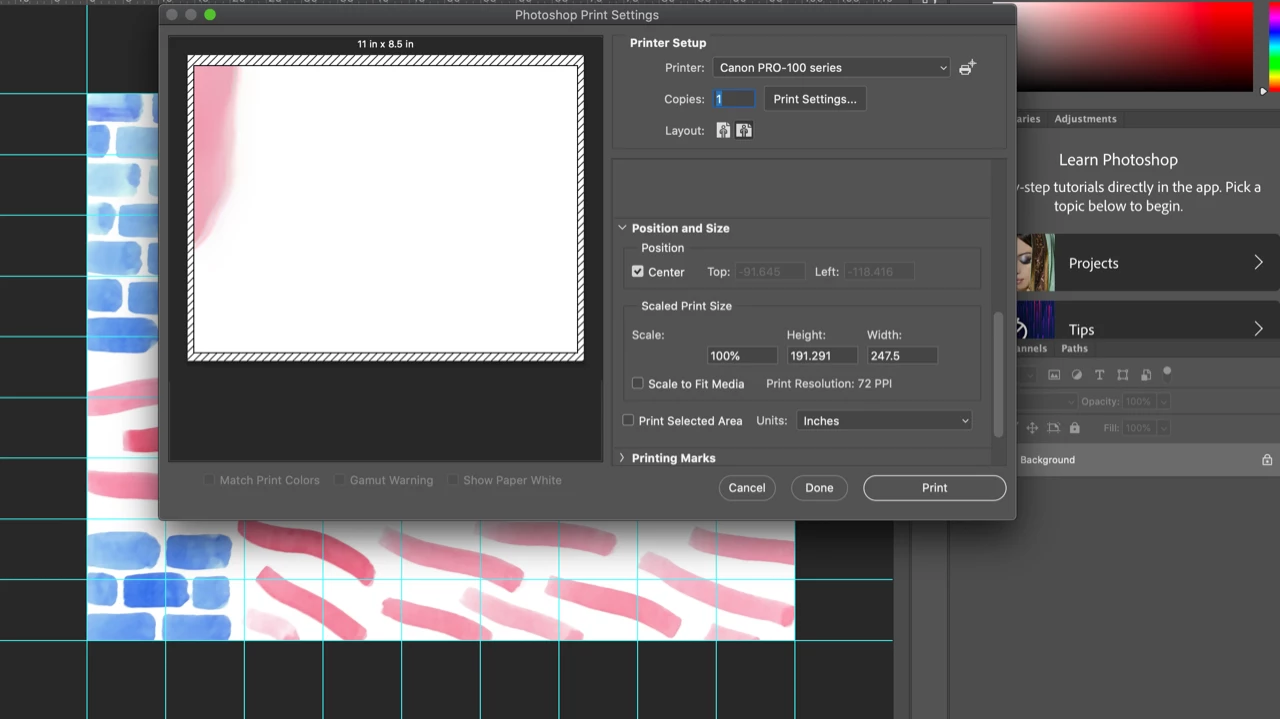
Any ideas? Is it the change up to PS 21.1.1 or ???


FYI - I use Mac OS Catalina 10.15.2, Canon Pro 100 printer and now PS 21.1.1.


FYI again - I upgraded to PS 21.1.1 and it solved the Dark Blue "Bleed" issue that was discussed in this link. The question there was is it a printer profile issue or a PS issue. My workaround was to use another Mac using High Sierra as a print driver.  It was a PS issue and it appears that  21.1.1 was a solution for the "bleeding" colors but did it create a new issue with the forced push to 72 ppi?


Stay Well and Thank You,

Jim

This topic has been closed for replies.

1 reply

JJMack
Community Expert
Community Expert
March 21, 2020

On Windows 10 Photoshop 21.1.1 set my canon 1D2 8MP Camera image  resolution to 389 PPI for a 6" x 9" portrait on my Canon Pixma Pro-10. What does menu Image Size show for the size and resolution of your document?

JJMack
Inspiring
March 21, 2020

Hi JJ,

Here is a screen shot showing the size and resolution of my image.

As you can see the printed size of this image is 99 x 76 1/2 inches and the resolution is 180 ppi. It is quite large so it takes 81 - 8 1/2 x 11 inch prints.  In the previous screen shot from the print dialog box the image size changes to 247.5 x 191.291 inches which is incorrect.

Any other suggestions or questions?

Jim

JJMack
Community Expert
Community Expert
March 21, 2020

How are you using Image size with or without resampling.  If you have resample checked you can change both the size and the resolution. Both images sized you show have the same ‭1.29 aspect ratio I would think that a proper resize of that image.


I do not have a problem with how Photoshop resizes Images.  I normally do not use resample unless I'm making small images for web pages.  I have resample not check. So only the print resolution changes all my cameras good pixels are preserved.  Just the size of the print changes because of the  print ppi pixel size. The image pixels are not resampled.


If you save the Print resolution images you need to be careful using Place with these files. Place will degrade images based on different print PPI resolutions IMO that a big problem with Place.

JJMack