ingec24614891
Participant
November 24, 2017
Answered

Printer issues in Photoshop and Lightroom

  • November 24, 2017
  • 1 reply
  • 368 views

Hi

My printer, pixma pro-1, doesn't show up in Photoshop under file/automate or in Lightroom under plugins extras. I have had this problem before and it took a long time before the plugins where registret ind the 2 programs. I remember that I had to manually take the plugins and drop them ind the files in Photoshop and I never got it to work in Lightroom. Well I did get to work in Lightroom but the it didn't work in Photoshop. 

I just can't remember the steps, can anyone help me?

I have updatet the drivers, the software and the printer firmware.

I have unplugged the printer cable and closed all software programs down before installing and I have restartet the computer.

I have updatet LR and Photoshop. I have the cloud plan.

Inge
This topic has been closed for replies.
Correct answer JJMack

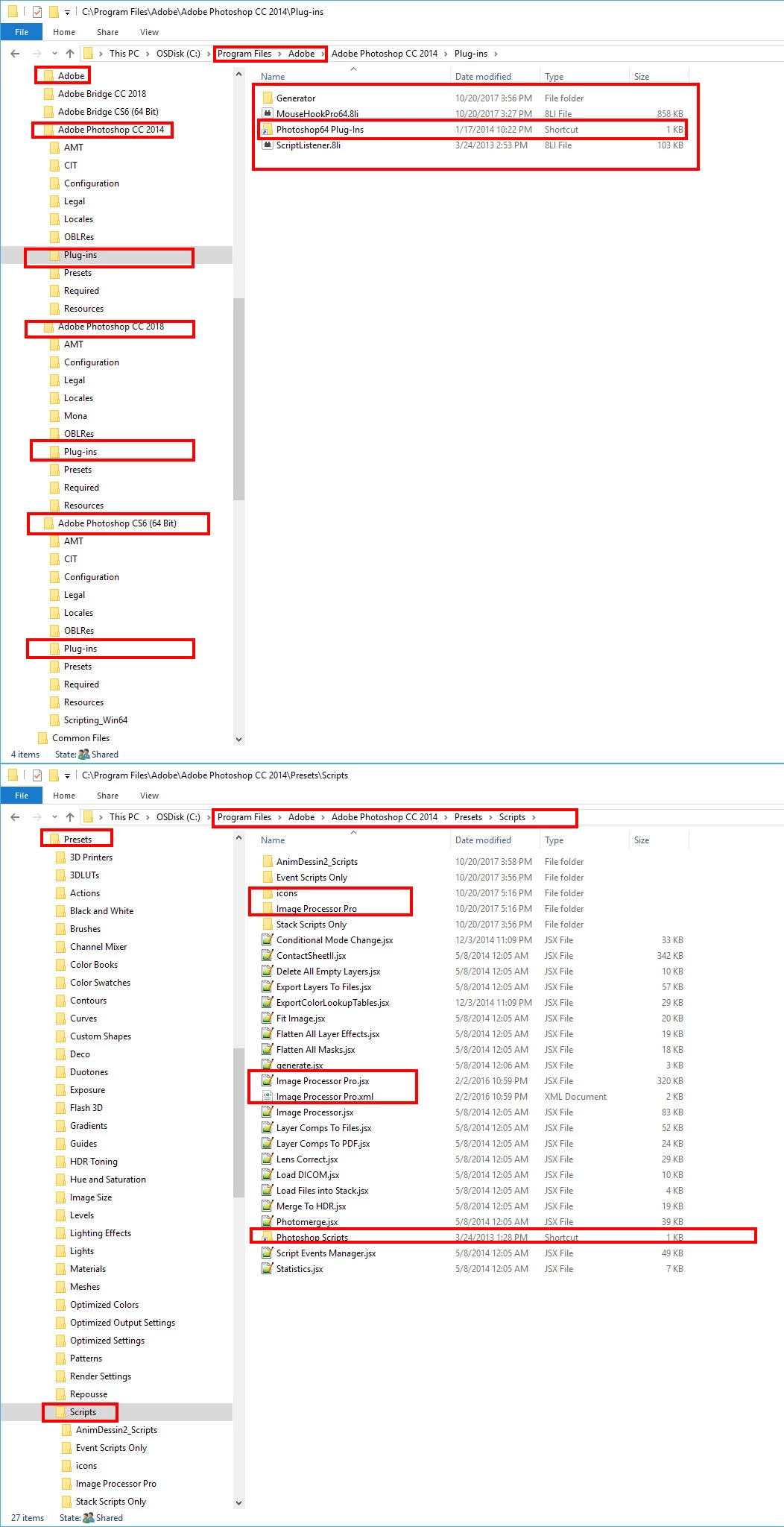
I use windows and all Plug-ins are not the same.  Some are compile and are normally installed in  Each version of Adobe Photoshop version Plug-ins folder.  However  most compiled plug-ins can be installed into you own plug-ins folder and Photoshop Plug-ins folder linked to your common folder.  Some compiled plug-ins though because of the way they are coded may actually need to be in Photoshop Plug-ins folder.    Scripts can also be Photoshop Plug-ins and are normally installed in each Photoshop version Presets\scripts\ like compiled plug-ins they may be able to be installed into a common folder however some like Image Processor Pro need to be in Adobe's folder and more files then the jsx script are installed for Image Processor Pro.   I use CC 2014 mainly but have CS6 and CC 2018 also installed.  I try to install  Plug-ins into a shared folder so all version of Photoshop use the same single copy when possible.

1 reply

JJMack
Community Expert
Community Expert
November 24, 2017

Adobe does not migrate third Party Plug-in when you install a new version of Adobe Applications you need to install any third Party Plug-ins you want to use in your new Adobe Photoshop Version.  You may be able to copy the plug-in into the third party Adobe Photoshop Plug-ins folder or you may need to use the third parties Plug-ins installer for more than the plug-in file may be needed to be installed for that plug-in use.

JJMack
ingec24614891
Participant
November 24, 2017

Thanks JJ for writing back

Are you working on a window pc or a mac?

Is this where you would drop the plugin?

I have reinstalled the printer drivers and the software. I'm doing something wrong because I can't se the downloads coming into the canon file, there only these 2 and they are not from the downloads I did today.

I'll have to keep uninstalling and reinstalling until they show up.

JJMack
Community Expert
JJMackCommunity ExpertCorrect answer
Community Expert
November 24, 2017

I use windows and all Plug-ins are not the same.  Some are compile and are normally installed in  Each version of Adobe Photoshop version Plug-ins folder.  However  most compiled plug-ins can be installed into you own plug-ins folder and Photoshop Plug-ins folder linked to your common folder.  Some compiled plug-ins though because of the way they are coded may actually need to be in Photoshop Plug-ins folder.    Scripts can also be Photoshop Plug-ins and are normally installed in each Photoshop version Presets\scripts\ like compiled plug-ins they may be able to be installed into a common folder however some like Image Processor Pro need to be in Adobe's folder and more files then the jsx script are installed for Image Processor Pro.   I use CC 2014 mainly but have CS6 and CC 2018 also installed.  I try to install  Plug-ins into a shared folder so all version of Photoshop use the same single copy when possible.

JJMack