Printing from photoshop mutes the colors
For reference I use a Canon PIXMA Pro-100 printer, and I have downloaded the ICC for the paper type that matches the best. The paper type is 100% cotton matte fine art velvet paper - it's used often with watercolor prints, though my prints are scanned copies of oil paintings.
When I try to print from inside photoshop I'm ending up with a very washed out result - it does NOT match what I am seeing on the screen in photoshop. I am using CMYK setting as well.
I had this issue with my matte vinyl and discovered it was an issue with Canon and Adobe not wanting to "talk" to each other about who is controlling the colors. I fixed that.
I will be trying 3 other types of paper(2 different brands for matte paper and a luster one) to see if perhaps it's the paper but I do really believe it's ALSO a setting of some type for printing out of photoshop?
So, I've heard that matte papers can be a pain anyway - but when I select fine art paper in quality and type, my printer won't print. If I select matte photo paper, it prints. Are there settings inside Adobe that can help this washed out/faded appearance? I currently let photoshop determine colors, not the printer. According to Canon it's not the printer - it's something to do with Adobe, as the settings are able to be used but something gets lost in translation between Photoshop and the printer but ONLY only the fine art paper settings.
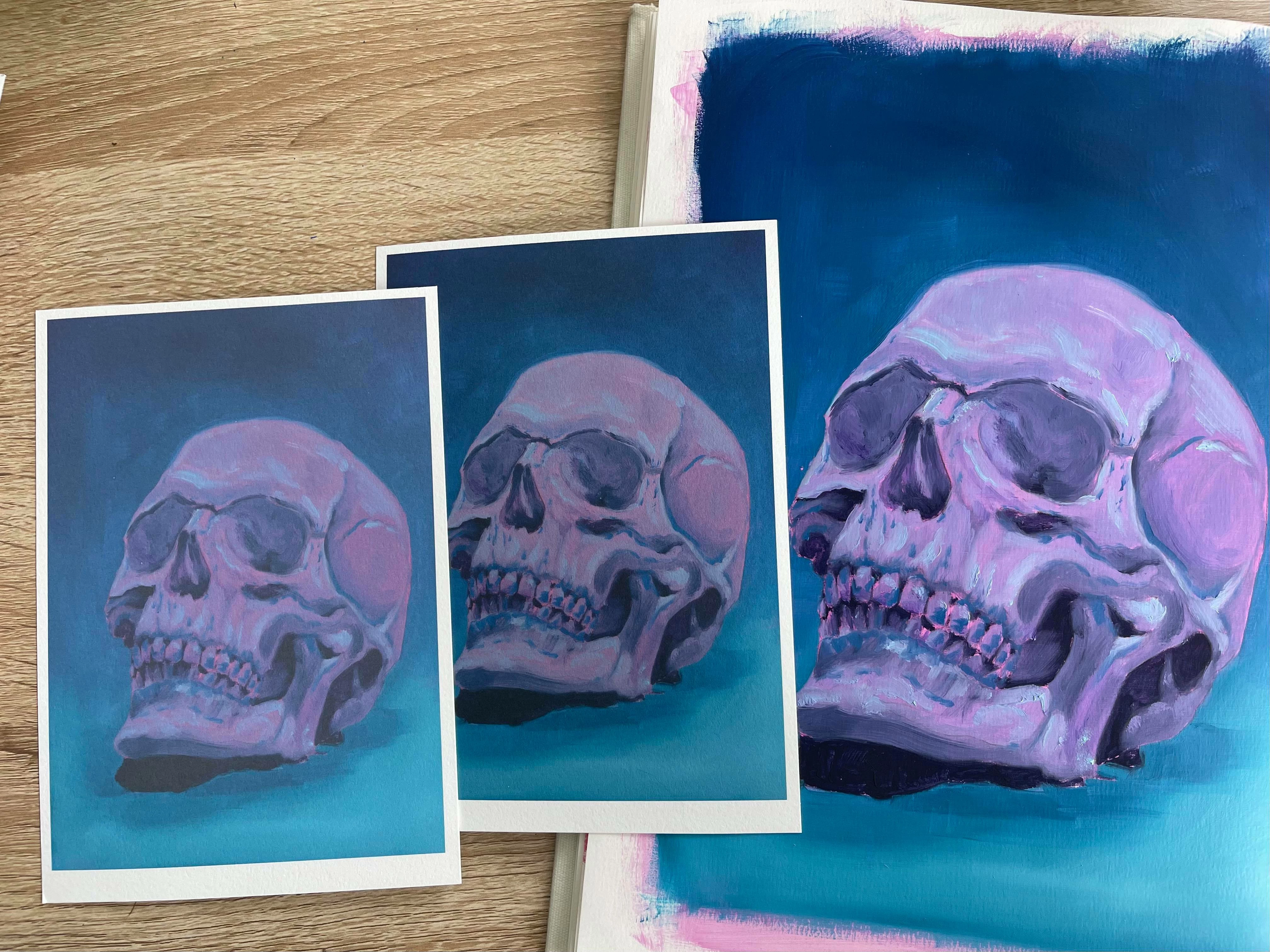
It is also losing a LOT of detail between the screen and the final printed product. It's set at 600dpi. Not just color issues like dark's not being dark enough, the purples are more pink, the almost neon pink in the original(and the scanned and edited version) not even showing up as bright much less neon, and the overall "looking like I'm seeing this through cataracts" vibe.
The photo below is the first and worst print, then the best one I've been able to product, and the original painting(which compared to the edited version on the screen look damn near the same).
Is there just something I don't know about in photoshop to help make sure my prints are matching what I'm seeing on the screen?
 AdChoices