
Known Participant
July 29, 2022
Question

Printing in PS 23.4.2 no color management

  • July 29, 2022
  • 2 replies
  • 1268 views

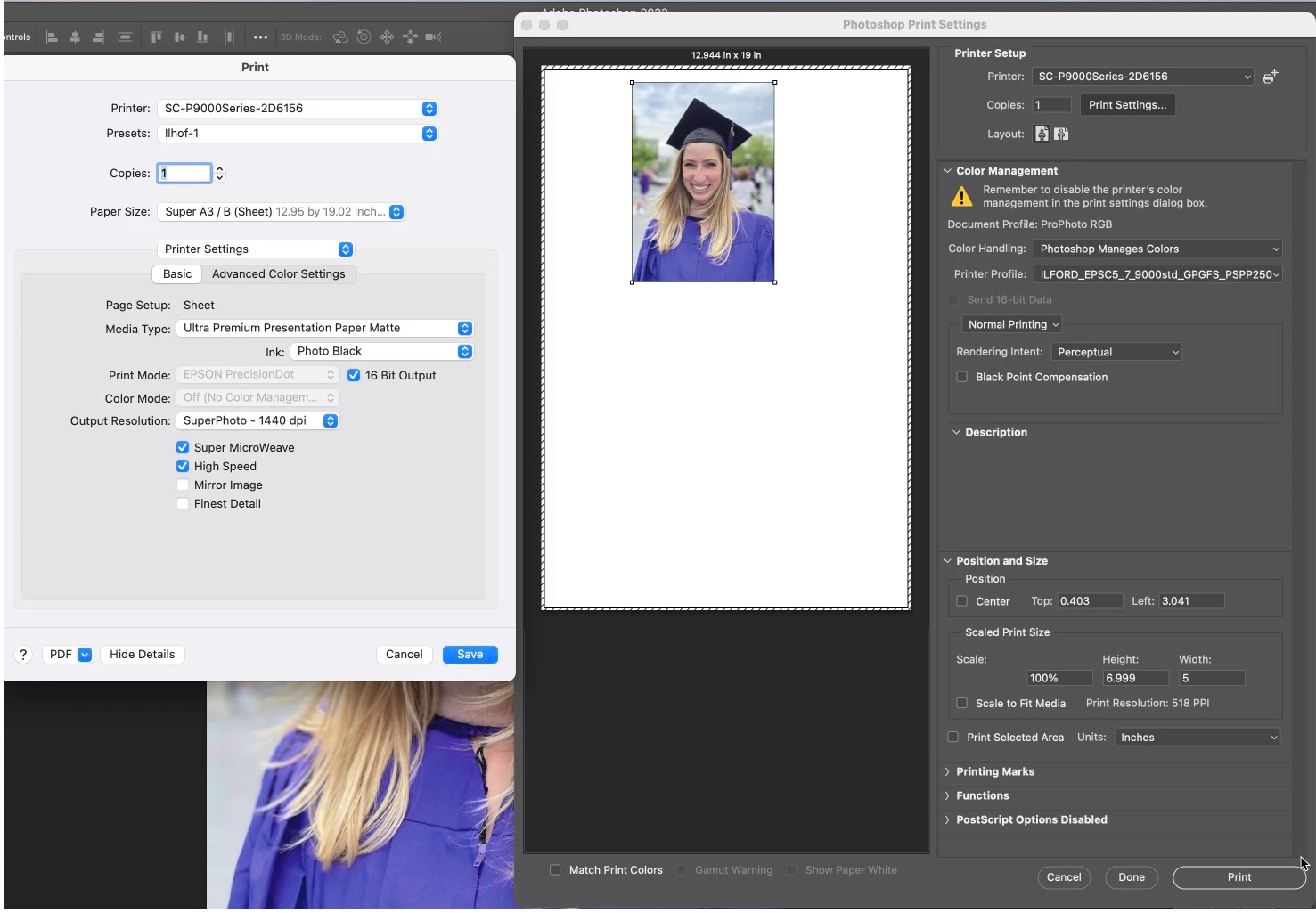
I just don't understand this. Long time PS user, Mac OS 12.4 and printing to an Epson P9000. Because of my frustrations with PS I have been using a rip for a while (ImagePrint Black) but would like PS for smaller jobs. I have a picture I am trying to print this morning and every time PS does not want to color manage the print. I have it set up as the image files color profile as ProPhoto and the paper file as ILFORD_EPSC5_7_9000std_GPGFS_PSPP250 as I am printing on Ilford Gallerie Gold Silk. P9000 is set to photo black, Premium luster, sheet. Every time to open up the Print dialogue boc and to to Ptinter settings, the Media type shows Ultra Premium Presentation Paper Matte with Photo Black ink. I change the Media type to Premium Semigloss Photo Paper, save the settings, print and no color management, I open the Printer Settings to Printer settigns and its back to Ultra Premium Presentation Paper Matte, Tried saving as a different Preset and no luck. The bottom line is that I cannot get a decent pring out of PS
This topic has been closed for replies.

2 replies

NB, colourmanagement
Community Expert
Community Expert
July 30, 2022

When you open "Print settings" from Photoshops Print dialogue you are accessing Eposns driver software, this is not part of Photoshop. 

It seems that saving an Epson driver preset [with the media setting etc], as you are attempting to do, is not working properly.

I guess you're aware that you need to select the saved preset by name to recall the settings you saved?

The Digitaldog has provided a useful explanation on how to remove and reinstall the Epson driver software. 

When adding the printer in System Preferences please do NOT select 'Airprint' under the 'use' pulldown, if you do, the macOS switches to using the macOS default '[Airprint (Gimp Print / Gutenprint)' driver which misses many of the proper Epson driver's settings.


your "add printer" dialog should look like this (substituting your own printer name of course)


Now you should continue to see actual Epson paper names in the Media options dropdown menu


IF your main issue is that your prints are not matching the screen various questions pertain

1: is your screen properly calibrated and profiled?

2: are you selecting the correct manufacturers ICC profile in "Photoshop Manages Color"?

To test both screen and print appearance I use this:

Have you ever wondered how to KNOW whether your screen [or printer] is ACCURATE and not just 'pleasing'?
If so please check this out: http://www.colourmanagement.net/products/icc-profile-verification-kit


I hope this helps
neil barstow, colourmanagement net :: adobe forum volunteer:: co-author: 'getting colour right'
google me "neil barstow colourmanagement" for lots of free articles on colour management

Known Participant
August 6, 2022

Thanks for the information and response.......I received a quirey from someone, perhaps Adobe asking if my issue got resolved.....Do to the pandemic, we have been bouncing between our vacation house and our townhome. The issue was at our townhome where I keep my large printer. I have a feeling that the issue revolves around the Epson driver for the P9000 but did not have the time to go through the deinstall and reinstall before we left for the vacation home. I have a separe system at the vacation home and PS works correctly there. I will report back later when I have a chance to work on the Epson drivers. 

jane-e
Community Expert
Community Expert
August 6, 2022

@ERobicheaux wrote:

I received a quirey from someone, perhaps Adobe asking if my issue got resolved


Most likely that was an auto-reply from a bot.


Jane


TheDigitalDog
Inspiring
July 29, 2022

What do you mean by "I change the Media type to Premium Semigloss Photo Paper, save the settings, print and no color management"? The output isn't as expected, what makes you say there is no color management?

Also turn OFF the 16-bit check box in the driver; doesn't do anything useful and sometimes produces buggy output. 

Author “Color Management for Photographers" & "Photoshop CC Color Management/pluralsight"
Known Participant
July 29, 2022

Thanks for the response......

As you will notice in the screen shot of the Print>Print Settings>Printer Settings, there is a drop down box in the middle under Page Setup called "Media Type" which in the Screen shot says "Ultra Premium Presentation Paper Matte" I do not want it to shoo that, I want the Media Type too be Photo Paper, not matte paper and endeavor tot change it as shown below but it will not change

TheDigitalDog
Inspiring
July 29, 2022

There should be no reason other than an ink mismatch that you could not select that media setting. 

Then maybe do the Epson Enema and install both drivers (from Epson) again: 

 1. Delete all instances of Epson printers from System Preferences>Print & Fax.


 2. Then go to /Library/Printers and toss the whole Epson folder.


 3. Toss LFP Remote Panel (IF you are using this utility for your printer).


 4. Then reinstall drivers from Epson and never Apple.


When you go back to Print & Fax to add the printer, on 10.X I had to wait almost a minute before the IP version of the printer showed up, whereas the Bonjour one shows up right away. Then add the IP instance of the printer. This is for printers on a network.

Then re-install LFP Remote Panel if you use it with this printer.


NOTE: IF you have more than one Epson printer, you need to install the driver in the order of their release! Older then newer or you run into issues (eg, install 4800 before you’d install 3880).


Author “Color Management for Photographers" & "Photoshop CC Color Management/pluralsight"