Participating Frequently
August 14, 2018
Answered

Problem automating action

  • August 14, 2018
  • 3 replies
  • 389 views

I'm using Photoshop CC 2018. I have been hired to lay out a new version of an old book. All we have of the old book is a PDF that someone scanned some time ago. If I try to place the book via script in an InDesign layout the pages look very distorted. So I experimented by converting a page from the PDF to .tif in Photoshop and placing that in the InDesign layout. The result looked much better. So I extracted each page of the PDF to a separate file and put them in a folder. Each page has a unique filename, such as "Family History 1.pdf." Here's the problem: I set up an action in PS to open one of these pages and save as a .tif. When I try to automate the action, PS opens and saves each PDF to the destination folder, but overwrites each with the same filename. So instead of having 83 .tifs in the destination folder, as I had 83 pdfs in the source folder, I have one .tif, bearing the filename of the first document. I can't figure out what I am doing wrong.
    This topic has been closed for replies.
    Correct answer Dramenon

    I use Actions all the time for my work and occasionally run into problems like this when I miss something...

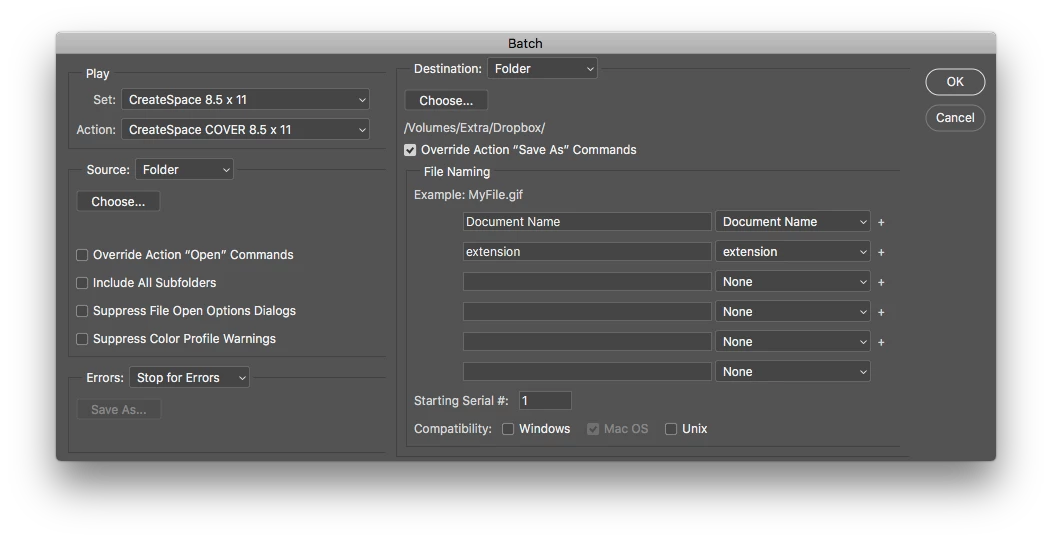
    Are you using File > Automate > Batch .... ?


    You should be able to select additional parameters to change file locations, names and more.

    This is what that dialog looks like:

    Hope that helps.

    3 replies

    JJMack
    Community Expert
    Community Expert
    August 14, 2018

    You state the old book  PDF was create using scans.  If the scanner software did not do OCR the scans were all raster Image files and it sounds like they may be distorted for some reason like pages were not flat and straight on the scanner.  The scans were also most likely straighten and cropped.  If that is the case I think you may want to save each page of the PDF as an Image file and see if you can find some OCR software that can process those image files to create a layer documents containing text layers and image layers. Then do your layout from there.

    JJMack
    Derek Cross
    Community Expert
    Community Expert
    August 14, 2018

    Might be better to try and extract the text from the PDF and rebuild the document in InDesign.

    Dramenon
    DramenonCorrect answer
    Inspiring
    August 14, 2018

    I use Actions all the time for my work and occasionally run into problems like this when I miss something...

    Are you using File > Automate > Batch .... ?


    You should be able to select additional parameters to change file locations, names and more.

    This is what that dialog looks like:

    Hope that helps.

    /end of line/