Participating Frequently
October 28, 2021
Answered

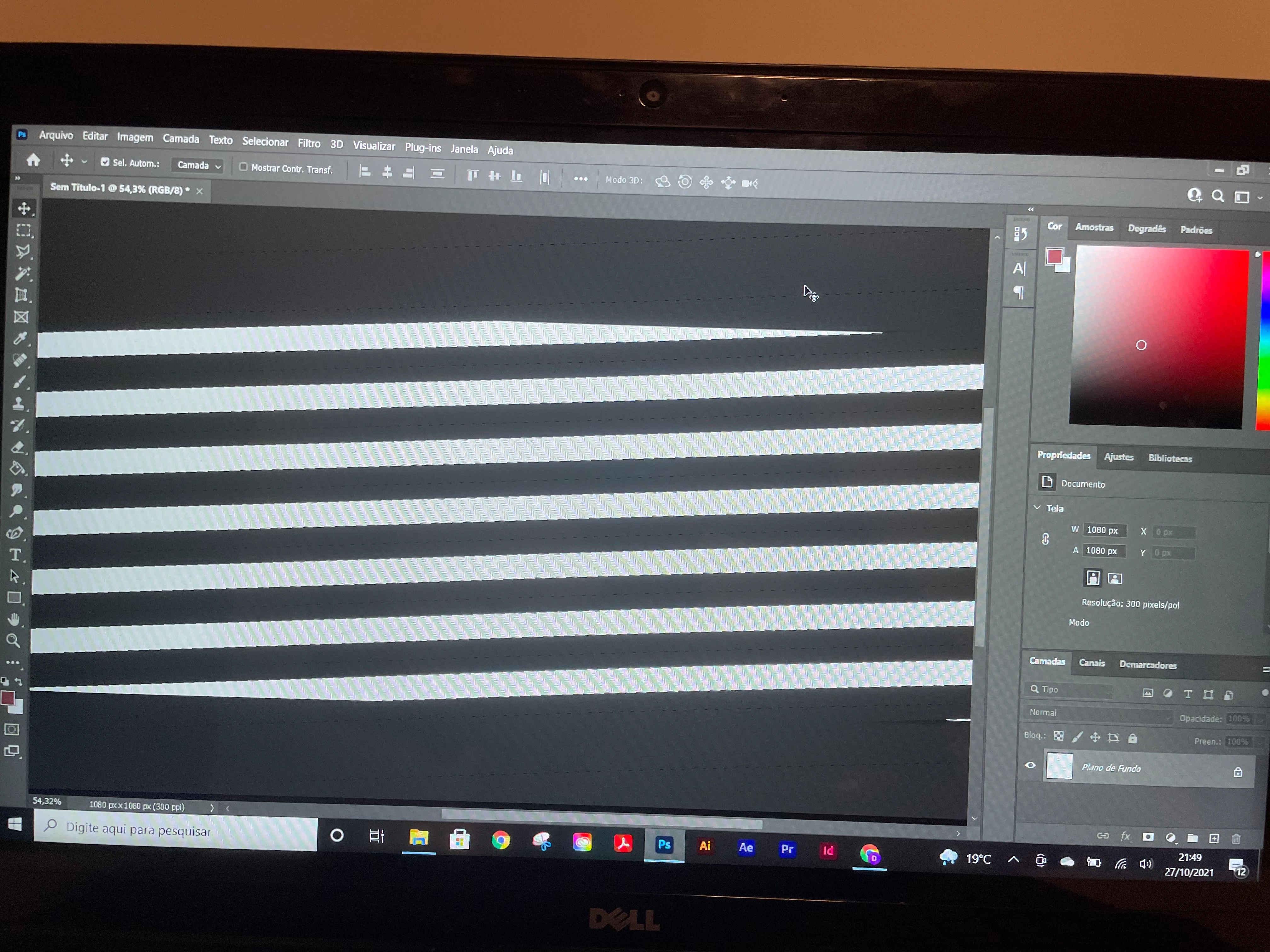
Problem displaying image in Photoshop on Windows
  • October 28, 2021
  • 3 replies
  • 353 views

hello,
I'm having troubles to fix this screen, I don't know how to get it normal back. Someone know about this and can help me, please?


regards,

David


{Thread title edited by moderator}

This topic has been closed for replies.
Correct answer NB, colourmanagement

If disabling the option to Use Graphics Processor from Photoshop doesn't help you may like to try resetting Photoshop - - 


If you want to try a method that’s proved successful to rule out many an issue we see with Photoshop, you can reset preferences:


To reset the preferences in Photoshop: 

https://helpx.adobe.com/photoshop/using/preferences.html


Note: Make sure that you back up all your custom presets, brushes & actions before restoring Photoshop's preferences. Migrate presets, actions, and settings


I hope this helps

neil barstow, colourmanagement net :: adobe forum volunteer

google me "neil barstow colourmanagement" for lots of free articles on colour management

[please only use the blue reply button at the top of the page, this maintains the original thread title and chronological order of posts]

3 replies

NB, colourmanagement
Community Expert
Community Expert
November 4, 2021

Hi David, thanks for the "correct"

May I ask - was it the disabling the grahics processor that fixed your issue?

Or resetting Photoshop?


thanks


neilB

NB, colourmanagement
Community Expert
NB, colourmanagementCommunity ExpertCorrect answer
Community Expert
October 28, 2021

If disabling the option to Use Graphics Processor from Photoshop doesn't help you may like to try resetting Photoshop - - 


If you want to try a method that’s proved successful to rule out many an issue we see with Photoshop, you can reset preferences:


To reset the preferences in Photoshop: 

https://helpx.adobe.com/photoshop/using/preferences.html


Note: Make sure that you back up all your custom presets, brushes & actions before restoring Photoshop's preferences. Migrate presets, actions, and settings


I hope this helps

neil barstow, colourmanagement net :: adobe forum volunteer

google me "neil barstow colourmanagement" for lots of free articles on colour management

[please only use the blue reply button at the top of the page, this maintains the original thread title and chronological order of posts]

nikunj.m
Legend
October 28, 2021

Hi,


We're sorry about the trouble with Photoshop. Would you mind sharing the version of Photoshop you're using?


You can try disabling the option to Use Graphics Processor from Photoshop by going to Preferences, then Performance. Once done, quit & relaunch Photoshop to check if that helps.


Regards,

Nikunj