
Participant
January 13, 2022
Question

Problem getting video project started - can't create New Video Group or Import Media to Timeline

  • January 13, 2022
  • 1 reply
  • 111 views

Photoshop 23.1 / macOS 12.1 Monterey


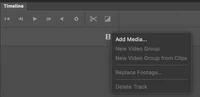
I want to create a short video from three video clips and I can't get past the starting line. When I click on the Filmstrip icon in the Timeline, the option for New Video Group is greyed-out. When I choose Add Media from the same pop-up, I'm able to navigate to a .mov file on my hard drive, but when I choose it and click Open, nothing happens.

What am I missing here? TIA for any help you can offer.
This topic has been closed for replies.

1 reply

Participant
January 14, 2022

I'm answering my own question here - it might help others who are having the same issue.


The issue seems to be due to the new Apple M1 chip used in the new Macbook Air and others. After some digging on this user forum, I found another thread where it was addressed. The solution - at least for me - is to quit Photoshop, go to Finder, single-click on the Photoshop app icon (in Applications), Get Info (command-I), and check the "Use Rosetta" box in the Info window. Then re-launch Photoshop. All worked as expected after that.


Note that the Get Info window for Photoshop on a non-M1 computer (like my 2013 MacPro) does not show the "Use Rosetta" checkbox.


Here's the other thread where I found the answer:

https://community.adobe.com/t5/photoshop-ecosystem-bugs/p-convert-to-video-timeline-option-missing-apple-m1-devices/idc-p/12014199/page/4#M35888