Participant
September 17, 2019
Answered

Problem: I can resize a masked group, resize the image in the masked group, but I can't resize both

  • September 17, 2019
  • 1 reply
  • 1732 views

Ever so often I get a really annoying problem.

Normally I like to make a group, put a mask on it, put ajustment layers and a smart object image inside with smart filters enabled all packaged nice and neat.

I click on the group, change it's scale; Joy! Everything inside scales.


HOWEVER! Sometimes there is no joy, only rage!

Sometimes when I click on the masked group and make ajustments to the scale, the only thing scaling in the mask on the group. The image no longer changes size to match the mask, I try selecting the group and the image inside directly, still still only scaling the mask. I select the image inside the group, it will scale image but the mask on the group doesn't do anything.

Once that happens, I have no choice, either bang my head on the keyboard and flip furniture like an enraged chimp or start anew.


Anyone know why it does that? Is it a feature?

If so, how do I turn the Enrage User toggle to off?


Thank you for your time.
This topic has been closed for replies.
Correct answer Bojan Živković11378569
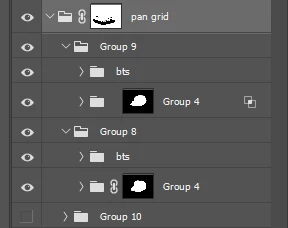
The "Group 4" inside "Group 9" has unlinked mask as already indicated and explained by @Sebastian_Bleak. Click between group and mask to appear chain icon and everything should start working as expected.

1 reply

Sebastian Bleak
Community Expert
Community Expert
September 17, 2019

My first guess is that your group and the mask are not linked together. Can you send a screen shot of your screen so we can confirm?


Here's an image to show you what I mean.

Participant
September 18, 2019
I added a screen shot, The "Group 4" inside "Group 9" is the problem group. The "Group 4" inside "Group 8" works like normal. The only clue is that overlapping squares icon. I can only surmise it indicates the User Rage toggle for that group is set to WTF.
Bojan Živković11378569
Community Expert
Community Expert
September 18, 2019
The "Group 4" inside "Group 9" has unlinked mask as already indicated and explained by @Sebastian_Bleak. Click between group and mask to appear chain icon and everything should start working as expected.