Participant
January 4, 2017
Question

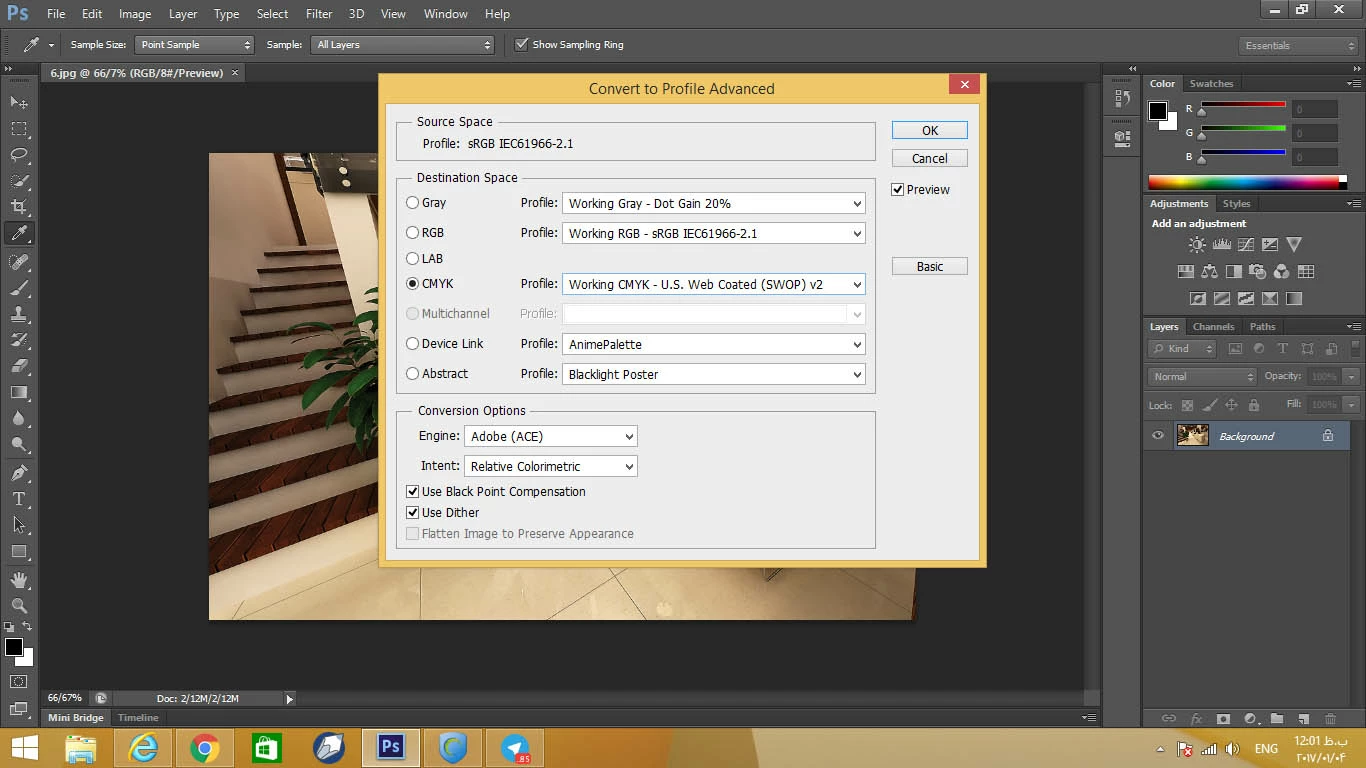
problem on choosing multichannel profile

  • January 4, 2017
  • 1 reply
  • 4080 views

hi dears

i have an problem and that is that when i want to convert my design by my multi channel profile i cant do that and this option is not activate on my photoshop how i can activate that

edit====>convert to profile===>advanced===> i can not checked multi channel
    This topic has been closed for replies.

    1 reply

    Mylenium
    Legend
    January 4, 2017

    It works as expected. You have to convert it to CMYK first and then you can add custom inks/ channels for printing.

    Mylenium

    Participant
    January 4, 2017

    tnx for your reply but i have an icc profile and i have to convert my design by multi channel icc profile

    Inspiring
    December 13, 2017

    I'm having the same problem. The answer marked as correct here is not correct. I tried converting to CMYK first, but I still can't convert to my multichannel ICC profile.

    You can manually add custom spot color channels to a file that is in RGB, CMYK, or Greyscale mode. There is no reason to convert to CMYK first before manually adding spots.

    Manually adding spots is NOT the same as converting to multichannel profile. What we're trying to do is the directions on this page:

    Creative Suite * Working with color profiles

    Under "Convert document colors to Multichannel, Device Link, or Abstract color profiles (Photoshop)"

    I installed a multichannel ICC profile in /Library/Application Support/Adobe/Color/Profiles/, restarted Photoshop, but the "multichannel" option is still greyed out under "Advanced" in the "Convert to Profile" dialog.