
Doc_Pit
Inspiring
June 21, 2021
Answered

Problem using dual brush

  • June 21, 2021
  • 1 reply
  • 2006 views

At left, the Brush Settings panel; at right, the Brushes panel.
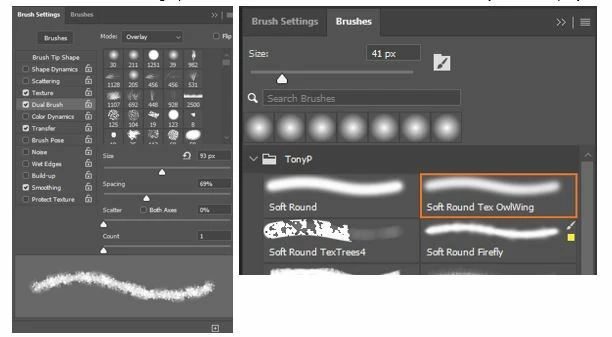
In the Brush Settings panel, Dual Brush is activated.  I selected the Soft Round as my first brush.  I can select any brush displayed in the Brush Settings panel as the second brush.  However, the brush I want for a second brush is the Soft Round Tex OwlWing brush, which is a custom brush preset displayed at right in the Brushes panel.  This custom brush does not show in the Brush Settings panel; so I can’t select it as the second brush of the Dual Brush set.  Does anyone know how to get that custom brush to show in the Brush Settings panel so that I can select it as the second brush?

This topic has been closed for replies.
Correct answer Doc_Pit

Dave, thanks for the response.  Edit>Define Brush shows me the new brush in the Brushes panel.  Also, I can go into Brush Settings and configure the brush.  However, as far as I can see, the only way I can use that new brush in a Dual Brush configuration is by selecting it as a Brush Tip Shape from among those illustrated in the Brush Settings panel.  I can't find the new brush tip in that panel.  Moreover, as a modus operandi, visually searching the boat-load of brushes illustrated in that panel is very time consuming.  Do you know by what logic PS places a new tip shape into that panel? Is there a way to search that panel, identify the new brush tip, and select it as a Dual Brush?

1 reply

davescm
Community Expert
Community Expert
June 21, 2021

Try making a single stamp from the brush with black on a white canvas. Then make a rectangular selection around it and use Edit - Define brush. That new brush should appear in your list of brushes in Dual brush settings (note it will not necessarily be at the end of the list)


Dave

Doc_Pit
Doc_PitAuthorCorrect answer
Inspiring
June 21, 2021

Dave, thanks for the response.  Edit>Define Brush shows me the new brush in the Brushes panel.  Also, I can go into Brush Settings and configure the brush.  However, as far as I can see, the only way I can use that new brush in a Dual Brush configuration is by selecting it as a Brush Tip Shape from among those illustrated in the Brush Settings panel.  I can't find the new brush tip in that panel.  Moreover, as a modus operandi, visually searching the boat-load of brushes illustrated in that panel is very time consuming.  Do you know by what logic PS places a new tip shape into that panel? Is there a way to search that panel, identify the new brush tip, and select it as a Dual Brush?

Doc_Pit
Doc_PitAuthor
Inspiring
June 22, 2021

I just realized the problem: an embarrassingly basic error

In the brush drop down menu, it has the options: Brush Name, Brush Stroke, Brush Tip.  I was creating a new brush tip but I didn't have that option checked, so, naturally, the new brush tip was not showing up in the illustrations.  Sorry about that.  Again, thanks for the response.