

AlPLAST
Participant
March 3, 2020
Question

Problem with 3D texturing

  • March 3, 2020
  • 3 replies
  • 475 views

Hi everyone!

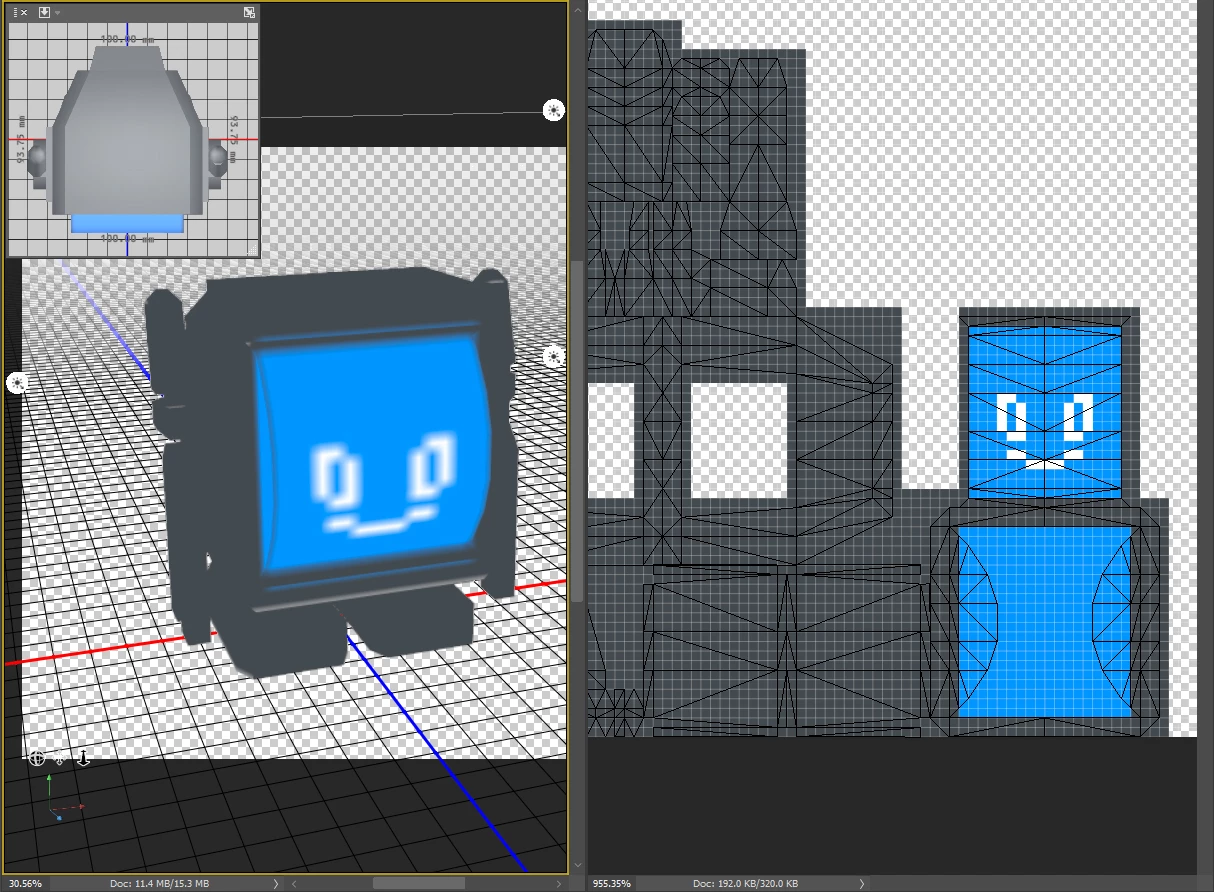
I am having some trouble texturing a 3D model inside photoshop. As you can see on the image below the flat texture on the right has sharp edges, but when displayed on the left on the model it comes out blurry. Been wrecking my brain trying to figure how to fix this but can´t figure it out. Any help would be greatly appreciated.
 

This topic has been closed for replies.

3 replies

Ussnorway7605025
Legend
March 3, 2020

in Dimension yes [as i said] but not in Photoshop which is not designed for quick preview and the last two builds have major bugs that make its preview worthless


if you don't want to use Dimension then Blender has better preview rendor options than Maya | Photoshop

Ussnorway7605025
Legend
March 3, 2020
  1. share the model please
  2. but just looking at the screengrab your texture is being stretched... i would export it as Obj [no face] and put the face on as a decal in Dimension
AlPLAST
AlPLASTAuthor
Participant
March 3, 2020

Hi! Thank you for the quick response.

1. Can't share the model because is for an on going project that i can't give to much detail about.

2. The texture is 256x256 pixels because I'm going to do a pixel art texture on the model. WHen I save the texture as a png and place it on the model in maya there is no problem and it looks sharp, but I would also like to see it sharp, on tha model, in photoshop as the preview would help me texture faster. Any ideas on how to make this happen?

lambiloon
Community Expert
Community Expert
March 3, 2020

Hi i think you should check the size of texture may be it is small that is why coming blurry or check the following video for more help....regards


https://youtu.be/7NHScKPGr0U

Ali Sajjad / Graphic Design Trainer / Freelancer / Adobe Certified Professional
AlPLAST
AlPLASTAuthor
Participant
March 3, 2020

Thank you for the response. Right now I am working on a texture that's 256x256 pixels because I'm going to do a pixel art texture on the model. WHen I save the texture as a png and place it on the model in maya there is no problem and it looks sharp, but I would also like to see it in photoshop as the preview would help me texture faster.