
Problem with brushes textures not showing up
hello, so i bought myself some kyle webster photoshop brushes, and when i tried them for the first time it was on a photoshop cs6 trial and they worked totally fine here. now i got myself photoshop cc and loaded the brushes here, but they dont work as well... its like the texture of almost all brushes is gone. for example here is how some of the brushes are supposed to look like:
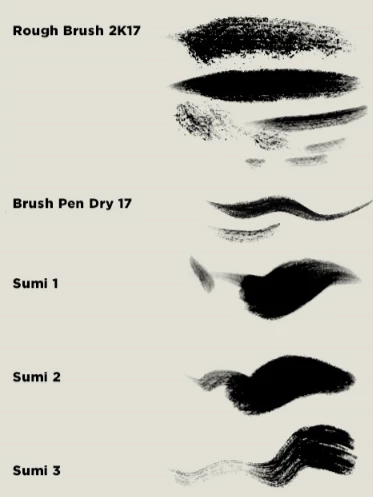
but when i use them on photoshop cc there is no texture and barely any dynamic to them (here i used rough brush 2k17 and sumi 3) :

(sorry my version is in french but im showing you this bc the texture doesnt even show here and in case i have to tweak something in this window)

for additional info i have a wacom bamboo tablet, and i have had this exact same problem years ago, on photoshop cs3 (it was a different brush set), with another tablet and another computer, and the problem was never solved. but i dont understand why im having the same problem even though everything i have right now is pretty recent.
thanks in advance
 AdChoices