
Participant
November 9, 2020
Answered

Problem with colors

  • November 9, 2020
  • 2 replies
  • 281 views

Hi. I have a problem with Photoshop, probably there is some confict between grafic driver and the program. PS is working fine but I dont see the colors, every thing is black, when you ad new transparent layer it is black, every photo or grafic I try to open is black. I've installed the latest and older grafic card studio drivers. I've try with older version of PS and with on and off grafic prcessor in PS. Nothing heled, maybe you can...


Asus zen book pro duo

GeForce RTX 2060

Photoshop 2021
This topic has been closed for replies.
Correct answer D Fosse

We've seen one or two cases lately where a broken monitor profile can do this. If you've tried disabling GPU without success, that's the next thing to try.


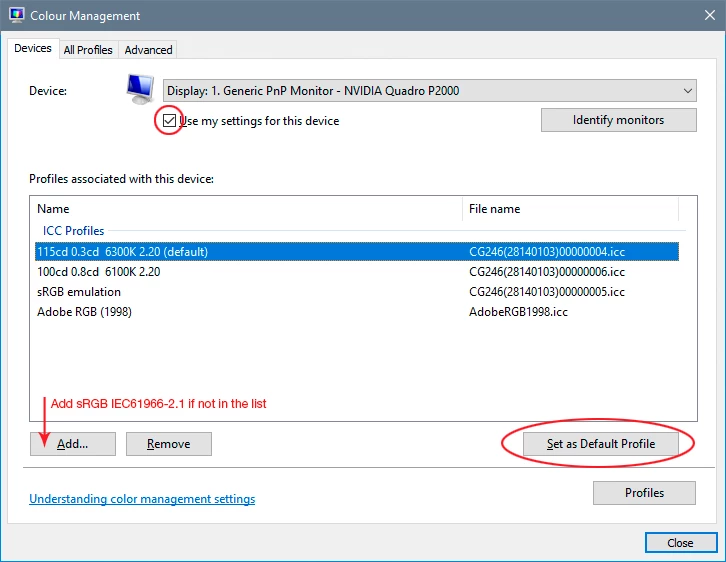
Replace your current profile with sRGB IEC61966-2.1 here. It won't be entirely correct, but it'll work. Relaunch Photoshop when done. It loads the profile at application startup:


If that fixes it, you should get a calibrator to make a new profile.


If you're not using a calibrator, monitor and laptop manufacturers distribute their own generic profiles through Windows Update. These profiles are very often defective/incorrect in many ways. The last few weeks there's been a flood of these cases, so apparently a particularly bad batch has just been released by one (or more) manufacturer.

2 replies

D Fosse
Community Expert
D FosseCommunity ExpertCorrect answer
Community Expert
November 9, 2020

We've seen one or two cases lately where a broken monitor profile can do this. If you've tried disabling GPU without success, that's the next thing to try.


Replace your current profile with sRGB IEC61966-2.1 here. It won't be entirely correct, but it'll work. Relaunch Photoshop when done. It loads the profile at application startup:


If that fixes it, you should get a calibrator to make a new profile.


If you're not using a calibrator, monitor and laptop manufacturers distribute their own generic profiles through Windows Update. These profiles are very often defective/incorrect in many ways. The last few weeks there's been a flood of these cases, so apparently a particularly bad batch has just been released by one (or more) manufacturer.

Participant
November 10, 2020

It works, thank you !

November 9, 2020

Hi

Looks like an issue with you monitor profile, type colour managment on the start button and open it up, then add sRGB

Participant
November 10, 2020

Thank you so much, it works 🙂