Inspiring
January 9, 2018
Answered

Problem with gradient banding in the newest version(s) of Photoshop CC

  • January 9, 2018
  • 2 replies
  • 2080 views

I prepared a pattern of +/-2ev gray in the previous version of Photoshop. There is illustrotion of this:

Exposure profile.jpg - Google Drive

This pattern is in 16bit Lab color mode. Each of rectagles has very precisely calculated gray values and then refined with X-Rite devices on prints . Because the Photoshop didn't allow to enter decimals into the Lab color values, I created gradient at the top and then used eyedropper tool to select fractional values such as Lab(47.2, 0, 0). It worked perfectly. Today I need to print and refine this pattern again. What was my surprise when this pattern stopped to be editable with fractional precision in the newest version of Photoshop CC (2018). Eye dropper tool reads only integer values from gradient (1% accuracy). All of my work got useless. Please help, how to bring back linear gradients without 1% banding (I mean values eg L= 50.7, 51.2, 51.9 instead of L=50, 51, 52... )
    This topic has been closed for replies.
    Correct answer davescm

    I use CC2018 here

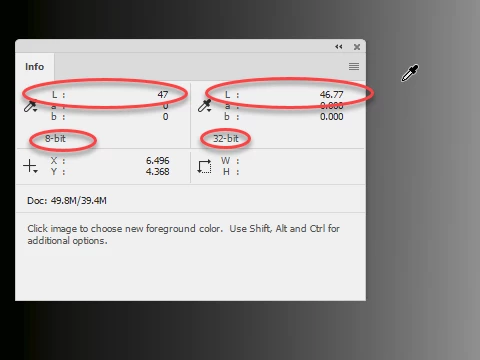
    The eyedropper reads exact values from the gradient in 16 bit Lab. Just switch the info panel to display 32 bit values (it will then show L as 0 to 100) to confirm.

    If you click - the value at that point becomes the foreground colour and can be used to paint or fill

    See below read from a 16 bit gradient in Lab mode

    Dave

    2 replies

    rob day
    Community Expert
    Community Expert
    January 9, 2018

    Set your Info eye dropper to 32-bit from the dropper's flyout menu:

    Inspiring
    January 9, 2018

    Hi,

    Thanks a lot! It works! :-)

    BTW - I have a question to you both. Do you know better method to enter particular Lab / HSB / whichever color values with decimals than using gradients and eyedropper?

    rob day
    Community Expert
    Community Expert
    January 9, 2018

    I think the reason the color picker will only take an integer is that not all real numbers would work, and there would have to be some kind of rounding to the next gray level representation. If the dialog took real numbers it would imply the chosen number was accurate, but that might not be the case—there would be gaps between the real number representation even with 16-bit.

    davescm
    Community Expert
    davescmCommunity ExpertCorrect answer
    Community Expert
    January 9, 2018

    I use CC2018 here

    The eyedropper reads exact values from the gradient in 16 bit Lab. Just switch the info panel to display 32 bit values (it will then show L as 0 to 100) to confirm.

    If you click - the value at that point becomes the foreground colour and can be used to paint or fill

    See below read from a 16 bit gradient in Lab mode

    Dave