Participant
February 6, 2021
Question

Problem with Magic Wand

  • February 6, 2021
  • 4 replies
  • 1349 views

I`m using the Magic Wand to make some selections. However, the wand will slect a little farther than it should. I tried lowering the tolerance, but even set to 0 it keeps on selecting a bit farther than the edges of the object I want to select.
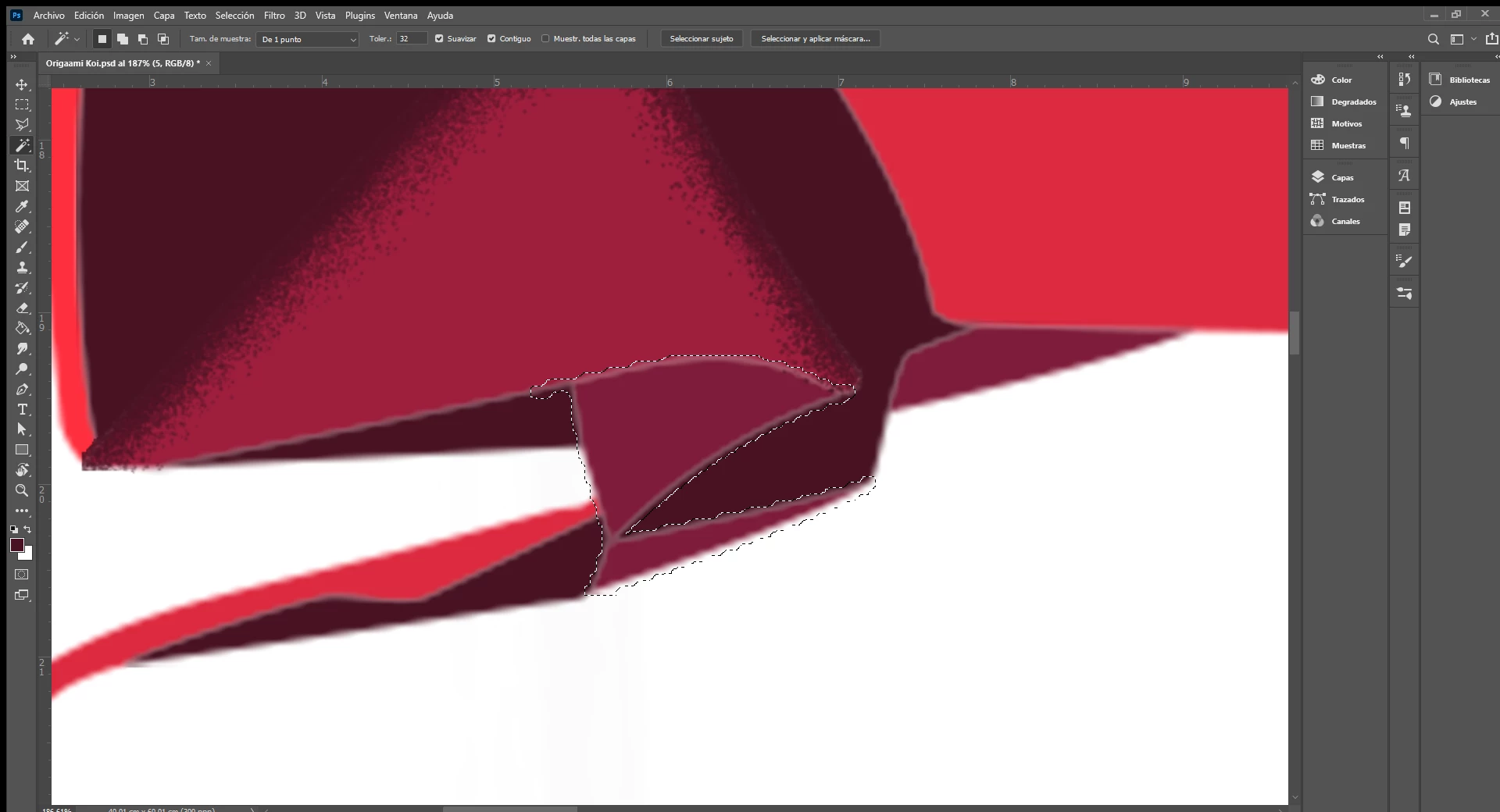


The selection is invading the other shades of color. I`ve also tried using the Quick Selection Tool, and it works, but I would still like to fix the Magic Wand.

This topic has been closed for replies.

4 replies

melissapiccone
Community Expert
Community Expert
February 8, 2021

Unless you are an Adobe engineer - I don't think you can fix the magic wand tool. It's old and tired, use the object selection tool and the quick selection tool.


Melissa Piccone | Adobe Trainer | Online Courses Author | Fine Artist
Chuck Uebele
Community Expert
Community Expert
February 7, 2021

The magic wand tool is a very old and crude tool. There are better ways to make selections. 

Trevor.Dennis
Community Expert
Community Expert
February 7, 2021

Like Chuck says, experienced Photoshop users might never use the Magic Wand tool.  The Object Selection tool might be a good alternative.  drag a box around the area you want to select, and the tool does a very reasonable job of reading your mind.  You can build on your selection if need be, by holding down the Shift key and dragging another window. 

JJMack
Community Expert
Community Expert
February 6, 2021

Try un-checking anti-alias and lower tolerance more.

JJMack
RC_kAuthor
Participant
February 7, 2021

Okay, so I un-checked anti-alias (I also tried by un-checking contiguous) and it still didn't work.

I tried by checking the Sample All Layers, it worked to an extent. However, the object I want to select is in a different layer than the one I'm working on, so it only works if I hide the layer I'm painting on, thus slowing my workflow a lot.

😞

Is there any way to reset only the Magic Wand Tool?

jane-e
Community Expert
Community Expert
February 6, 2021

Hi @RC_k 

What happens if you lower the tolerance to about 10 or 5 and Alt+Click with the Magic Wand to subtract the part you don't want? Or you might try the Polygonal Lasso tool with a series of clicks.

~ Jane

RC_kAuthor
Participant
February 6, 2021

Hi, @jane-e 

Thanks for the suggestion. I tried it, and while it decreases the selection, it still remais outside the edges 😞

jane-e
Community Expert
Community Expert
February 6, 2021

If I were selecting the dark red area, I would use the Pen tool with the options bar set to the Path mode, then convert it to a selection in the Paths panel. There is a learning curve. The other method is the Polygonal Lasso tool, in which you make a series of clicks.

https://helpx.adobe.com/photoshop/using/selecting-lasso-tools.html

https://helpx.adobe.com/photoshop/using/drawing-pen-tools.html

~ Jane