
Inspiring
June 27, 2024
Answered

PROBLEM WITH NEW PS (24.3.0) versus PS CS5

  • June 27, 2024
  • 3 replies
  • 1207 views

hi..... whenever I finish preparing a .psd image for printing, I convert it to .jpg before printing, to
flatten it, mostly, and so the image is not so big..

now in PS CS5 I used to do this under SAVE AS, with no problem, and the beauty of it
was, it preserverd the resolution of the .psd i.e., it converted to a .jpg, but the resolution
remained at 300 ppi...


but I can't do this with the new Photoshop.... this is crazy...
now under SAVE AS, there is no option to save either as .jpg or .png.... WHY IS THIS....

under none of the format options available now (Large Document Format, PDF, TIFF) can you now flatten your image and preserve
the resolution of the .psd file.. (if it's converted to PDF, how do I know at what resolution the PDF is, and is it in the same dimensions as the .psd?)


am stumped here.. would appreciate some help/suggestions..  

thank you....
This topic has been closed for replies.
Correct answer gener7

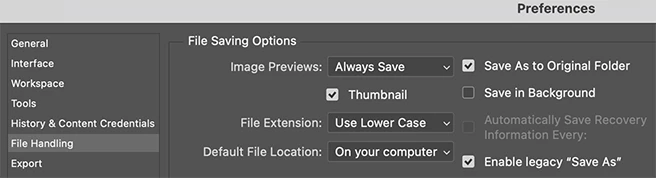
Long story short: You have to enable the legacy "save as" option. Much has changed in MacOS and Photoshop since CS5.

You can then see jpeg as an option and preserve the print resolution of the PSD file.


3 replies

gener7
Community Expert
gener7Community ExpertCorrect answer
Community Expert
July 1, 2024

Long story short: You have to enable the legacy "save as" option. Much has changed in MacOS and Photoshop since CS5.

You can then see jpeg as an option and preserve the print resolution of the PSD file.


maya90Author
Inspiring
July 1, 2024

OMG!!  that did it!!  thank you very much...  now I can save my .pds as .jpg's at 300 ppi resolution again..... woo hoo hoo..

mglush
Community Expert
Community Expert
June 28, 2024

Hi!

Can you post a screen shot of the dialog box that you are seeing, because something doesn't sound right. If could see your window, the panels that you are using and the jpg dialog box it would help us help you!

Michelle

maya90Author
Inspiring
July 1, 2024

hi mg, thank you for your response.. it's the simple SAVE AS dialog... 


screenshot attached..  (am also including a screenshot of using SAVE AS A COPY option..  with all the options..

none of them (not even the jpg options (what the heck is "JPEG 2000" and "JPEG stereo"?)) saves keeping the resolution of 300 ppi... I tried stuff like .psb (what's that?), .png..  NONE of them would save keeping the resolution of 300 ppi...


am also including a screenshot of Adobe Bridge, showing my .jpg's at resolution of 300 pppi, which I saved with PS CS5 in my old computer, using simply the SAVE AS dialog...


am truly stumped here..  would appreciate help/suggestions.. (do you by chance have access to PS CS5? you can compare behavior of the SAVE AS dialogs, very different in new PS from CS5...)


I find it truly incredible that now in the new PS under the SAVE AS dialog, there's no .jpg or even .png option...

WHY THE HECK IS THIS....  


thank you very much...

D Fosse
Community Expert
Community Expert
July 1, 2024
quote

I find it truly incredible that now in the new PS under the SAVE AS dialog, there's no .jpg or even .png option...

WHY THE HECK IS THIS....  


By @maya90


Here's why:


  • The jpeg specification does not support 16 bit depth, layers, transparency or alpha channels. Any document with these properties needs to be saved out as a jpeg copy with those properties removed. That has always been the case.
  • Directly saving out a jpeg copy through the Save As dialog was a "hack" that was actually introduced in Photoshop CS5, with some fanfare. Prior to that it was not possible at all (but nobody seems to remember that...)
  • This hack relied on certain OS APIs that happened to be available in both MacOS and Windows.
  • Some years ago Apple pulled the plug on those APIs. They simply removed them. The hack wouldn't work anymore, MacOS didn't allow it.


So then Adobe had to come up with a workaround, first Save A Copy, then "legacy Save As". The latter is not the default because this time, there is a real risk of unintentionally overwriting originals.


The big mistake Adobe did, was to try to sell it as a "feature" instead of what it was, an emergency rescue.

maya90Author
Inspiring
June 27, 2024

and under the SAVE AS A COPY option, if you save as .jpg or .png, it cuts the resolution to about half (from 300 ppi to 144 ppi....)