
Inspiring
June 7, 2018
Answered

Problem with tabs after repair

  • June 7, 2018
  • 1 reply
  • 359 views

I just some minor repairs done to my computer and had to change all my programs back to the customs settings I was using.

Now my images are opening with tabs stuck together, which I don't like.  I clicked on float all in windows and they separate but then they go back together when I open another image.  How can I make my images stay apart on their own tabs like I had them before?

Thank you
This topic has been closed for replies.
Correct answer Jeff Arola

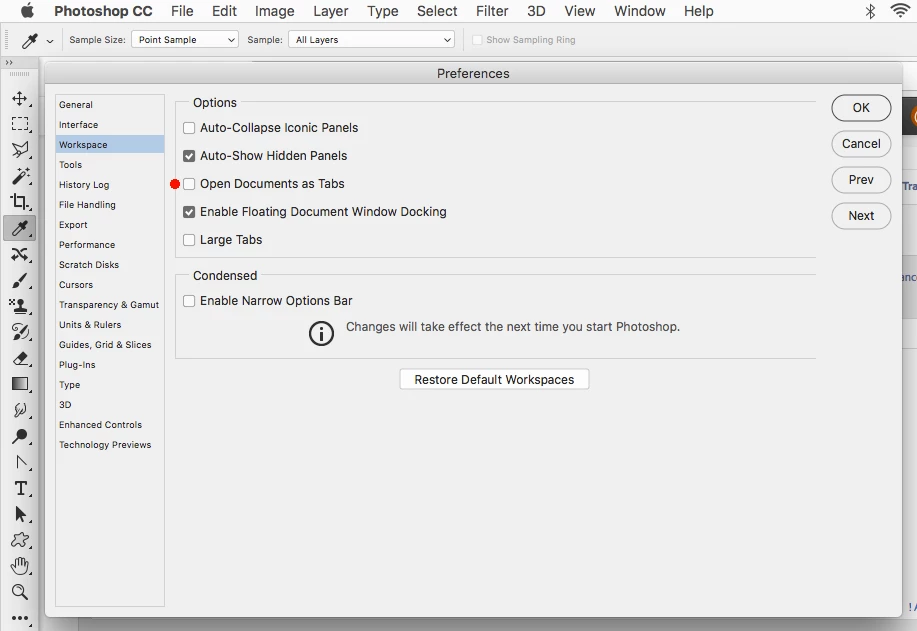
You don't say what version of photoshop or operating system your using, but for photoshop CC 2018 look in the photoshop Preferences>Workspace and uncheck Open Documents as Tabs.

1 reply

Jeff Arola
Community Expert
Jeff ArolaCommunity ExpertCorrect answer
Community Expert
June 7, 2018

You don't say what version of photoshop or operating system your using, but for photoshop CC 2018 look in the photoshop Preferences>Workspace and uncheck Open Documents as Tabs.

pslane1Author
Inspiring
June 8, 2018

Thank you!  I was looking in the wrong place.  Yes, I have CC 2018 and now I've got it fixed right.