
Participating Frequently
January 4, 2024
Answered

Problème dans l'enregistrement d'une action et sa réutilisation

  • January 4, 2024
  • 3 replies
  • 428 views

Bonjour,


Je me suis mise à utiliser Adobe depuis peu pour le travail. J'essaie d'enregistrer des actions pour les automatiser et modifier ainsi plusieurs photos en même temps. Toutefois, je ne sais pas pourquoi le processus d'alignement entre les deux calques saute lorsque j'essaie de réutiliser cette action pour modifier une nouvelle photo:
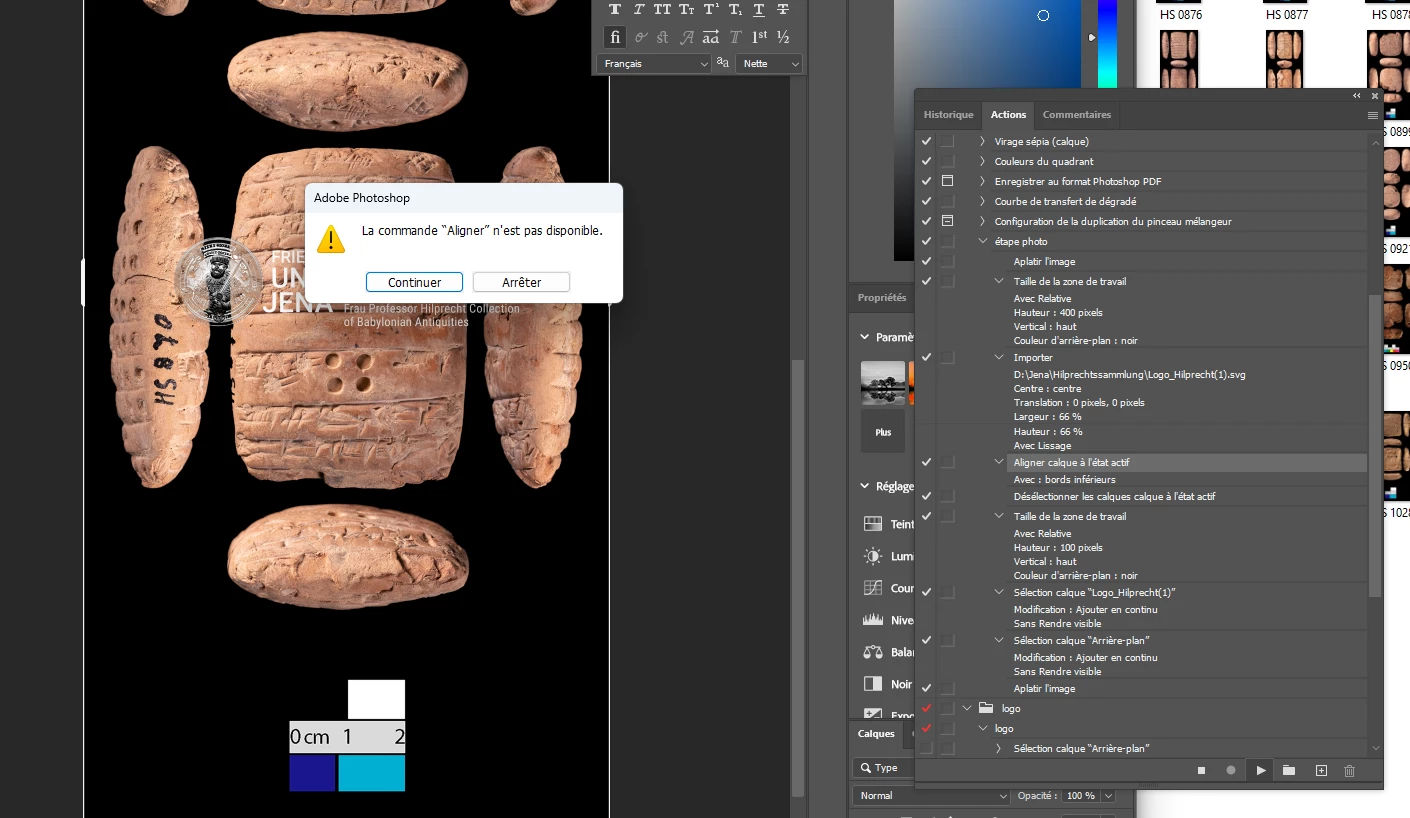
 

Avez-vous une idée de la manière de réparer cela?

J'ai utilisé l'alignement pour mettre le logo en bas de la photo

merci !

This topic has been closed for replies.
Correct answer Stephen Marsh

Alignment can be to the canvas or selection, but this option can't be recorded in an action and and there may be a conflict.


Best to select all first.


Then you can align the active layer/s to the selection (acts the same as align to canvas, but is more reliable).

3 replies

Stephen Marsh
Community Expert
Stephen MarshCommunity ExpertCorrect answer
Community Expert
January 4, 2024

Alignment can be to the canvas or selection, but this option can't be recorded in an action and and there may be a conflict.


Best to select all first.


Then you can align the active layer/s to the selection (acts the same as align to canvas, but is more reliable).

Participating Frequently
January 4, 2024

Thanks ! It works now with selectioning them before to do the alignement.

didiermazier
Community Expert
Community Expert
January 4, 2024

Pour que l'alignement du logo sur la photo se fasse il faut que les 2 calques soient activés. Ajoute dans l'action de les sélectionner puis d'activer Aligner ensuite

Participating Frequently
January 4, 2024

Bonjour,

merci ! C'est bien cela qui manquer. J'ai séléctionné les deux calques et maintenant cela fonctionne.


Participating Frequently
January 4, 2024

*manquait


jane-e
Community Expert
Community Expert
January 4, 2024

@Marie33930409ckcx 


Does one of your steps say to select two layers? We can't translate screenshots. Can you show your Layers panel when the action gets to this step?


Jane

Participating Frequently
January 4, 2024

Dear @jane-e


Thank you for your response. It appears that the layers are selectionned before the alignement.


Best,

Marie

jane-e
Community Expert
Community Expert
January 4, 2024

@Marie33930409ckcx 


I see one layer selected, not two. Try aligning them without using the Action, then undo.


Jane