
Participant
June 11, 2017
Question

Problems exporting image sequence larger than 5k

  • June 11, 2017
  • 1 reply
  • 3555 views

Hey all,

I'm trying to export an animation I created in timeline as an image sequence using the File > Export > Render Video > Photoshop Image Sequence method but I've come across a problem.

The pixel dimensions I'm working on are 5760x704 and apparently I can't export an image sequence larger than 5k. See screenshot below.
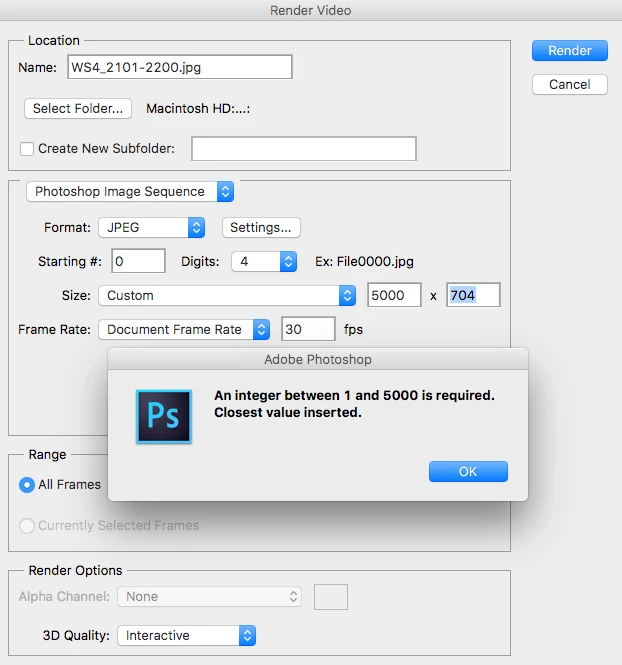
Is there an alternate method I could possibly try? Any help would be appreciated!

Cheers,

Baron

This topic has been closed for replies.

1 reply

JJMack
Community Expert
Community Expert
June 11, 2017

That is a very wide aspect ratio wider than 4K video and shorter than 1K.   Find yourself a 5K or 8K video editor and try that software.

JJMack
Participant
June 11, 2017

Hey JJMack,

Thanks for the response.

That would probably be ideal- except I've gone gungho and done a full 3 minute animation in photoshop under those dimensions! I'm a beginner in animation (clearly) and I like the frame by frame option in PS

Would it be possible to bring the animated PSD file into a video editor like AE with all animation frames still in tact? And then export them as an image sequence from there?

Or can automated scripts help?

B

JJMack
Community Expert
Community Expert
June 11, 2017

A 90:11 aspect Ratio is very wide.  What is the video to be used with? Resize the document down in size reduce the number of pixels.   A video 5760 Pixels wide can only be displayed on an 8K display.  Dell 8K display is $5000 how many users do you know that have an 8K display.

JJMack