
Participant
March 26, 2021
Question

Problems uploading to when saving from save for web

  • March 26, 2021
  • 3 replies
  • 378 views

For some reason, I'm having problems uploading to files websites, specifically if I save them from Photoshop using Save for Web (legacy). But if I save them doing a regular save as, my images can be selected.


Anyways...

They look like this when I try to upload. 

Can't select them, I already tried asking apple for help cause I thought this was a mac problem, but they said its more of a adobe problem since it only happens when I save from Save for Web.
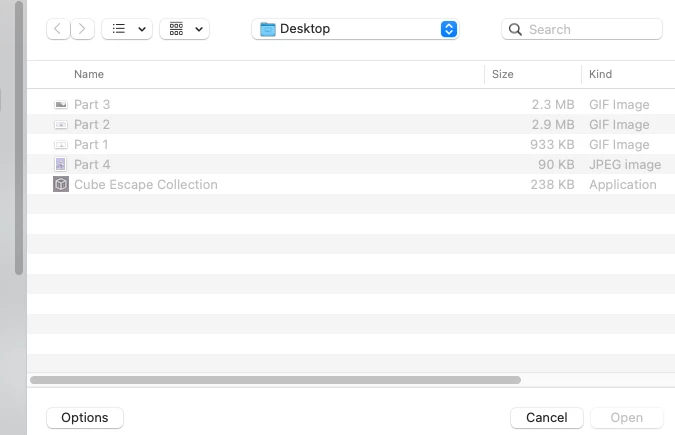
This topic has been closed for replies.

3 replies

Jeff Arola
Community Expert
Community Expert
April 13, 2021

The mac version of photoshop 22 has a file extension bug that sometimes precludes the file extension getting added.


If when you use File>Save for Web always check that there is a file extension added to your filename before saving.


https://feedback.photoshop.com/conversations/photoshop/photoshop-save-for-web-mojave/5f8fa4d572a09d07dea818f7

Bojan Živković11378569
Community Expert
Community Expert
April 9, 2021

I am Win user but... why are files washed or grayed out? Is that normal? Are you exporting animated GIF's? Can you upload somewhere one or more files and post link to check them?

FairyblueAuthor
Participant
April 13, 2021

The files are not "washed out/grayed out" they simply cannot be selected to be uploaded anywhere in the web.

As I stated in my post, this only happens if I use Save for Web.


Community Expert
March 26, 2021

Please, try to add the extension type of the file to the filename.

Es:

Part 3.gif


FairyblueAuthor
Participant
April 9, 2021

Tried it. It does not work.