
Participating Frequently
November 3, 2017
Question

Problems with the stylus in Photoshop

  • November 3, 2017
  • 3 replies
  • 2639 views

Hello!

I'm bad at typing in English, I hope you understand me.

I have a graphic tablet bamboo cth-470

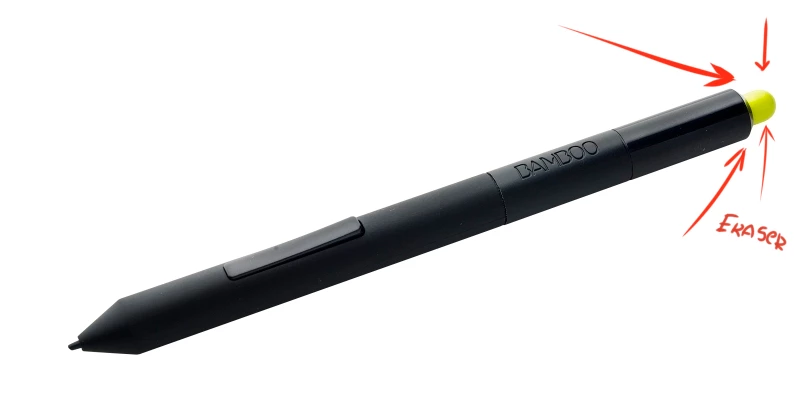
Also, there is a stylus with an stylus eraser

I want to draw with the back of the stylus

But the photoshop can only erase, but not draw

I want to draw with the back of the stylus eraser , help!

How to disable the definition of stylus eraser?

Maybe in the registry, where do have it?

Wakom refused to support, saying that you need to contact Adobe with this question

You are my last hope!
This topic has been closed for replies.

3 replies

JJMack
Community Expert
Community Expert
November 8, 2017

Simply put it is not a problem.  You want a new finger painting feature added to Photoshop.  You can request such a feature on Adobe's feedback site Photoshop Family Customer Community . However I do not believe Adobe will think that, that would be worthwhile feature to add.

JJMack
JJMack
Community Expert
Community Expert
November 5, 2017

How do you choose a brush the bamboo pen is a wacom device supported with wacom device driver and the only Photoshop tool the driver supports for the pen eraser is Photoshop Eraser tool. I tried setting the Wacom Intuos Pen eraser to Click like the pen tip is set by default.  What even tool I select in Photoshop the pen tip click acts like a mouse left click and hold and mouse stroke.  However no matter what tool I select in Photoshop UI the eraser click setting like a mouse left click hold and stroke with the eraser tool. No matter what Photoshop  Tool Bar and Tool Option Bar shows is the current Photoshop tool.  The Wacom erases set to click is still acting like the Photoshop Eraser. Photoshop is not performing like the current tool showned in Photoshop's UI it performing like the eraser tool is active.  Is the problem in Photoshop or is the problem in Wacom's pen driver.

JJMack
Participating Frequently
November 5, 2017

I really do not understand what's written here

But here that is interesting

If a Bamboo driver error occurs, then the Photoshop perceives the eraser as a normal mouse and fine-tunes the tools

Therefore, it is worthwhile to understand that Photoshop checks the eraser and, based on this, selects the tool (as it thinks) the eraser tool

I checked MediBang Paint Pro

This also determines the presence of the eraser, BUT !!!

This allows me to choose any other tool, unlike Photoshop

If only Adobe would pay attention to this and fix such a problem, it would be very wonderful!

But as I understand, if there is no support from Adobe, then no one can help me.

I need to solve the problem, and not discuss it :(

JJMack
Community Expert
Community Expert
November 5, 2017

I also do not fully understand what you write either.  I feel this is because neither of us knows how Photoshop and Wacom software communicate with each other.  So if there is a problem it may be on one or both sides of this communication.

I wrote I set the Wacom pen eraser to Click just like the Pen point tip.  When I select any tool in Photoshop Tool Palette  Photoshop Highlights that tool Icon in the tool palette bar and Photoshop's Tool option bar changes to the tools icon and the options for the tool.  However when I use the Wacom Pen eraser end Photoshop performs like the erase tool is active even though Photoshop UI Tool Palette bar and Tool Option bars shows that a different tool is Photoshop current tool.  If the erase tool is operating the eraser tool should be highlighted in the tool palette bar and the eraser tool icon and eraser options should be in the tool option bar.  This is not what I see. Clearly something is wrong here.   There is a Problem here is it a single problem in Adobe's or Wacom's code or more then a single problem with the way they communicate.   I feel since you want this problem fixed you should report the problem to both Wacom and Adobe.  This is not the proper place to report problem to Adobe. This is a user forum.

To report a problem to Adobe use the problem area on Adobe's feedback site.  Use this link then select problem. First search for your problem and if not found to be a reported problem report your problem. Photoshop Family Customer Community

JJMack
JJMack
Community Expert
Community Expert
November 4, 2017

I have a Wacom Intuos Pro and Wacom defaults the Eraser to Photoshop's Eraser in Photoshop.  You can not set the eraser to any other tool in Photoshop.  You can set it to click,Keystroke,  and an Application.  It a Wacom thing not a Photoshop thing.

Here is Wacom Intuos Pro Preferences UI for the Pen eraser settings.  Clearly the only Photoshop tool Wacom offers is the eraser tool.

JJMack
Participating Frequently
November 4, 2017

My setup menu is completely different from yours

I do not understand you well, I will clarify ..

Can you use eraser as a pen in Photoshop?

------------------------------

I also found the file Recover.tabletprefs

As I understood, the values ​​of these or those parameters are inside.

I opened it with a notepad and found it ..

Is there something in those lines that is responsible for Eraser?

My pen tip is broken.

in my country buying a new pen is very expensive.

In SAI, you can draw with the back of the stylus

In Photoshop only clear

Participating Frequently
November 4, 2017

<ButtonFunction type="integer">14</ButtonFunction>

Number 14 in the line of code - as I understand it, Left click

If you set the number 40, the following will happen:

Perhaps this changes the act when you press the back of the pen

number 40 - crawls out what that menu

but the photoshop still perceives the back side of the pen as an erase, the tool erases the eraser