

Proper Photoshop Setup - Color Space - Work Space - Export - Monitor Calibration
Hi, I'm sitting here so frustrated, confused and depressed. I've tried for weeks to fix my workflow issues and everything I edit and export looks awful. I must start from square one as if I'm a beginner and get everything right. I will post what I have and hope someone can offer advice, video tutorials to fix things. Thank you to anyone or everyone who tries to help me.
SYSTEM
- MAC Studio 2022 - M1 MAX - 32 GB Mem
- Sonoma 14
- Apple Studio Display 27" 5120-2880 - P3-600nts Preset, "However"
- I calibrated my monitor w/Xrite Display Pro XL - Under "User" "StudioDisplay_24-06-24.icc"
- Shooting with a Nikon Z9 always RAW
SOFTWARE
- Have Adobe Photoshop, Photoshop Beta, Lightroom Classic, Lightroom, Premiere Rush, Bridge all on the machine and being used at various times. Have Lightroom Classic from a full ver. I purchased
So I open my NEF/RAW files and start working in Photoshop under "Camera Raw Preferences" it shows workspace as "StudioDisplay_24-06-24.icc"
I will then export with legacy or export as and convert to JPG, sRGB
When exporting a preview window will come up and the colors do not match my work, always more saturated.
I always get this message "Embedded Profile Mismatch" - I've tried all three options and still the end result is not a WYSIWYG.
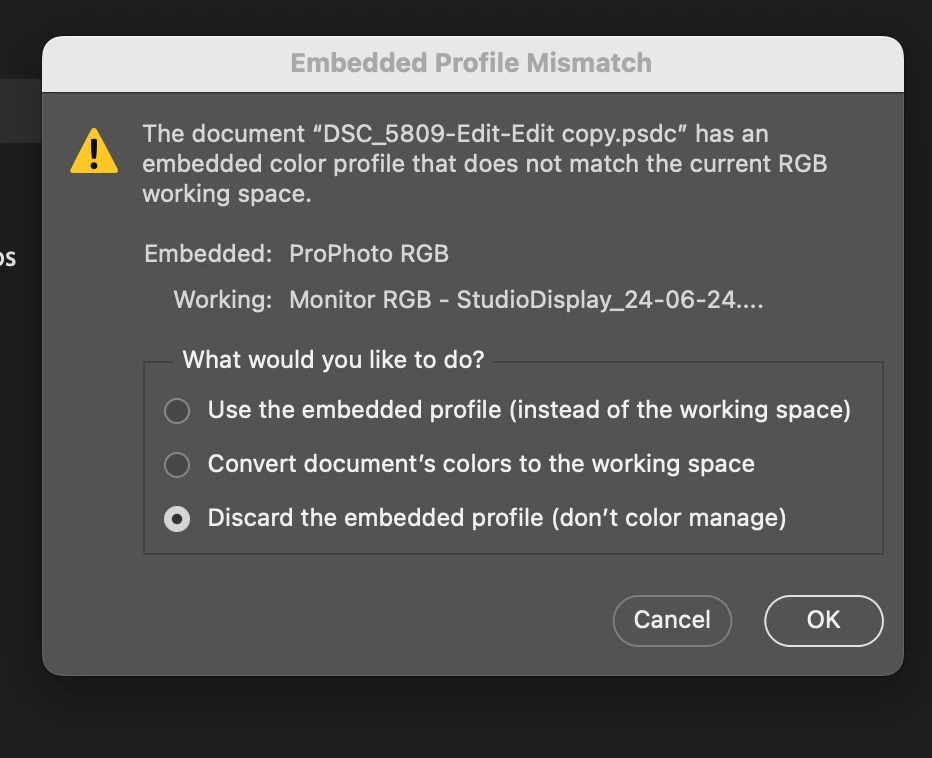
In PROOFING I've tried to use that, it's set to Internet Standard RGB (sRGB) and again nothing matches. Things look washed out or to the other extreme very oversaturated.
I'm hoping a professional out there will notice what I have to do at first glance or send some questions to help me to find the issue. I'm just beside myself and have not slept for two days, up all night and it's way beyond me.
Thank you to Adobe and The Adobe Community of users for trying to help me in advance.
Best regards, Tony
 AdChoices