GNBeraldo
Inspiring
July 19, 2018
Question

Properties Panel mismatch

  • July 19, 2018
  • 2 replies
  • 421 views

Hi guys, I am still learning Photoshop, so please forgive me.

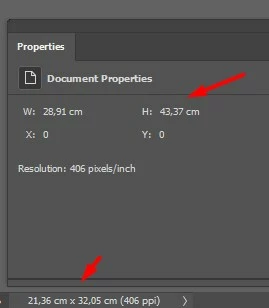
Why the properties panel doeasn't match the real dimension of the image?

I want to print multiple images in the same print and I want to know the dimension of each image in relation to the ppi. I used to select each layer corresponding to each image and I used to look at the Properties Panel to do that, but probably it's not the right place to look at.
This topic has been closed for replies.

2 replies

JJMack
Community Expert
Community Expert
July 20, 2018

Target the background layer its size will be canvas size its transparency is locked to canvas size.  Layers can be any aspect ratio and size you are targeting a  pixel layer that size is smaller than canvas size. The Properties panel is showing its width height and its upper left corner position relative to the documents upper left canvas corner which is  position x:0 y:0 your layer is to the right and down from 0,0.

Photoshop background is a special layer. Iy is the bottom layer in your layers stack if you have a background layer and it does not support transparency so it is always canvas size. 

Look at what layer is targeted in the layet palette.

JJMack
JJMack
Community Expert
Community Expert
July 19, 2018

What version of Photoshop are you using? You Properties panel has a different format than my CC 2018 19.1.5.

Here are some screen captures CC 2018 19.1.5 with a document size like your where properties panel  is showing  Document size and an other where it is  showing Layer 1 size.  Your Properties panel does not have the X: and Y: upper left corner position?

JJMack
GNBeraldo
GNBeraldoAuthor
Inspiring
July 20, 2018

Thank you,

my version is Adobe Photoshop Version: 19.1.5 20180604.r.346 2018/06/04: 1175273  x64