Hi David,
Thanks for reaching out. We are sorry for the trouble with Photoshop. This topic can be confusing. Let me try to clarify this.
Photoshop can change color profiles as per your workflow and needs. You can use the Color Settings to change the default color workspace in Photoshop, and you can also decide how you would like Photoshop to handle any differences.
To open the Color Settings in Photoshop, you can press CTRL + SHIFT + K on Windows or CMD + Shift + K on macOS.
You can check the options highlighted in the screenshots to set your color management policies.
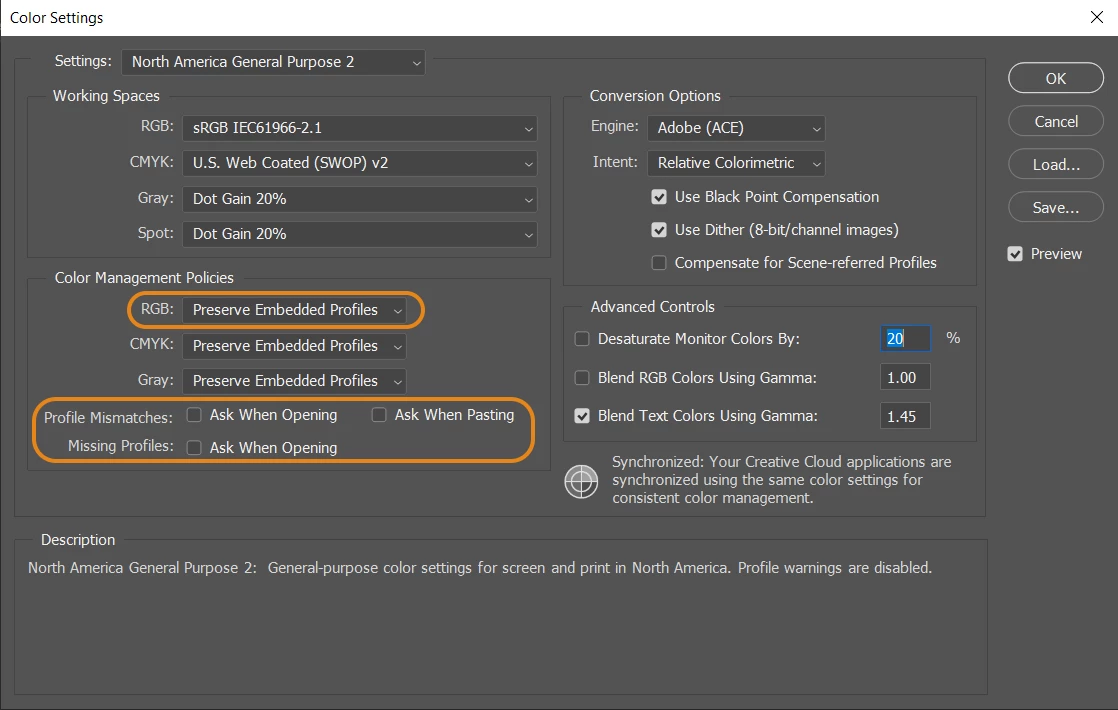
- Set the RGB policy to Convert, Preserve, or OFF (Do not manage) the document's color profile to the working space. (In your case, it is ProPhoto, and in my Photoshop, it is sRGB by default)
- If Photoshop asks you to manage the color space when you open a new document with a different color profile than that of your Photoshop, you can uncheck the 'Ask when opening' option. This will make Photoshop go by the policy you have set above to handle RGB documents.
Check this article to learn more: https://helpx.adobe.com/photoshop/using/color-settings.html
We hope this helps,
Thanks!
Sameer K


 AdChoices