do77709026
Known Participant
May 3, 2022
Answered

Prophoto preference on Photoshop 2022

  • May 3, 2022
  • 2 replies
  • 330 views

Goodmorning;

After changing macos system, and open dialog still ask me on photoshop2022 if I want to chose a colorometric profil different from the one i'm working with : Prophoto.


The problem is that I cannot configure anymore my photoshop in order to avoid this step and loosing time choosin the profile.  Does anyonte can tell me where I can find and locate this profile of mine , please? 


Thanks to alls.


Best

David

This topic has been closed for replies.
Correct answer Sameer K

Hi David,


Thanks for reaching out. We are sorry for the trouble with Photoshop. This topic can be confusing. Let me try to clarify this.

Photoshop can change color profiles as per your workflow and needs. You can use the Color Settings to change the default color workspace in Photoshop, and you can also decide how you would like Photoshop to handle any differences.


To open the Color Settings in Photoshop, you can press CTRL + SHIFT + K on Windows or CMD + Shift + K on macOS.

You can check the options highlighted in the screenshots to set your color management policies.
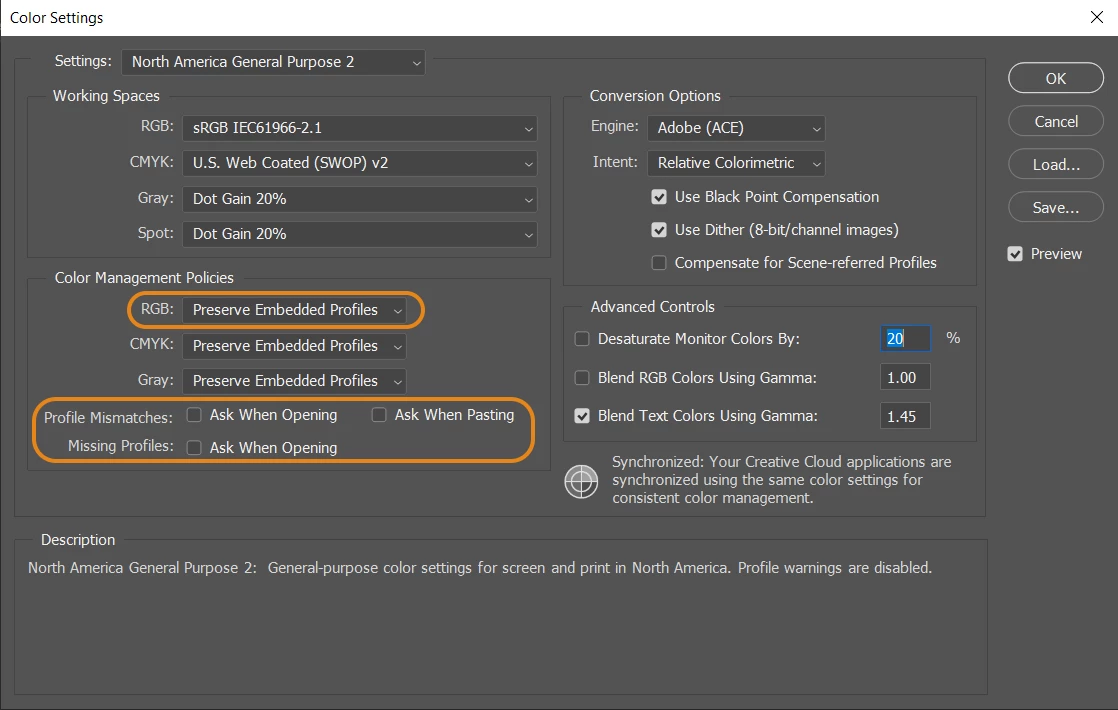
  • Set the RGB policy to Convert, Preserve, or OFF (Do not manage) the document's color profile to the working space. (In your case, it is ProPhoto, and in my Photoshop, it is sRGB by default)
  • If Photoshop asks you to manage the color space when you open a new document with a different color profile than that of your Photoshop, you can uncheck the 'Ask when opening' option. This will make Photoshop go by the policy you have set above to handle RGB documents.


Check this article to learn more: https://helpx.adobe.com/photoshop/using/color-settings.html

We hope this helps,

Thanks!

Sameer K

2 replies

TheDigitalDog
Inspiring
May 3, 2022

See: http://digitaldog.net/files/PhotoshopColorSettings.mp4

Photoshop CC Color Settings and Assign/Convert to Profile video

Author “Color Management for Photographers" & "Photoshop CC Color Management/pluralsight"
Sameer K
Community Manager
Sameer KCommunity ManagerCorrect answer
Community Manager
May 3, 2022

Hi David,


Thanks for reaching out. We are sorry for the trouble with Photoshop. This topic can be confusing. Let me try to clarify this.

Photoshop can change color profiles as per your workflow and needs. You can use the Color Settings to change the default color workspace in Photoshop, and you can also decide how you would like Photoshop to handle any differences.


To open the Color Settings in Photoshop, you can press CTRL + SHIFT + K on Windows or CMD + Shift + K on macOS.

You can check the options highlighted in the screenshots to set your color management policies.

  • Set the RGB policy to Convert, Preserve, or OFF (Do not manage) the document's color profile to the working space. (In your case, it is ProPhoto, and in my Photoshop, it is sRGB by default)
  • If Photoshop asks you to manage the color space when you open a new document with a different color profile than that of your Photoshop, you can uncheck the 'Ask when opening' option. This will make Photoshop go by the policy you have set above to handle RGB documents.


Check this article to learn more: https://helpx.adobe.com/photoshop/using/color-settings.html

We hope this helps,

Thanks!

Sameer K