
Participating Frequently
October 6, 2023
Question

PS 24 - Outil Supprimer (IA) ne marche pas

  • October 6, 2023
  • 2 replies
  • 1076 views

Bonjour, 

Lorsque j'utilise le nouvel outil supprimer (IA), je selectionne la partie à supprimer (apparait en mauve traansparent), ensuite l'ordinateur travaille et le résultat final me donne une trace noire ou marron correspondant à la sélection à supprimer (cf photo jointe). J'ai vérifié le CPU, j'ai rebooté le mac (macbookpro 2019 - 16 Go RAM - macOs Ventura 13.6). Je réussi à le faire refonctionner normalement quand je modifie les réglages comme suit : Réglages - Traitement de l'image - Outil Supprimer en cours - Plus stable (au lieu de plus rapide par défaut). 

Quelqu'un a t'il rencontré ce problème ? Merci pour votre support. 
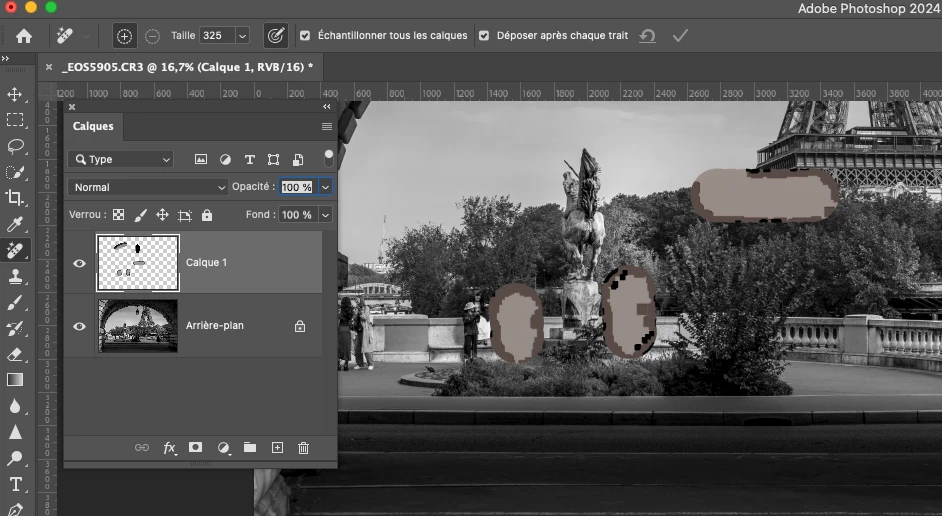
This topic has been closed for replies.

2 replies

Participating Frequently
October 6, 2023

Hi @CShubert and thanks for your prompt feedback. 


Yes indeed it works fine with this setting (more stable) but I know before it was working fine under the "Plus rapide" setting so I tried to get back to this setting. The trouble is I do not know exactly when it started "dysfunctionning" ? Is it when I moved from the PS 23 beta version to the PS 24 version? Is there any way for me to get back to the initial setting (plus rapide)? 

Again many thanks for your ssupport which is very much appreciated 🙏

Kevin Stohlmeyer
Community Expert
Community Expert
October 6, 2023

Your 2019 MBP may require you to keep it on "More Stable" in order to generate better results. Is there an issue keeping it on "More Stable"?

Participant
October 6, 2023

Thanks for your feedback Kevin. 
thay's fine, I will keep it under the more stable settings. 

Kevin Stohlmeyer
Community Expert
Community Expert
October 6, 2023

Hi @Vincent32758320xm0n not sure what your issue is. You changed the preference to "More Stable" which is the correct method and it now works? You've already solved your issue.