jank63750246
Participant
September 27, 2017
Answered

PS always downsize picture

  • September 27, 2017
  • 3 replies
  • 739 views

Hello

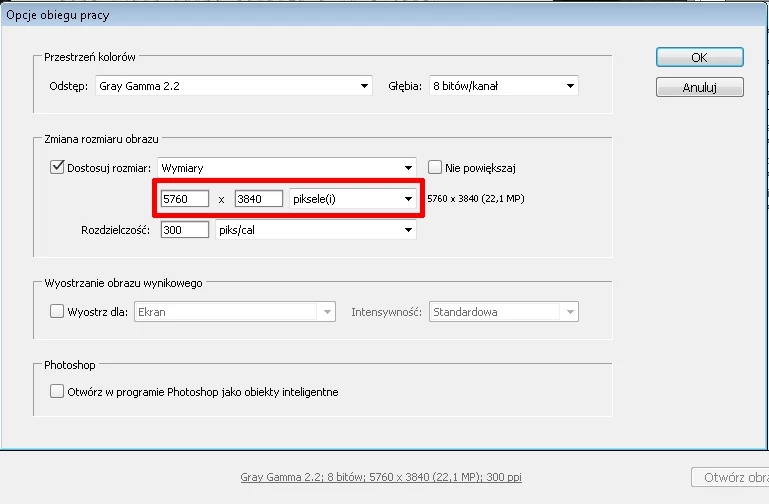
I've got problem, I've tried to save raw picture (cr2) as tif format. Raw has 5760x3840 but tif always has 3960x2640, I think it could be set in Raw Camera, only way I found is set size manualy to 5760x3840, but it isn't convinient because when size will be other I'll have to change it again. Doesn't have any option which allow us to don't change the picture size, it always have to do it manualy?
    This topic has been closed for replies.
    Correct answer Per Berntsen

       It's medium raw, bellow is in exif, but actually something strange is there from me:

    There is a setting in the camera for Medium Raw - 3960 x 2640.

    See the clip below from DPReview - Canon EOS 5D Mark III Review: Digital Photography Review

    So you have change the setting from MRAW to Raw in the camera to get the full resolution.

    Option

    Values / Actions

    Notes

    Shooting tab 1
    Quality • RAW
    -
    RAW
    MRAW
    SRAW
    • JPEG
    -
    Large Fine
    Large Normal
    Medium Fine
    Medium Normal
    Small1 Fine
    Small1 Normal
    Small2
    Small3

    - JPEG Large = 5760 x 3840
    - JPEG Medium = 3840 x 2560
    - JPEG Small1 = 2880 x 1920
    - JPEG Small2 = 1920 x 1280
    - JPEG Small3 = 720 x 480


    - RAW = 5760 x 3840
    - MRAW = 3960 x 2640
    - SRAW = 2880 x 1920

    Turn front dial to change RAW image, turn rear dial for JPEG.

    3 replies

    D Fosse
    Community Expert
    Community Expert
    September 27, 2017

    This can only mean two things.

    • Either this is the real size out of the camera. If so, it would look and behave exactly like this. Are you sure they are not jpegs, or some "small" raw variety?
    • Or there is a corrupt preferences file. I can't recall how you reset ACR preferences - anyone?
    jank63750246
    Participant
    September 27, 2017

    I think it's something wrong with PS, too,

    It's medium raw, bellow is in exif, but actually something strange is there from me:

    --------

    Filename - IMG_000001.CR2

    ImageWidth - 5760

    ImageLength - 3840

    BitsPerSample - 8 8 8

    Compression - 6 (JPG)

    Make - Canon

    Model - Canon EOS 5D Mark III

    StripOffset - 91232

    Orientation - Top left

    StripByteCount - 2082829

    XResolution - 72

    YResolution - 72

    ResolutionUnit - Inch

    DateTime - 2000:01:01 02:58:39

    Artist -

    Copyright -

    ExifOffset - 446

    ExposureTime - 1/160 seconds

    FNumber - 7.10

    ExposureProgram - Manual control

    ISOSpeedRatings - 400

    Recommended Exposure Index - 400

    ExifVersion - 0230

    DateTimeOriginal - 2000:01:01 02:58:39

    DateTimeDigitized - 2000:01:01 02:58:39

    ComponentsConfiguration - YCbCr

    ShutterSpeedValue - 1/166 seconds

    ApertureValue - F 7.03

    ExposureBiasValue - 0

    MeteringMode - Center weighted average

    Flash - Flash not fired, compulsory flash mode

    FocalLength - 70 mm

    UserComment -

    SubsecTime - 00

    SubsecTimeOriginal - 00

    SubsecTimeDigitized - 00

    FlashPixVersion - 0100

    ColorSpace - Uncalibrated/Unknown (-1)

    ExifImageWidth - 3960

    ExifImageHeight - 2640

    InteroperabilityOffset - 69800

    FocalPlaneXResolution - 2710.47

    FocalPlaneYResolution - 2716.05

    FocalPlaneResolutionUnit - Inch

    CustomRendered - Normal process

    ExposureMode - Manual

    White Balance - Manual

    SceneCaptureType - Standard

    Owner Name -

    Lens Info - 70  70  0  0

    Lens Model - 70mm

    Lens Serial Number - 0000000000

    GPS information: -

    GPSVersionID - 2.3.0.0

    Maker Note (Vendor): -

    Macro mode - Normal

    Self timer - Off

    Quality - RAW

    Flash mode - Not fired

    Sequence mode - Single or Timer

    Focus mode - MF

    Image size - Large

    Easy shooting mode - Manual

    Digital zoom - None

    Contrast - Normal

    Saturation - Normal

    Sharpness - Low , -32769

    ISO Value - 32767

    Metering mode - Center weighted

    Focus type - Auto

    AF point selected - 0

    Exposure mode - Manual

    Focal length - 70 - 70 mm (1 mm)

    Flash activity - Not fired

    Flash details -

    Focus mode 2 - 65535

    Auto ISO - 100

    Base ISO - 400

    White Balance - Fluorescent

    Sequence number - 0

    Camera Temperature - 27 C

    Flash bias - 0 EV

    Subject Distance - 0.00

    Image Type - Canon EOS 5D Mark III

    Firmware Version - Firmware Version 1.2.3

    Owner Name -

    Sharpness (EOS 1D) - 0

    Directory index (EOS 450D) - 0

    File index (EOS 450D) - 1

    AF point selected - Off (Manual Focus)

    Num AF Points - 61

    Valid AF Points - 61

    AF Image Width - 5760

    AF Image Height - 3840

    File number - 000 - 0000

    Sharpness (A0) - 3

    Thumbnail: -

    JpegIFOffset - 80324

    JpegIFByteCount - 10908

    -------

    Per Berntsen
    Community Expert
    Per BerntsenCommunity ExpertCorrect answer
    Community Expert
    September 27, 2017

       It's medium raw, bellow is in exif, but actually something strange is there from me:

    There is a setting in the camera for Medium Raw - 3960 x 2640.

    See the clip below from DPReview - Canon EOS 5D Mark III Review: Digital Photography Review

    So you have change the setting from MRAW to Raw in the camera to get the full resolution.

    Option

    Values / Actions

    Notes

    Shooting tab 1
    Quality • RAW
    -
    RAW
    MRAW
    SRAW
    • JPEG
    -
    Large Fine
    Large Normal
    Medium Fine
    Medium Normal
    Small1 Fine
    Small1 Normal
    Small2
    Small3

    - JPEG Large = 5760 x 3840
    - JPEG Medium = 3840 x 2560
    - JPEG Small1 = 2880 x 1920
    - JPEG Small2 = 1920 x 1280
    - JPEG Small3 = 720 x 480


    - RAW = 5760 x 3840
    - MRAW = 3960 x 2640
    - SRAW = 2880 x 1920

    Turn front dial to change RAW image, turn rear dial for JPEG.

    D Fosse
    Community Expert
    Community Expert
    September 27, 2017

    (since I don't speak Polish )

    Per Berntsen
    Community Expert
    Community Expert
    September 27, 2017

    Uncheck the box next to "Dostosuj rozmiar", and the pixel dimensions will not be changed.

    jank63750246
    Participant
    September 27, 2017

    This box was unchecked by default and all of images have been changed to 3960x2640

    I've tried to set higher size 25MP, but image was scalled to 6123x4082 :/

    option Don't enlarge [Nie powiększaj] set size to default it means 3960x2640

    Per Berntsen
    Community Expert
    Community Expert
    September 27, 2017

    This box was unchecked by default and all of images have been changed to 3960x2640

    This screenshot shows that you are using a camera which takes 10,5 megapixel pictures, or you have set the camera to take that format.

    (3960 x 2640 = 10.5 million)

    So if you want to enlarge, you have to check the Dostosuj rozmiar box and enter the dimensions.