
Participant
November 6, 2017
Answered

PS CC 2018 - 3 Drop Shadow tools under Layer Styles?

  • November 6, 2017
  • 1 reply
  • 3122 views

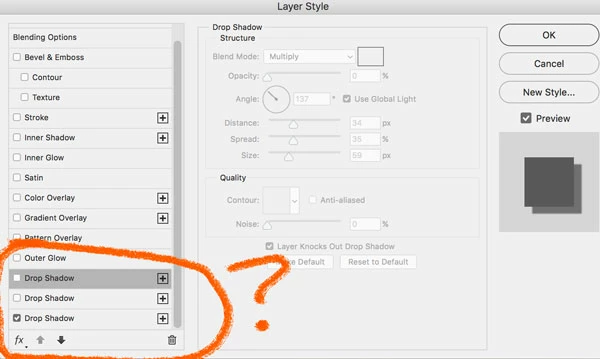
Hope this isn't a dumb question, but under layer styles blending options there are now THREE drop shadow options? The top one doesn't seem to do anything, the other two work as I would expect. Perhaps this is some advanced function I'm not up on.
This topic has been closed for replies.
Correct answer Theresa J

You can double stack many of the layer styles. Every style listed with the large + can be multiplied. For example you could put two strokes around an object for a special effect. At some point you probably clicked the plus next to drop shadow twice which added two more drop shadows. You can easily remove the extra ones by clicking the trashcan icon in the lower right of your orange circle.

1 reply

Theresa J
Community Expert
Theresa JCommunity ExpertCorrect answer
Community Expert
November 6, 2017

You can double stack many of the layer styles. Every style listed with the large + can be multiplied. For example you could put two strokes around an object for a special effect. At some point you probably clicked the plus next to drop shadow twice which added two more drop shadows. You can easily remove the extra ones by clicking the trashcan icon in the lower right of your orange circle.

Participant
November 9, 2017

Thank you so much!