
Participant
October 20, 2017
Answered

PS CC 2018: Start Error that i need Windows 10 Version 1511+ on Windows 10 Enterprise Version 1607

  • October 20, 2017
  • 5 replies
  • 18025 views

Hello,

i can not start PS CC 2018 on my Windows 10 Enterprise Version 1607. I get the message that i have to update my Windows 10 to November Update 1511 or higher. But I have a newer Version. Has someone an idea for me. Where check PS on start whiche Windows i have? On the registry?

Here the message. Sorry is in german:
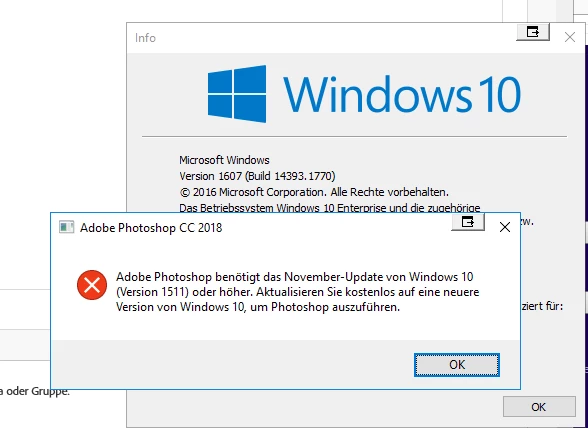
Thanks for your answers.

Kerstin

    This topic has been closed for replies.
    Correct answer Pete.Green

    Kerstin, and all,

    Sorry for the Windows 10 version requirement confusion with Photoshop 19.x versioning.

    In short,

    I'm working to get our System Requirements documentation updated to this effect, apology for the confusion/frustration caused by the lack of documentation update.

    Regards

    Pete

    5 replies

    Participant
    December 30, 2020
    So which version of photoshop can I run on my pc

    Sent from my Huawei phone
    AxelMatt
    Community Expert
    Community Expert
    December 30, 2020

    With you windows version you can use Photoshop CC 2017.

    Photoshop system requirements (adobe.com)


    BTW: Your Windows version is more tha 5 years old and Microsoft doesn't support this version since more than 3 year. It means that your version have dozen of security leaks that don't be fixed anymore. You are taking a very high risk if you connected this PC with the internet. And for installing Photoshop you need a connection to the internet.

    It's highly recommend that you installed the recent version of Windows.

    My System: Intel i7-8700K - 64GB RAM - NVidia Geforce RTX 3060 - Windows 11 Pro 25H2 -- LR-Classic 15 - Photoshop 27 - Nik Collection 8 - PureRAW 6 - Topaz Photo AI
    Participant
    December 30, 2020

    Excuse me my pc is version 1511 of Windows 10 then can I run photoshop 2018 in my pc

    Pete.Green
    Community Manager
    Pete.GreenCommunity ManagerCorrect answer
    January 30, 2018

    Kerstin, and all,

    Sorry for the Windows 10 version requirement confusion with Photoshop 19.x versioning.

    In short,

    I'm working to get our System Requirements documentation updated to this effect, apology for the confusion/frustration caused by the lack of documentation update.

    Regards

    Pete

    Geoffrey Gilson
    Participant
    February 1, 2018

    Hi,

    I'm running Photoshop CC on 2 computers...1 have at home with latest windows 10 version....no problem.

    The other computer is my company computer, and has an OEM Windows 10 based on 1511...therefore the latest Photoshop became not compatible with this operating system.

    No way for my company to run Windows 10 on the lastest version.

    What are our options other than downgrade in order to benefit from the latest Photoshop CC features, which is as far as i understood the reason why we are paying a monthly sub?!

    Regards

    Geoffrey

    Vlad.C.A
    Participant
    February 1, 2018

    Now mr. Gilson here i think has spoken the idea behind this, in fact this is the problem. Sure the devs can release new versions of their software with higher system requirements and it's ok they provided the easy solution to revert back to an older version (NOT ok though to not specify the requirements from the start - i mean in the CC GUI). Although their reply is simple - you want this, you must have windows version X - but isn't this a messure too drastic? if i had windows 7 i could;ve run the 2017 version without a problem (that's almost 8 years of compatibility since the OS was availlable) but if i have windows 10 i can't run the 2018 version (not even 3 yearssince the release of windows 10 in 2015)??   and i need version 1703 wich was released in July 27, 2017.

    So in short: no one who has windows 7, vista, windows 8, windows 10 can run your latest software without the update from half an year ago??? or the ones that are having windows 7 (released in 2009 !!!!) can run photoshop but those who have windows 10 1511 (late 2015) CAN'T run it??? (btw can anyone confirm that it runs with windows 8.1 or windows 7 or is that another mistake in the "updated requirements section"

    mr Gilson was right .... "why am i paying for the latest when i can only have the old?" (paying for the entire cc collection btw ... didn't even update the other adobe apps as to not find this same issue again)

    vladyess
    Participant
    January 24, 2018

    I have the same problem after update Photoshop 22 January 2018! I don't want to update Windows to 1607. Tell me about the solution of the problem, please.

    And I completely agree with Vlad.C.A, it is necessary to warn in advance about new requirements to software.

    Thanks in advance

    Vlad.C.A
    Participant
    January 24, 2018

    The only temporary solution i've found is to uninstall photoshop and then install an older version by clicking the small downward arrow next to the install button (we are in the CC-apps interface). The newest version that works is the 2017 one, both the 2018 versions require 1607...at least i can continue working and the new 2018 version doesn't have that much changes anyhow.

    vladyess
    Participant
    January 24, 2018

    It is exactly what I did. But this is not a solution of the problem,

    Akash Sharma
    Legend
    October 20, 2017

    Hi Kerstin,

    Have you tried running it in the compatibility mode to check the app is compatible on your computer?

    Also, Refer Photoshop system requirements

    Let us know the outcome.

    Thanks,

    Akash

    Participant
    October 20, 2017

    Hi Akash,

    do you mean the Microsoft Windows compatibility mode? Yes that have i tried. The requirements are fulfilled my Computer.

    Thanks,

    Kerstin

    Vlad.C.A
    Participant
    January 23, 2018

    I have the same problem.... i don't and WILL NOT update to the 1607 version of windows 10.

    Please offer a link to the EXACT system requirements that this latest version of photoshop requires that version of windows as i could only find this one Photoshop system requirements . Where it says nothing about 1607 version and ALSO when prompted to update photoshop there was NO prompt that it will need version 1607 of windows the download and installation just started and now i cant find ANY way to start photoshop wasting time to figure out a solution while my clients wait for their projects to be done !!!

    Please tell us why this issue occured and how can we resolve it, also if you made an update without specifying that it will need version 1607 i will END my contract with adobe cloud collection immediatelly as i can't have clients waiting for me to resolve your stupid communication problems!

    Waiting on an answer for another 3 hours after which i'll switch to COREL !!!