Günter Heißenbüttel
Inspiring
October 21, 2018
Answered

PS CC 2019 • Adjustment Layer Panel: Temporary revert icon doesn’t work

  • October 21, 2018
  • 1 reply
  • 914 views

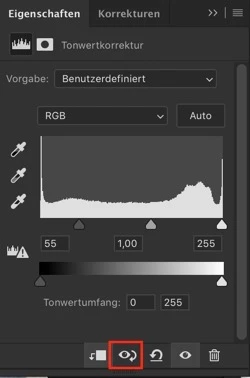
If I create an adjustment layer and want to temporarily revert the adjustments by clicking the corresponding icon, the icon inverts, but nothing happens.

Photoshop CC 2019, macOS Mojave, iMac, AMD Radeon R9 M295X 4096 MB)
This topic has been closed for replies.
Correct answer

Hi

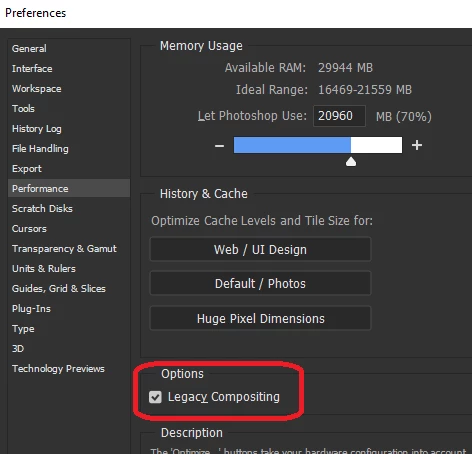
Have you tried enabling this option in preferences and restarting Photoshop to see if that helps

1 reply

Correct answer
October 21, 2018

Hi

Have you tried enabling this option in preferences and restarting Photoshop to see if that helps

Günter Heißenbüttel
Inspiring
October 21, 2018

Thank you, Ged Traynor​, this is working.

But, what does that mean? Are we dealing with a bug, which can be circumvented by using the legacy compositing engine?

October 21, 2018

Hi

It is a bug although nobodies been able to find out what the new engine does and why it breaks it, there is this post on this thread

PS 2019 – Color Blend Mode Buggy

The compositor crunches layer data for screen display, and there is a LOT of performance upside to upgrading it. The differences between Legacy on or off are too numerous to mention, but you are not losing out a bit if you find it necessary to use the Legacy option.