
ericg75780915
Participant
October 25, 2021
Answered

PS CC 2021 opens new files in cropped window

  • October 25, 2021
  • 2 replies
  • 1798 views

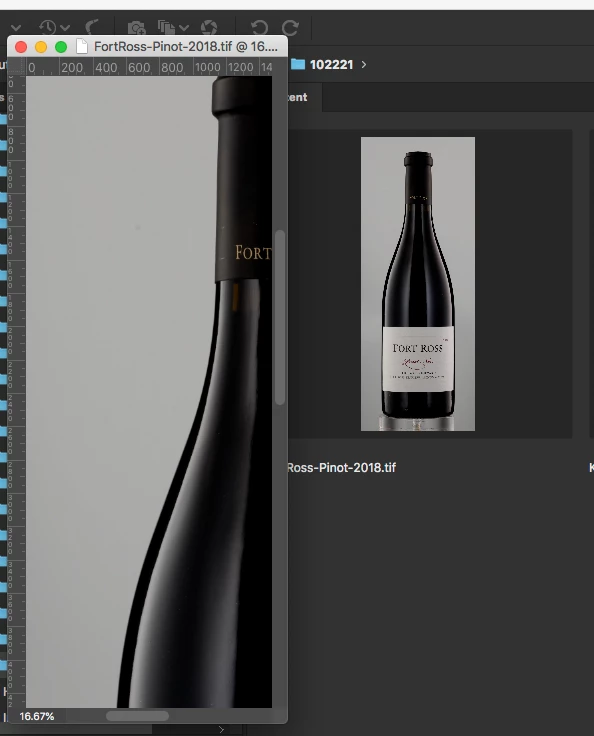
OK so starting earlier in October 2021 my Photoshop CC 2021 (Mac OS 10.14.6 Mojave iMacPro) opens all new files in a window that is roughly 1/4th the size of the whole file. (see attached file) Over the last 20 years or so, Photoshop has always opened all files as "fit to screen" meaning they usually open showing the entire image in a window as large as possible that still fits on whatever monitor size I have...I am not sure if it is a preference that has gone haywire or a bug...Please advise
 

This topic has been closed for replies.
Correct answer J453

You'll have to choose which behavior you prefer or you can set up a Script Event to set the document the way you want with Overscroll enabled: https://community.adobe.com/t5/photoshop-ecosystem-discussions/fit-on-screen-automatically-in-photoshop/m-p/10576298 

Photoshop used to default with "Overscroll" off. In recent versions, this setting was set to on.


2 replies

Zen Creative Agency
Known Participant
December 9, 2021

I have this same problem with Photoshop 2022 – and turning off the Overscroll preference makes no difference whatsoever.


Has anyone found a fix for this?  It is seriously irritating when I'm constantly opening files in Photoshop and having to take that extra step of zooming in or out to get the window to fit to the image.


*Using: Mac OS Big Sur 11.6.1 on Mid 2014 MacBook Pro 15 inch Retina)

Participant
January 3, 2022

Same here. This was never an issue until either PS vs 23.0.2 or Apple OS Monterey. Both came onboard at the same time. 

iMac Retina 5K 27" 2020 Monterey 12.1  PS 23.0.2

Legend
October 25, 2021

If you go to Preferences > Tools... and uncheck "Overscroll" does it work correctly?

ericg75780915
Participant
October 25, 2021

Hi, no, it didnt make any difference. Thanks for trying though 🙂

It seems to be including the entire artboard on screen and the "View/Fit Artboard On Screen" is grayed out.

Not sure what is going on here, but it affects all scrolling even when I do a command-0 and it shows entire image, the scrolling wants to include the entire artboard in all directions.