Participant
October 7, 2021
Answered

PS CC won't create new file and crashes my Mac or says scratch disks are full

  • October 7, 2021
  • 5 replies
  • 354 views

Hi everyone,

I am using PS 22.5.1 on MacOS Catalina.

When I click on "New", the window where I can choose the size etc, appears, but when I click on create, it keeps buffering and nothing happens, except that my computer crashes. If I try to restard the computer, the window of the create file remains on my screen and the computer doesn't turn off unless I manually push the turn off button. Mind well, I have 19gb of free space - which I believe to be enough for PS to run. 
I have looked at other solutions (deselect auto show home screen, select use legacy...), and when I used this type of solution and repeated the process (created a new file) all over again, a message popped up on my screen saying that "the scratch disks are full". 
I honestly don't know what to do and furthermore I'm terrified of my pc crashing again (cause it's happened at least 7 times today trying to solve this problem) because I have all of my university work in it. And my Mac works perfectly fine for everything else. Unless for this PS thing I would be grateful mostly because I use PS for work. Thank you
This topic has been closed for replies.
Correct answer Ged_Traynor

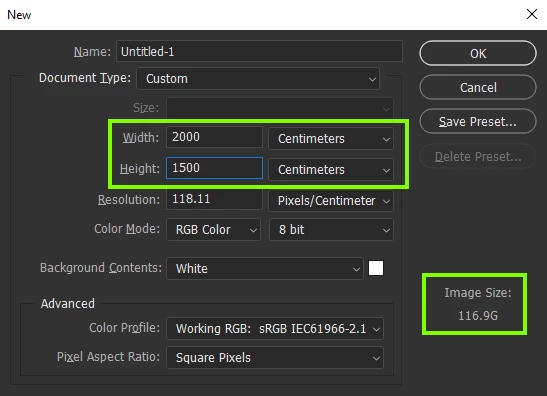
When creating a new file what are the dimensions of the file, you may be selecting something other than pixels

For example a 2000 * 1500 cm document will have a size of 116.9GB

5 replies

Ged_Traynor
Community Expert
Ged_TraynorCommunity ExpertCorrect answer
Community Expert
October 7, 2021

When creating a new file what are the dimensions of the file, you may be selecting something other than pixels

For example a 2000 * 1500 cm document will have a size of 116.9GB

Participant
October 7, 2021

I just tried and it works! I can't thank you enough! 

Ged_Traynor
Community Expert
Community Expert
October 7, 2021

You're welcome 🙂

Legend
October 7, 2021
Participant
October 7, 2021

Hello again,

cleaned my memory up and now I have 115GB of free space, restarted my Mac, but still the message pops up saying my "scratch disks are full". What should I do? Does it need more free space in order to run properly or is it something else?

Participant
October 7, 2021

Oh, I see... thank you for the answer I hope this solves my problem!

Legend
October 7, 2021

Having just 19GB of free space is nowhere NEAR enough free disk space. I'd be looking to get that up around 100GB.

Its probably time to buy an external hard drive.