Known Participant
June 28, 2018
Answered

PS CS6 File Info 'copyright notice' not saving

  • June 28, 2018
  • 2 replies
  • 564 views


I have an action, created after following this video:Add Copyright Data in Photoshop Automatically - YouTube


In all the dialogues of the File Info / Description - I have information.

In the Copyright notice dialogue I have '© a name 2018. all rights reserved', and exported as as preset, when creating the 'File Info' action PS presents 3 options, choosing the one recommended in the video:

'Keep original meta data: but append matching properties from template'

When OK'd I see that the above copyright notice has not been populated in the copyright notice box, (all others in the description tab have been) so I cancel and repeat, but this time selecting:

'Keep original meta data: but replace matching properties from template'

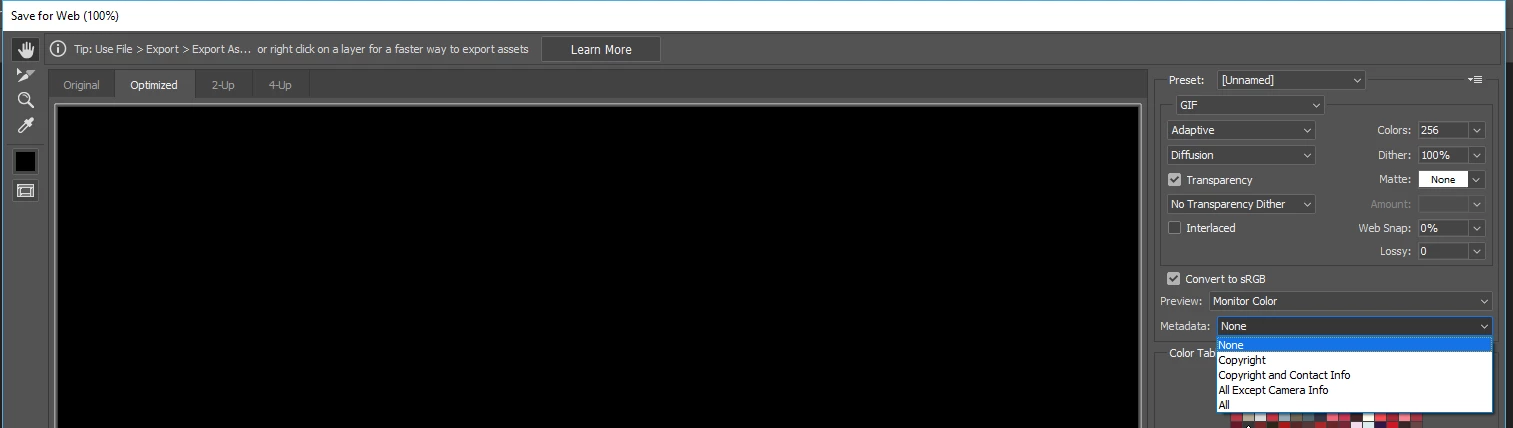
Now it populates the 'Copyright Notice', I go on to then create the 'Save for Web' action, in the settings dialogue for this i have 'Meta Data: All' selected.

After the script has been saved, a droplet is created, and a file tested, after running and saving I reopen the file in PS, yet I see nothing in the File Info 'Copyright Notice' box - I expect to see my: '© a name 2018. all rights reserved', what am I doing wrong

This topic has been closed for replies.
Correct answer JJMack

By default Save for web will strip metadata.  You can use its metadata options to save some or all metadata. When you reordered the Save for web action step what Options did you use?

2 replies

JJMack
Community Expert
Community Expert
June 28, 2018

If the metadata has been striped setting All will not recover the deleted metadata.

JJMack
Known Participant
July 2, 2018

Thank you, so the 'Save for Web' option strips out this info, so is there a way to save a light weight file 'for Web' that includes this particular meta data

... what fields does the include 'meta data' drop down look to, it is the 'File Info' 'Description' tab items I want included, this option only seems to be including the 'description' part, but not 'copyright notice' - why prioritise it this way - seems very odd,

JJMack
Community Expert
JJMackCommunity ExpertCorrect answer
Community Expert
June 28, 2018

By default Save for web will strip metadata.  You can use its metadata options to save some or all metadata. When you reordered the Save for web action step what Options did you use?

JJMack
Known Participant
June 28, 2018

Thanks for the reply ...

"I go on to then create the 'Save for Web' action, in the settings dialogue for this i have 'Meta Data: All' selected.

I selected 'All' ...

I did wonder if this setting is interfering with something.

Strips Meta out to save space I guess ... but selecting 'All' I would have thought puts it back, or maybe not as I have discovered ...