Participant
July 16, 2019
Answered

Ps freeze

  • July 16, 2019
  • 2 replies
  • 1017 views

hi, my Ps freeze many times, and it takes about 1 minute to been able to work again, in particular when i undo an operation with a ctrl Z. Anyone can help me with this prob. Thanks a lot !

    This topic has been closed for replies.
    Correct answer

    Hi

    Try resetting your Photoshop preferences

    You may want to backup your settings beforehand

    Migrate presets, actions, and settings
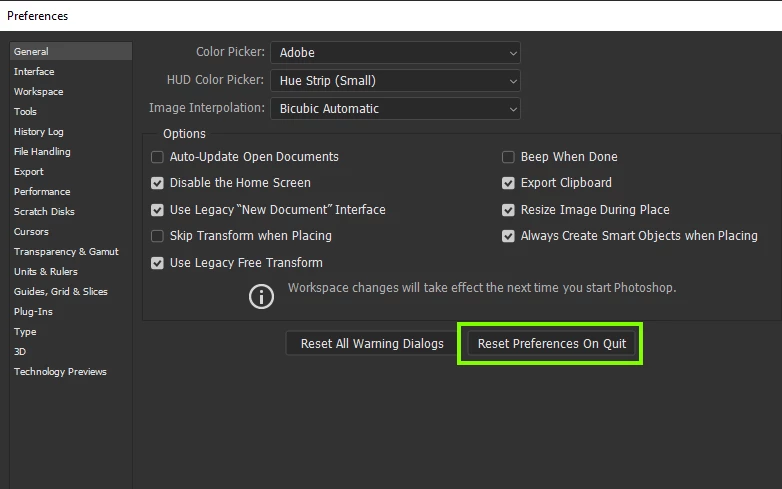
    Also check to make sure you have the latest driver for your GPU installed from the manufactures website

    2 replies

    italosan
    Community Expert
    Community Expert
    July 16, 2019

    Hi, could you by chance provide more information about the version of Adobe Photoshop you are using and the features of your computer?

    Participant
    July 17, 2019

    Hi italosan and Ged ,

    i Apologize for my last incomplete post.

    Here below there are features of my W.station.

    I also use a Wacom intuos pro 5 that is updated with the last drivers.

    Just yesterday i dowloaded the latest version of Ps from my adobe account, but the problem remain and only in Ps.

    Ai and Ae the other 2 apps i use, work perfectly.

    The problem with PS is : when i try to fill a path or a selection or just when i draw it / when i do a ctrl + Z / when i paint something with a brush in the 50 % of these cases, PS freezes for about a minute.

    you can understand that is more than annoyng : ) !

    Thank you for your kind attention!

    GPU : geforce rtx  2080 Ti

    Correct answer
    July 17, 2019

    Hi

    Try resetting your Photoshop preferences

    You may want to backup your settings beforehand

    Migrate presets, actions, and settings

    Also check to make sure you have the latest driver for your GPU installed from the manufactures website

    July 16, 2019

    Hi

    You need to provide a lot more detailed information, take a look here

    ASK- Forum Success Guide: Efficiently using the forums

    Especially this bit "Tips for effective posting"