kevholloway
Inspiring
December 9, 2022
Answered

PS gives 4GB warning when file isn't over 4GB.

  • December 9, 2022
  • 12 replies
  • 2007 views

Hi all,


I want to save files in TIF format, mainly because when saving I can keep working on the file while the save is happening.  PSBs don't seem to allow this, so you have to pause for a minute every time you want to save while working.


I get the attached message.  The Document Status bar shows the file size at 2GB.  The file after saving is 2GB.  But I can't save as TIF.

Anyone else having this problem?
This topic has been closed for replies.
Correct answer D Fosse

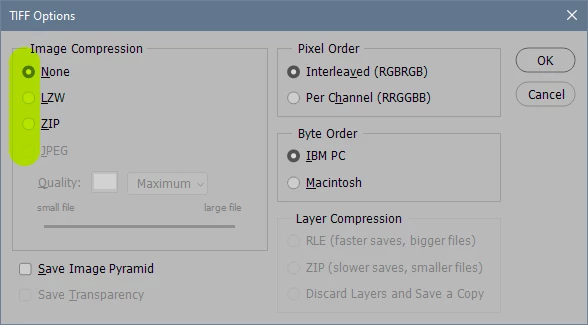
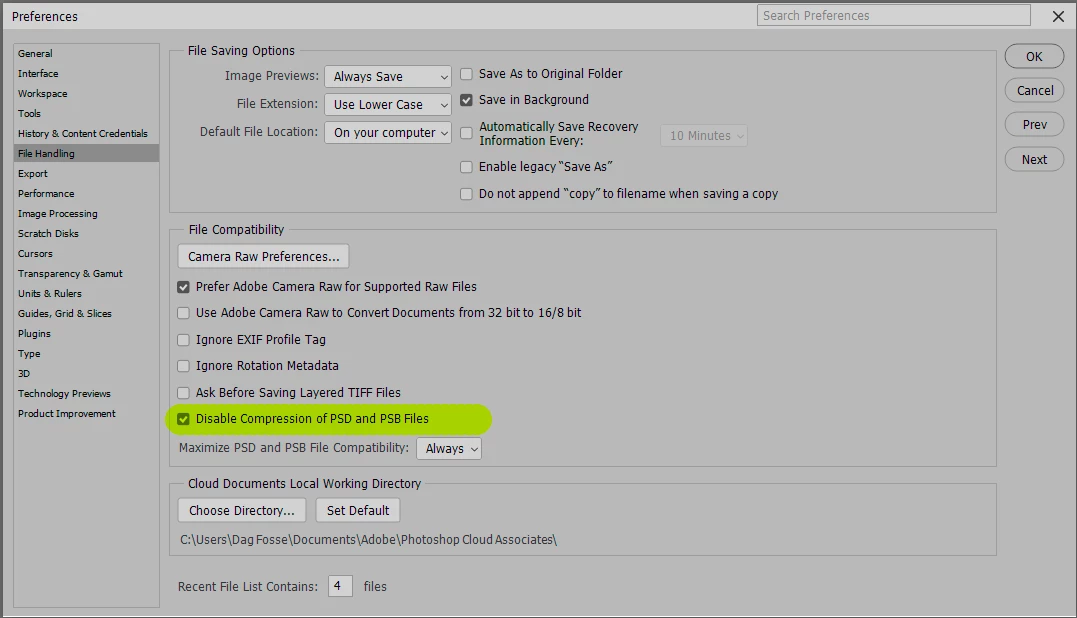
You can start by telling us your compression settings.


PSD/PSB:

TIFF:

With compression off, PSD/PSB or TIFF should be roughly identical, with only minor differences.

12 replies

davescm
Community Expert
Community Expert
December 13, 2022

Thanks for confirming that your document has smart objects. That is why you are seeing a smaller size in memory than it takes on disk. In the status bar, smart objects are counted only as a pixel layer, at document size. In reality the content can be much bigger but it all needs to be saved in the file.


Dave

kevholloway
Inspiring
December 13, 2022

Thanks @D Fosse@davescm and @rayek.elfin , if I disable psd/psb compression the file comes in a 4GB+.  I don't mind the extra size - the fact that it now saves quickly and I can continue working while it saves is all that matters to me.  And yes, there are smart objects in these files.


I really appreciate everyone's help!

davescm
Community Expert
Community Expert
December 10, 2022

The document status bar shows the size in Ram but only counts smart objects as single pixel layer in the master doc size. In reality the smart object can contain much larger content, multiple layers, and even nested further smart objects.

So my question is - does your document contain smart objects, in which case the difference between reported size and saved size is normal.


Dave

D Fosse
Community Expert
Community Expert
December 10, 2022
quote
does this mean the PSB is getting compressed (hence saving as 2GB on disk, but uncompressed TIF / PSB would be 4GB+)?

By @kevholloway


Yes, that can easily happen.


Compression for PSD/PSB is on by default. This is one of the things I always turn off first thing, mostly because it increases save/open times by a huge amount (5-10 x). File sizes typically increase somewhere between 60-100% by disabling compression, but this varies a lot with the layer structure.


As for TIFF, note that the TIFF options has a separate layer compression setting.

TheDigitalDog
Inspiring
December 10, 2022

You can't post a document here so upload to something like Dropbox and give the link to Adobe via private chat.

You can also apply a massive blur on the image but you can trust the internal Adobe team to examine the image/document.

Author “Color Management for Photographers" & "Photoshop CC Color Management/pluralsight"
kevholloway
Inspiring
December 9, 2022

I've attached the prefs, does this mean the PSB is getting compressed (hence saving as 2GB on disk, but uncompressed TIF / PSB would be 4GB+)? 


That's not a setting I would have changed manually so is it default?


D Fosse
Community Expert
D FosseCommunity ExpertCorrect answer
Community Expert
December 9, 2022

You can start by telling us your compression settings.


PSD/PSB:

TIFF:

With compression off, PSD/PSB or TIFF should be roughly identical, with only minor differences.

kevholloway
Inspiring
December 9, 2022

Hey Cory - it's client work for a campaign that isn't live so I can't post on here.  Happy to share to a private link or send a downlad link to an email address.  You can reach me on kev at adamandkev dot com if that works.

CShubert
Community Manager
Community Manager
December 9, 2022

Hey @kevholloway, the team has asked if you can post the file for them to work with or if it is too large to share, downsize by 50% and share and then they can uprez and see what they can find out might be at issue.


Thank you,

Cory

rayek.elfin
Legend
December 9, 2022

Which settings are you using when you save to Tiff?

Depending on the settings a 2GB PSB/PSD can easily cross the 4GB file size threshold.


For example.

I have a 1GB layered PSD file 6800x4600 pixels. Many layers.

I save this file as a layered Tiff file with the following settings: maintain layers and unpacked compression.

It saves fast (due to the lack of compression). And the file size blows up to a whopping 2.16GB.


In short: a PSB/PSD file cannot be directly compared to a Tiff file.

So it is entirely possible that a 2GB PSD may cross the 4GB file size barrier. It all depends on your Tiff settings.