Participant
February 15, 2024
Question

PS layers problem
  • February 15, 2024
  • 3 replies
  • 507 views

Hi, anyone can help! 

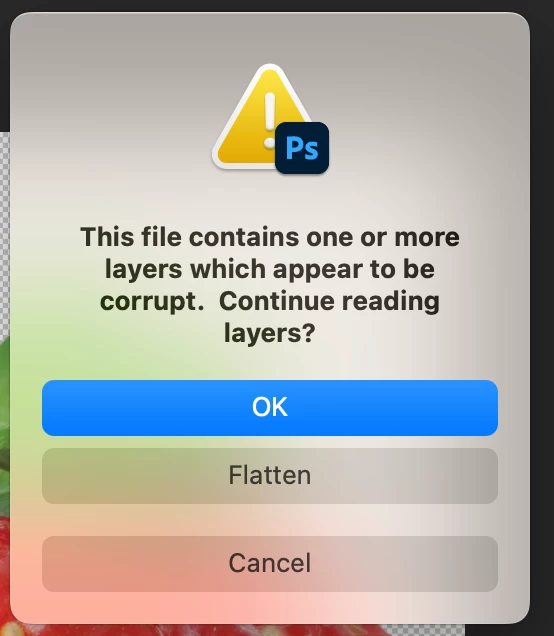
I'm using 25.4.0 Photoshop version but I can't open the PS file in PS and showed as attachment. Does anyone know what happened? 

This topic has been closed for replies.

3 replies

c.pfaffenbichler
Community Expert
Community Expert
February 15, 2024

The file may have been damaged … 

Do you use any backup-system from which you could extract a previous version of the file? 

edited


There are programs (try googling »repair damaged psd«) for such cases, but I have no experience with those. 

D Fosse
Community Expert
Community Expert
February 15, 2024

Since this is apparently an external file, the original creator should be made aware of it - so the obvious thing to do is ask for a new copy.


In any case, I don't think I have ever heard of a corrupt psd being successfully recovered. Worth a shot of course, but don't hold your breath.


D Fosse
Community Expert
Community Expert
February 15, 2024

That's a corrupt file. File corruption is always caused by failing hardware.


It could be a failing drive or bad RAM - but the most likely cause is saving directly to an external drive. Never do that. Save locally, then copy over.

Participant
February 15, 2024

Thanks for your reply! Let me ask the creator to re-save the file!

Michael Bullo
Community Expert
Community Expert
February 15, 2024

Did you create this Photoshop file or someone else?
Did you have this file open previously when either Photoshop or your system crashed?

Participant
February 15, 2024

An other other designer created the PS file and send the original for me for other use but I can't open the orignial file. 😞 

I tried to open it in PS2023(24.7.2) and PS2024(25.4.0), even PC PS is the same. Do you think is the original PS file is corrupted? That means need the creator to open the original file and embended the layer in PS? 


Michael Bullo
Community Expert
Community Expert
February 15, 2024

Best of luck. I hope the designer can get to you a working PSD.