Participant
September 14, 2017
Answered

PS Variables errors on empty cells

  • September 14, 2017
  • 3 replies
  • 6805 views

I am working on a data sheet design where we will be outputting 700 or so sheets. After much trouble shooting and reading online I have solved all but one of my problems when importing data from a CSV file. Hopefully one of you can help me out.

I have a section where I am listing application properties, the excel data has a variation of 1 to 5 applications per data sheet, so in my excel sheet it looks like this:

Applications_01
Applications_02Applications_03
Applications_04Applications_05
abcdefxyz123
abcdef
abcdefxyz123456
abcdefxyz

The problem I am having is the empty cells cause an error "Data set 1 was Incomplete" because when opening up the CSV it looks like the line ends with a comma. A few things I have tried are putting a couple of spaces in each empty cell ( gives me a "program error") and using the bullet special character (outputs as • instead of ).

Any help on this would be great.

This topic has been closed for replies.
Correct answer davescm

Hi

Since typing my last answer I found a better way

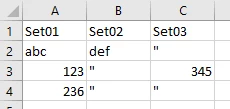
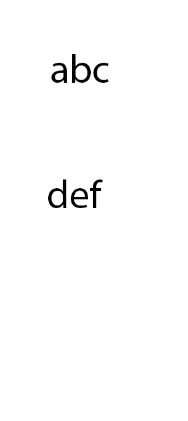
Type "       that is " followed by a single space into Excel.  That will parse OK and be treated just as a space when replacing text in the variable

Makes:

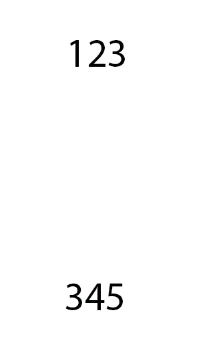
or

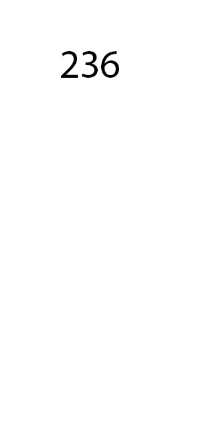
or

Hope that helps

Dave

3 replies

DarkBahamut
Participant
April 16, 2022

The quote + space method did not work for me with Photoshop 2020 win. However, after a little trial and error, a quote + space + quote in the empty cell/csv location translated to an empty space to replace the string variable in Photoshop. Praise the gods, I was at wits end!

adamfp
Inspiring
May 13, 2022

Thank you for posting this!


And for anyone else in a bind, I've also learned that Photoshop won't accept em dashes! I also wrapped all my cells in double quotation marks in case they had commas I missed.

Try this formula in sheets to do this automatically (if you want to change cell A2, put it in B2)"

=CONCATENATE(CHAR(34), A2, CHAR(34))


angie_taylor
Legend
September 14, 2017

Have you tried adding a space in these cells? or would it work to add a zero?

davescm
Community Expert
Community Expert
September 14, 2017

Hi

If a character instead of an empty data field is acceptable you could use '-  or '_  or '.  in Excel which outputs as - or _ or . respectively.

These work without any errors

Dave

davescm
Community Expert
davescmCommunity ExpertCorrect answer
Community Expert
September 14, 2017

Hi

Since typing my last answer I found a better way

Type "       that is " followed by a single space into Excel.  That will parse OK and be treated just as a space when replacing text in the variable

Makes:

or

or

Hope that helps

Dave

Chuck-NDAuthor
Participant
September 15, 2017

Perfect! That is exactly what I needed. Thank you much.