Participant
December 2, 2021
Question

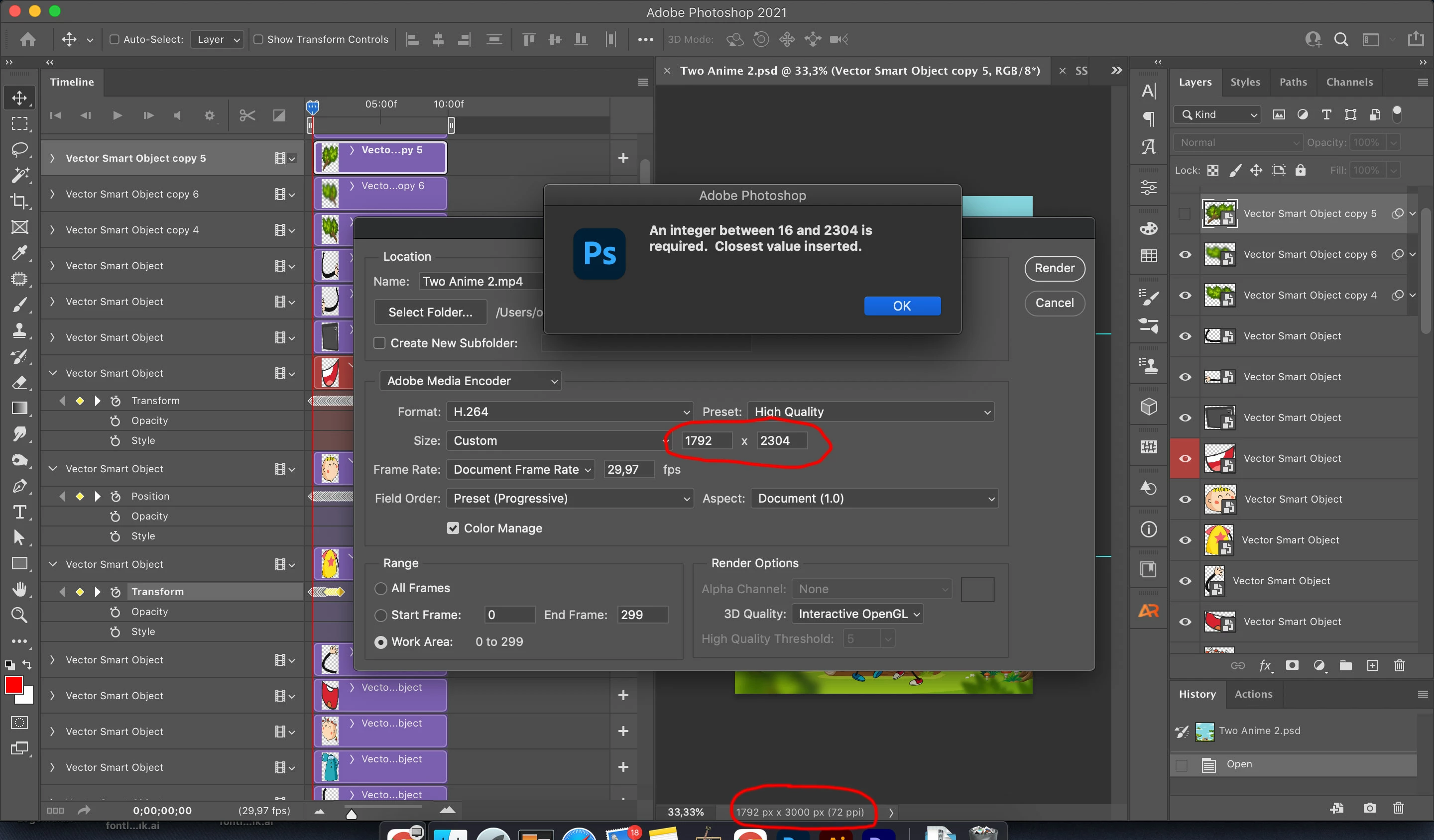
PS Video Render Problem. Document size with render size doesn't same.

  • December 2, 2021
  • 2 replies
  • 2718 views

My document size is 1792x3000 but when i want to render a video, it shows me 1792x2304 and when i change it as 1792x3000, showing me warning dialog it says "

An integer between 16 and 2304 is required.  Closest value inserted."

What is this?

is this too much big for working on PS video?


This topic has been closed for replies.

2 replies

Community Expert
December 25, 2021

H.264 has a maximum frame size of 4,096 x 2,304 pixels @ 56 frames per second, or 4,096 x 2160 @ 60 frames per second, so that standard H.264 decoders don’t have to accommodate any frame size or frame rate larger than that 


If you change your settings to Quicktime, you will see your 3000 pixel height.


Merry Christmas

headTrix, Inc. | Adobe Certified Training & Consulting
Sahil.Chawla
Adobe Employee
Adobe Employee
December 25, 2021

Hi there,

Sorry to hear about this. Could you please try updating Photoshop to version 23.1.0 through the Creative Cloud Desktop app and let us know if it helps?


Regards,
Sahil