
Known Participant
May 20, 2012
Question

PSCS6 - Slow Saves??

  • May 20, 2012
  • 9 replies
  • 17956 views

I have CS6 loaded on a Mac (OSX 10.6.8), 16 GB RAM, SSD, tons of disk space, etc. I find performance to be excellent, and faster than previous versions of PS.....except when saving files.

Saving multi-layered PSD or TIF files takes a LONG time compared to earlier versions of PS on the same computer. These are 8-bit, half a dozen layers, includes a few alpha channels, but nothing humongous. Original files are from a Canon 5Dmk2. For example, I saved a four-layer TIF, with one alpha channel, and it took 25 seconds to save. The final sized file size was only 27MB. In previous versions of PS, this saved in a few seconds at most. Layered TIF seem to take longer than PSD files. Below are my File Handling Preferences for PSCS6.
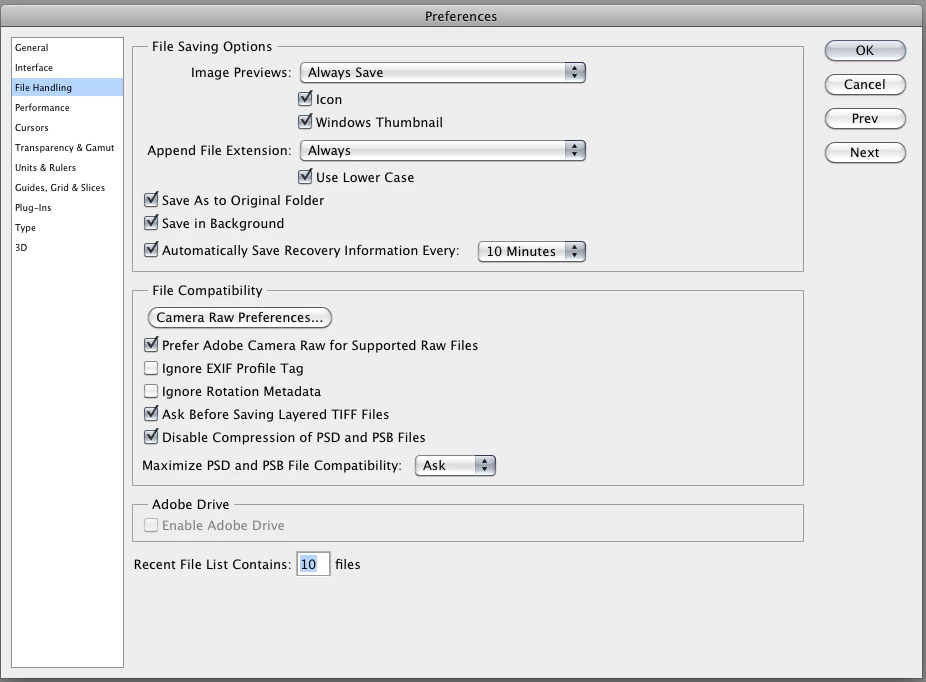
Any thoughts, suggestions, comments?

Thanks.

    This topic has been closed for replies.

    9 replies

    Noel Carboni
    Legend
    February 5, 2013

    Okay, here are some controlled test results:

    I saved a large (600 megapixel), multi-layer (40ish layers) file with all combinations of compatibility and compression.  Here are the timing results and file sizes:

    Compatibility Always, Compression Enabled:  180 seconds, file size 1,187,588 KB

    Compatibility Never,   Compression Enabled:  111 seconds, file size    813,191 KB

    Compatibility Always, Compression Disabled:   37 seconds, file size 6,062,369 KB

    Compatibility Never,   Compression Disabled:   10 seconds, file size 3,254,357 KB

    For each of the following tests I rebooted the Windows 7 test system to ensure nothing was cached and opened one of the files saved above into Photoshop CS6.  Times are repeatable to within 1 second.

    Compatibility Always, Compression Enabled:   33 seconds

    Compatibility Never, Compression Enabled:     23 seconds

    Compatibility Always, Compression Disabled:  16 seconds

    Compatibility Never, Compression Disabled:    10 seconds

    The differences between the compatibility Always/Never timings in the second section seem to confirm that when compression is disabled, having the composite or not having the composite in the file does make a pretty significant difference in timing (something like 60% longer to open).

    -Noel

    February 5, 2013

    These are the compatibility modes applied to the file not just the settings in Photoshop, right?

    BTW, I ran a day of running Compatibility Never and Compression disabled on all documents, and I saw a significant increase in open/save times as you are reporitng. Aftering saving, it seems like opening of those documents is much faster, even from a cold start.

    Noel Carboni
    Legend
    February 5, 2013

    The only differences were settings in Photoshop, made through the Edit - Preferences - File Handling dialog.  I did not change settings for the opens, just the saves.

    When you say you saw a "significant increase in open/save times", did you mean to say reduction in times (increase in speeds)?

    -Noel

    February 4, 2013

    I'm using the same os and my 35M raw files and multi layered files open very rapidly.  My settings in cs6 preferences:

    Uncheck:  auto update and also Allow extension panels to connect to the internet.  And uncheck Adobe Drive.

    Check: Disable compression of psd / psb files.

    Use graphic processor and in advanced set at normal.

    25 history states

    4 cache levels and cache size 1024

    My mem use set at 6485 - 89%

    I use auto save every 10 minutes, save previews as icon

    Also, the machine would hang sometimes and it was the AdobResourceSynchronizer.app doing something.  In finder click Adobe Reader app, then right click and show package contents, in the contents folder go to the support folder where you will find that app.  Just rename it by adding a couple of A's to the front. Then it won't run.

    February 4, 2013

    Did anyone ever figure out the best way to speed up filehandling of Photoshop files with mutliple layers? It takes me 25+ seconds to save and open files that are less than 30mb in CS6.

    Noel Carboni
    Legend
    February 4, 2013

    Try disabling the creation of Image Previews in the File Handling preferences.  I've heard someone else say that sped things up markedly with large files.  Who knows, it might help with small ones as well.  Also try changing Maximize PSD and PSB File Compatibility to Never (assuming you don't need to share files with folks with much older Photoshop versions or other apps that may not be able to understand layers).

    It might help if you'd mention what system you have (Mac/PC, what OS version).

    -Noel

    February 4, 2013

    Hi Noel,

    I've already disabled image previews. I've tried so many things, even turning off layer thumbs, toggled compression, changed the graphic settings to basic, made OSX performance changes... all to no avail. Compatability may have helped some. Still takes awhile to open documents. Would full compatability mode cause files to take longer to open?

    I'm running Mac OS 10.8.2

    Noel Carboni
    Legend
    May 30, 2012

    I just tried creating a photo with 6 layers, 16 bits/channel, 1598 x 1337 pixels and an alpha channel.  File - Save As TIF completed too quickly to measure accurately - I'd guestimate maybe a quarter of a second.  The TIF file on disk is 55 megabytes.  I have a fast disk array, but a file of this size shouldn't even be much of a burden on the disk in a slow computer from 10 years ago.  I guess a proper follow-up question would be:  What options are you choosing when saving as TIFF?

    Regarding cidrmakr2's question, perhaps it would be helpful to be more specific...  What kind of document are you saving?  What format - PSD?  What size is it in pixels and on disk once saved?  How long is "slow" by your definition?  From what I can see the time spent doing compression isn't too much...  I just saved a single layer 18432 x 12306 pixel x 16 bits/channel PSD with Maximize Compatibility: Always in 5 seconds.  Size on disk is 1.3 gigabytes.  My disk speed is ridiculous, but we're talking about compression here.

    -Noel

    May 30, 2012

    cs5 had a plug in (disallowflatecompression) that enabled fast saves of large files.  cs6 does not support that plug in.  Will that plug in be upgraded to work in cs6?  Or is the slow saves here to stay?

    Chris Cox
    Legend
    May 30, 2012

    The plugin is not needed in CS6 - that functionality moved into preferences.

    Lou DinaAuthor
    Known Participant
    May 21, 2012

    Thank you for all the comments and suggestions. Generally, I save multi-layered documents with alpha channels as PSDs and will continue doing so. You folks are correct....saving PSDs is MUCH faster, but a long shot. When I do save a TIF, I try to stick to the original TIF definition (flat images, no alpha channels, etc, so it remains compatible with other programs). I just happened to have a few TIF files and added a few layers and alpha channels to try out CS6, and it took 25 seconds to save! Yikes.

    I tried turning off Save in Background and Windows thumbnails and that didn't seem to help. But it is good to know that TIFs save slow, at least mult-layered ones with alpha channels. I'll stick with PSD and only use TIF when somebody asks for it.

    Thank you folks!!

    station_two
    Inspiring
    May 20, 2012

    Two additional differences are that I don't generate and save Windows thumbnails, nor do I have Save in Background checked.

    Noel Carboni
    Legend
    May 20, 2012

    I believe the Adobe folks have said that because so much more complexity is involved to make the Save operation capable of running in the background safely while you continue to work on the file, it may be somewhat slower than it has been in the past.

    Have you tried unchecking the [  ] Save In Background setting to see if it speeds things up?

    -Noel

    station_two
    Inspiring
    May 20, 2012

    Noel posted while I was typing.  I see he also mentions Saving in Background.

    station_two
    Inspiring
    May 20, 2012

    Lou,

    Because—in my experience—TIFFs take forever to open and save on all my machines, I abandoned the format several years ago.

    PSDs and PSBs save amazingly fast in CS6, but perhaps my amazement comes from the fact that this version of Photoshop (CS6) is the first one I've ever run on a MacIntel under Snow Leopard.