Participant
November 7, 2022
Answered

PSD Dateien

  • November 7, 2022
  • 1 reply
  • 542 views

Moin Adobe-Support.


Das Abo wurde vor kurzer Zeit verändert.

PSD wurde verändert.

Nun kann ich meine älteren PSD Dateien nicht mehr öffnen.


Groooooßer Alarm für mich.
Anbei zwei Beispiel-Screenshoots
mit dem Hinweis-Fenster die Datei zu öffnen

und den Angeboten zum Öffnen.


Dort können Sie sehen,
dass alle PSD-Dateien leer sind.


Außerdem konnte ich PDF-Dateien,
die ich mit Ebenen bearbeitet hatte,
nicht mehr als klassische PSD-Dateien abspeichern.


Ich bitte Sie um Hilfe.


MfG
Karsten
This topic has been closed for replies.
Correct answer Sameer K

Welcome to the Photoshop Community. I'd be happy to help you figure this out.


Are you able to open Photoshop via the Creative Cloud desktop app? Please try to re-install Photoshop.

If Photoshop opens, use Open to load up the PSDs you've shown in the attached screenshot.


This is common on Windows machines to forget File-Type-Association for non-Microsoft apps like Photoshop.

Try these steps:

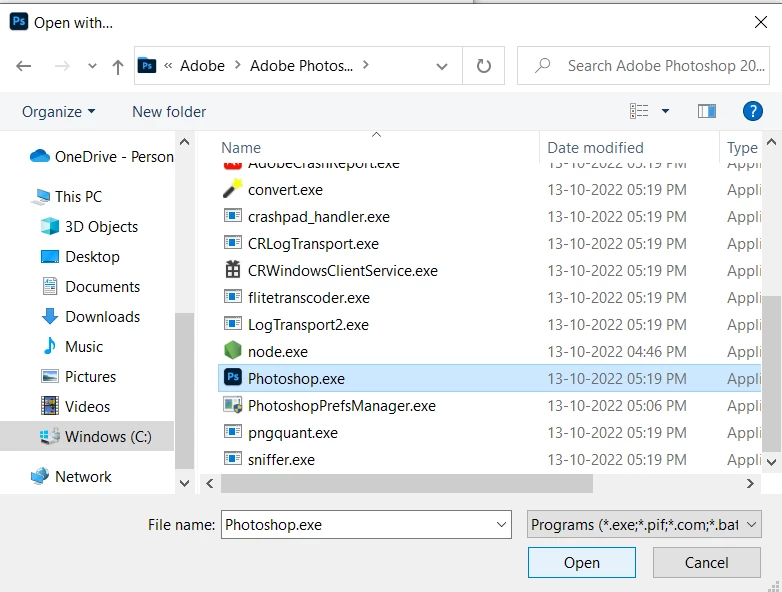
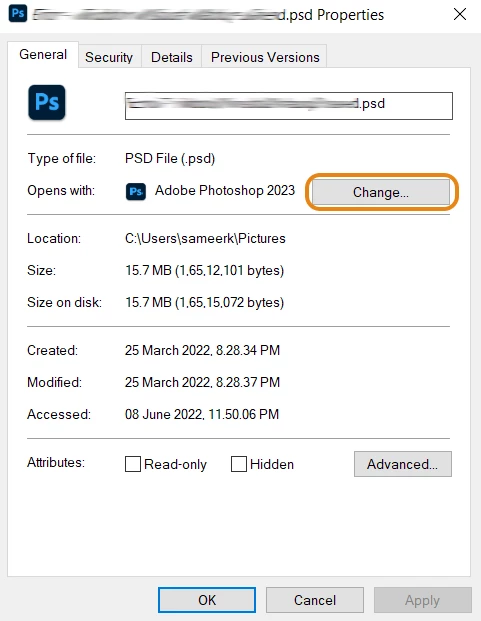
  1. Select a .PSD file > Right-click and go to 'Properties'
  2. In 'Opens With:' select Change > Select Photoshop 2023 here.


  3. If Photoshop isn't in the first list, select  More Apps > scroll down and select 'Look for another app on this PC.'
  4. Go to the following installation location.

    C:\Program Files\Adobe\Adobe Photoshop 2023


  5. Select Apply and Ok to save the changes; now, it should work as expected.

Let me know how it goes. Thanks!

Sameer K

1 reply

Sameer K
Community Manager
Sameer KCommunity ManagerCorrect answer
Community Manager
November 9, 2022

Welcome to the Photoshop Community. I'd be happy to help you figure this out.


Are you able to open Photoshop via the Creative Cloud desktop app? Please try to re-install Photoshop.

If Photoshop opens, use Open to load up the PSDs you've shown in the attached screenshot.


This is common on Windows machines to forget File-Type-Association for non-Microsoft apps like Photoshop.

Try these steps:

  1. Select a .PSD file > Right-click and go to 'Properties'
  2. In 'Opens With:' select Change > Select Photoshop 2023 here.


  3. If Photoshop isn't in the first list, select  More Apps > scroll down and select 'Look for another app on this PC.'
  4. Go to the following installation location.

    C:\Program Files\Adobe\Adobe Photoshop 2023


  5. Select Apply and Ok to save the changes; now, it should work as expected.

Let me know how it goes. Thanks!

Sameer K

Participant
November 15, 2022

Hey Sameer.

Hallelujah.....match.
I am happy.......so easy....thx

and now it works...like it was befor.

Greetings

Karsten