
Inspiring
November 23, 2022
Answered

PSD files icons not showing (Photoshop - Win10)

  • November 23, 2022
  • 3 replies
  • 3463 views

I'm still without solution about this topic: https://community.adobe.com/t5/photoshop-ecosystem-bugs/i-lost-psd-files-icon-with-photoshop-23-5-1-update/idi-p/13210474
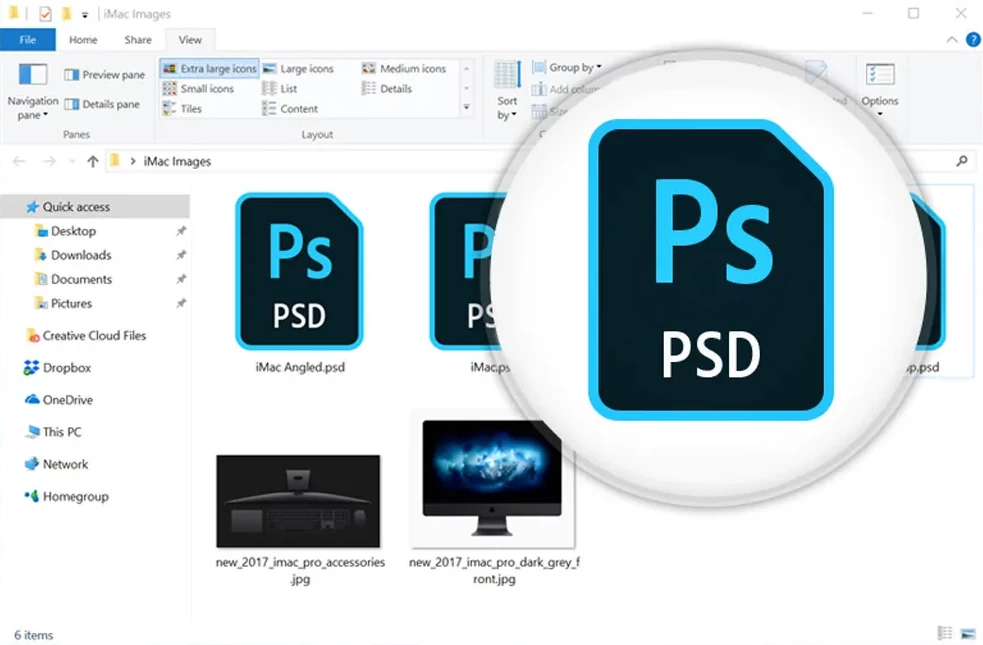
 

It is a nightmare to work with PSD files only showing thumbnails, like a picture file, I cannot quickly detect that is an importante PSD file with thumbnails on by default. I need my old icon back.


I tried everything, is not a Windows problem, it should be a Photoshop problem.


Please, I'm about to throw my PC out the window.

This topic has been closed for replies.
Correct answer FedeIUHIBA

Hi, @Jeff Arola 


YOU ARE A REAL HERO!! ALL MY RESPECT TO YOU


You nailed the problem! I had a video codec called "Shark007" for mp4/mkv files and subtitles that in the new versions they added a new complement called "Icaros thumbnailing" so when I installed this program in the new PC "Icaros" started to mess things up and on my old PC I was using an older version of this codec that's why I didn't have this problem.


Now I disabled "Icaros thumbnailing" and the new PSD files showed icons again. I need to found now a way to delete previous cache information so every PSD files shows as icons and verify if the pictures, videos and the rest of the files types are ok, but this was the problem, for sure!


You don't know how happy you made me, thank you very much!

3 replies

Participant
February 7, 2023

Als ik in PS 2023  een PSD wil openen laat hij alleen de blauwe iconen zien en vroeger zag ik gelijk wat  de inhoud was (afbeelding).


Ik wil nu de afbeeldingen zien.


in een oudere versie van PS stond hier: alle indeling  ingevuld.

Hoe krijg ik dit weer goed!

Met vriendelijke groet Coby Rietdijk

Kevin Stohlmeyer
Community Expert
Community Expert
February 7, 2023
Participant
December 28, 2022

bonjour.

ou trouve t on ps psd

Jeff Arola
Community Expert
Community Expert
November 23, 2022

Your sure no codec is installed that shows the psd files as thumbnails?


In your other post you say it's a new computer, so the maker could have installed the program/codec.


You looked at the list of installed programs to see?

FedeIUHIBAAuthorCorrect answer
Inspiring
November 23, 2022

Hi, @Jeff Arola 


YOU ARE A REAL HERO!! ALL MY RESPECT TO YOU


You nailed the problem! I had a video codec called "Shark007" for mp4/mkv files and subtitles that in the new versions they added a new complement called "Icaros thumbnailing" so when I installed this program in the new PC "Icaros" started to mess things up and on my old PC I was using an older version of this codec that's why I didn't have this problem.


Now I disabled "Icaros thumbnailing" and the new PSD files showed icons again. I need to found now a way to delete previous cache information so every PSD files shows as icons and verify if the pictures, videos and the rest of the files types are ok, but this was the problem, for sure!


You don't know how happy you made me, thank you very much!