thomasl34294613
Participating Frequently
July 17, 2019
Question

PSD files not showing a preview image in finder

  • July 17, 2019
  • 2 replies
  • 2195 views

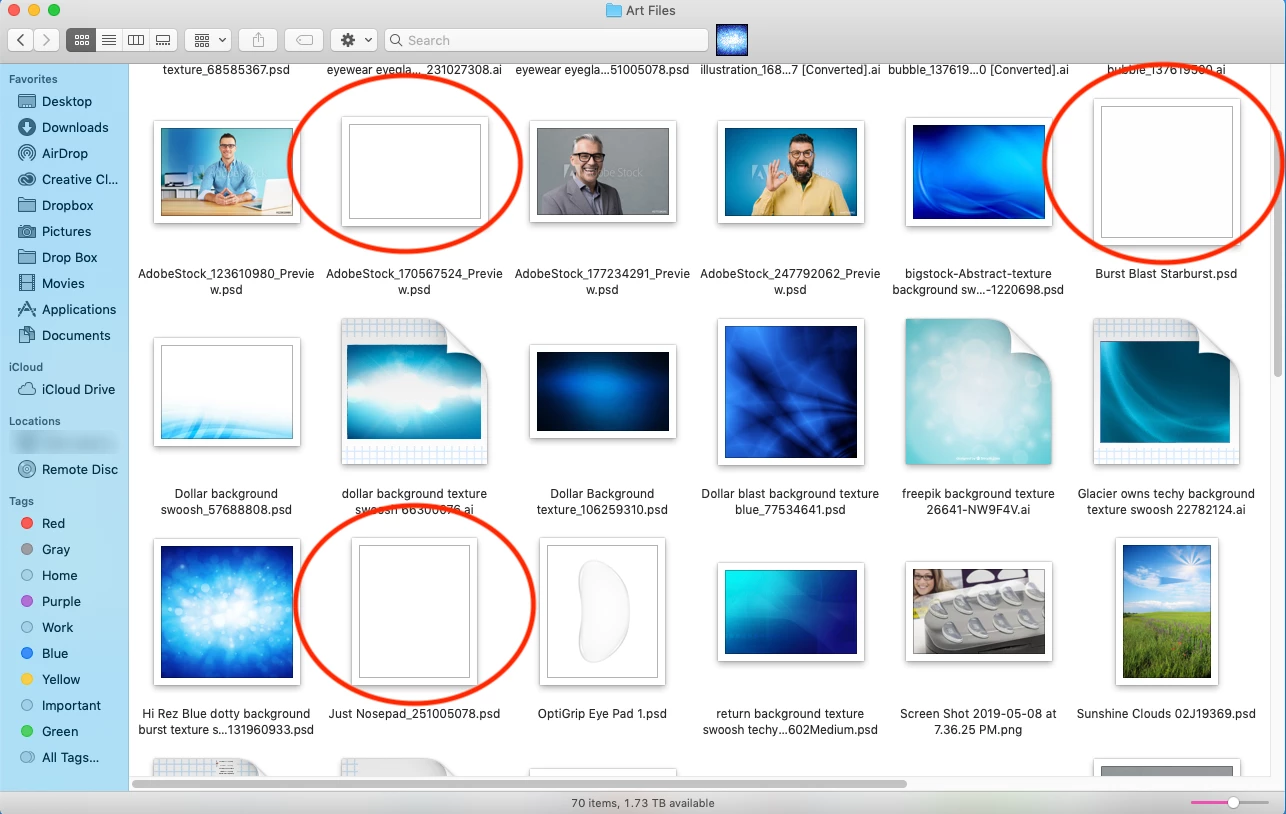
Recently my PSD files don't have a preview image when they're in a folder.

I'll search for images (show as icons option) in a folder on my desktop, and the PSD files previously had a nice preview so I could easily choose the file I want.

Now most of them are just white square previews, or just certain layers showing in the preview.

Illustrator files preview fine, jpeg and pngs preview fine. The only problem I'm having is with the layered PSDs.


Help!!  Thanks!
This topic has been closed for replies.

2 replies

Sahil.Chawla
Adobe Employee
Adobe Employee
July 17, 2019

Hi Thomas,

That does not sound good, could you please let us know the version of Photoshop and the operating system you're working with?

Also, please go into Photoshop's Preferences > File Handling and set Maximize PSD and PSB File Capability to Always, then try saving a psd and let us know how it goes.

Regards,
Sahil

thomasl34294613
Participating Frequently
July 18, 2019

Thanks for that Sahil.  System 10.14.5 Photoshop 19.1.8 (2018)

But no that didn't work. I changed all my settings to yours and no luck.

I also tried opening the new 2019 version of Photoshop 20.0.4. But that one won't save previews either.

So maybe it's a system thing, and not a Photoshop problem?

Thanks,
Tom

thomasl34294613
Participating Frequently
July 17, 2019

If this helps...

I did notice when I convert to RGB, the preview reappears.

But any CMYK psd shows as a blank white preview.