
Inspiring
January 14, 2020
Answered

Puppet warp mesh behind art board and can't see pins

  • January 14, 2020
  • 3 replies
  • 3556 views

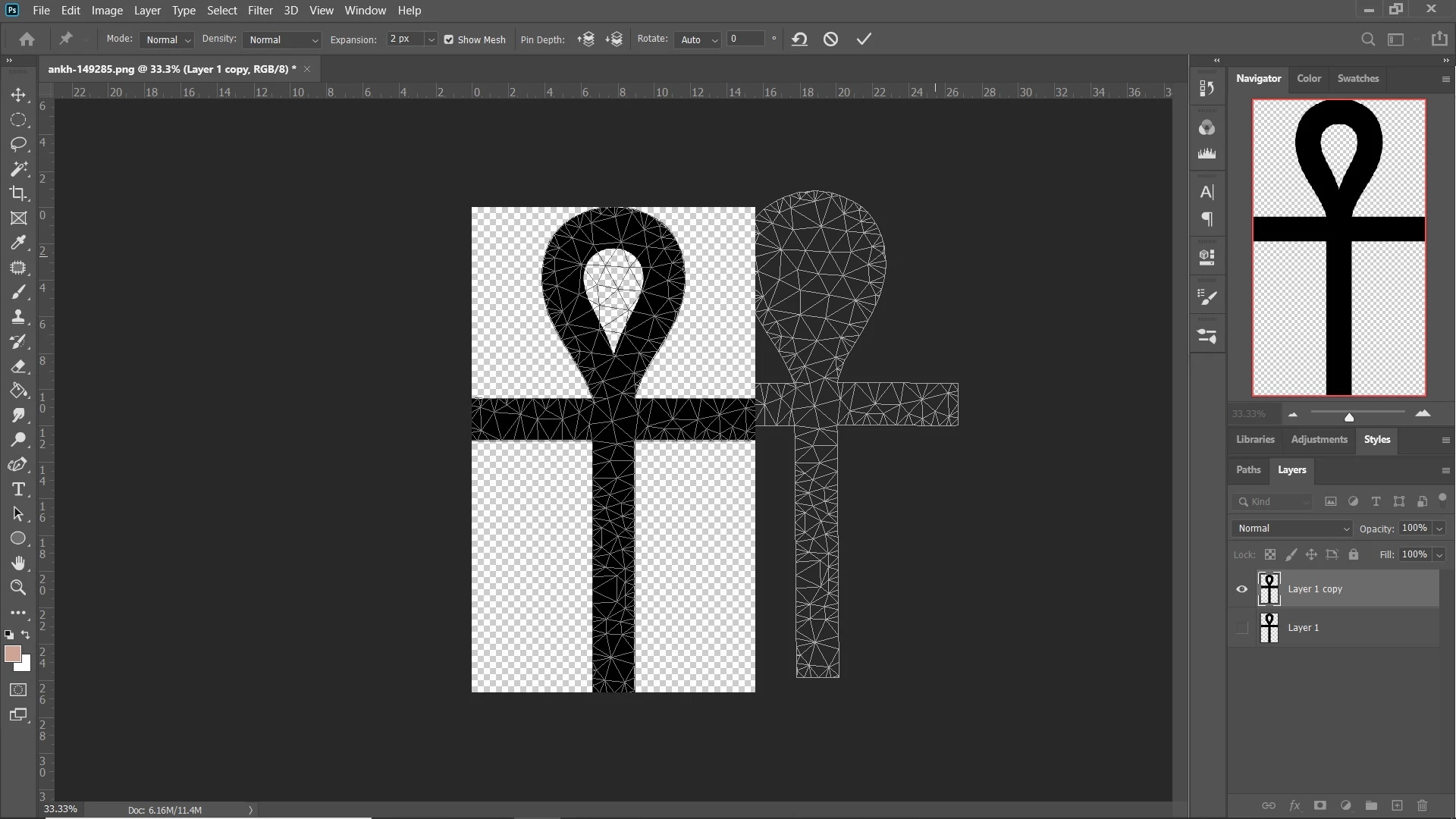
This is a problem that just recently started (I last used puppet warp a couple months ago with no problem). The first problem is that the mesh appears both on top of what I'm working on, as it should, but also behind the art board. And only the mesh behind the art board is movable as it should be. The mesh over the object doesn't move and pins can't be seen anywhere on it. Also, the pins place and can be manipulated on the mesh that's behind, but you can't actually see them. The only way I know they're there is that the mesh moves where it should. I have the option checked to enable the graphics processor and am at a loss as to what else to do.
This topic has been closed for replies.
Correct answer calm_fashion5C6D

Resetting Preferences from Preferences > General would be the next step. Be sure to back up whatever you have customized, such as Brushes, Swatches, Styles, Custom Shapes, etc., first.

~ Jane


That was one of my first steps. However, I just got an update notification and the problem resolved itself after the update install. Guessing it was a bug.

3 replies

Participant
March 6, 2020

I had this issue as well!


Check your 3D menu option- if grey'd out your graphics card has been turned off. Go to photoshop preferences and make sure in performance you turn on your Graphics card. Puppet tool points will appear.

Participant
January 28, 2020

I have the same problem. I already checked the graphic processor too. But nothing works.
The grids are showing and I can edit it, but I can't see the editing only when I click enter it'll show me what I did. 
There's also no update for photoshop… I don't know what to do further

Inspiring
January 29, 2020

Unfortunately, the problem started for me again also. I'm just going to try re-installing and see if that helps, otherwise I don't know what to do.

Myra Ferguson
Community Expert
Community Expert
January 14, 2020

I can't recreate the second mesh issue, but I do see that the pins don't show up. If I convert the artwork on the layer to a smart object before using puppet warp, the pins show up. If you'd like to report the bug, you can post it here https://feedback.photoshop.com/photoshop_family/.

jane-e
Community Expert
Community Expert
January 14, 2020

In addition to what Myra said, it's always a good idea to make a SO before using Puppet Warp. If you don't, it's destructive editing (permanent). When you make a SO first, you can edit or remove the Warp.

~ Jane