

Naoki-Hada
Known Participant
November 8, 2017
Answered

[Q] Set Brush Smoothing value by script (CC 2018 feature)

  • November 8, 2017
  • 1 reply
  • 2277 views

Hi all,

I'm struggling to set value on Brush's Smoothing on Photoshop UI part as below.

From XTools' Getter.jsx file, it seems Smoothing is exported as following as same level of Opacity and Flow.

XTools: xtools
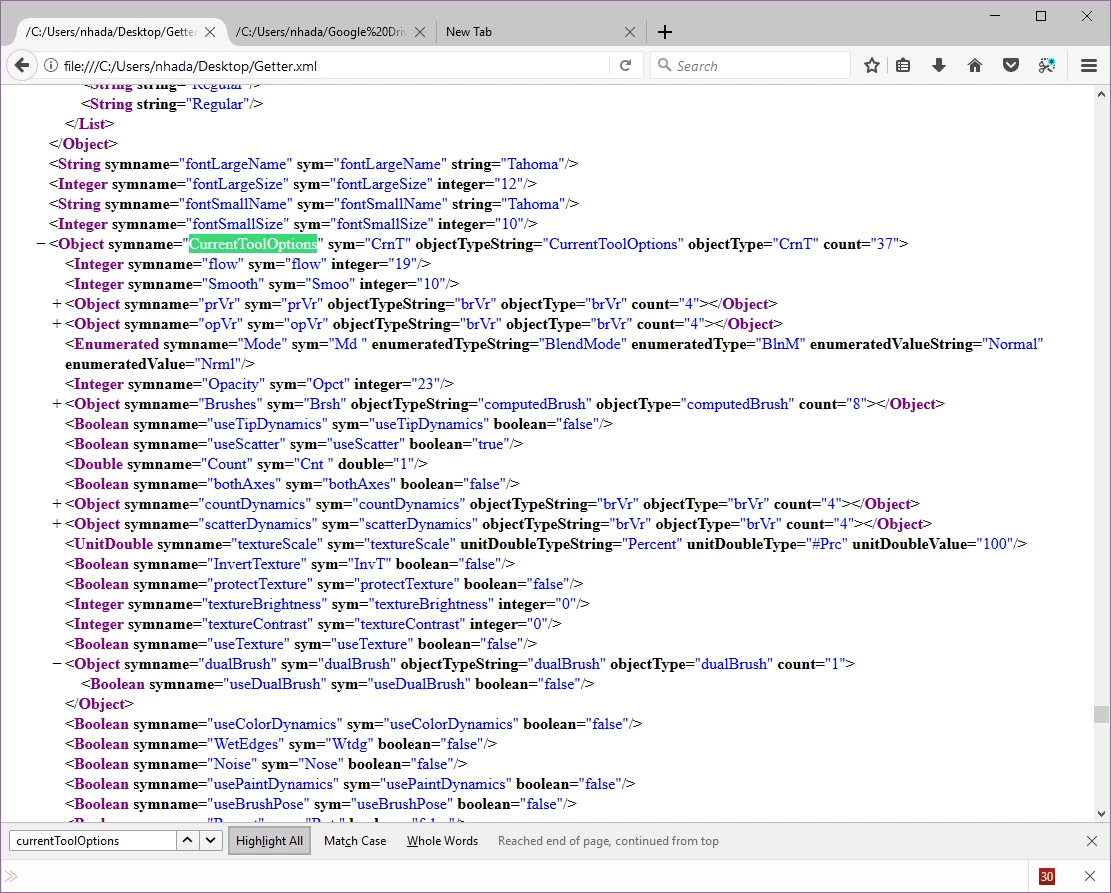
So I tried to modify from code from changing Opacity from following and the modified code.

JavaScripts/SetPaintBrushOpacityAndOthers.jsx at master · TomRuark/JavaScripts · GitHub

// Code from : 

// https://github.com/TomRuark/JavaScripts/blob/master/SetPaintBrushOpacityAndOthers.jsx

var idset = stringIDToTypeID( "set" );

var desc226 = new ActionDescriptor();

var idnull = stringIDToTypeID( "null" );

var ref170 = new ActionReference();

var idPbTl = stringIDToTypeID( "paintbrushTool" );

ref170.putClass( idPbTl );

desc226.putReference( idnull, ref170 );

var id12 = stringIDToTypeID( "to" );

var desc5 = new ActionDescriptor();

// opacity

var id13 = stringIDToTypeID( "opacity" );

var id14 = stringIDToTypeID( "percentUnit" );

desc5.putUnitDouble( id13, id14, 88 );

// flow

var id19 = stringIDToTypeID( "flow" );

desc5.putUnitDouble( id19, id14, 77 );

// TEST: smoothing: Not working

var id99 = stringIDToTypeID( "smooth" );

desc5.putUnitDouble( id99, id14, 66 );

var id18 = stringIDToTypeID( "null" );

desc226.putObject( id12, id18, desc5 );

executeAction( idset, desc226, DialogModes.NO );

Opacity and Flow can be set the value.

Smoothing is not working.

I still don't understand well on the ActionDescriptor's code and still learning.

Any help, suggestions, tips, links are appreciated.

Thank you,

Naoki

This topic has been closed for replies.
Correct answer r-bin

This does not work in CS6, so I'm not particularly interested.
In CC2018, you can use this

// smooth_value = 66;


desc5.putInteger (stringIDToTypeID ("smooth"), smooth_value);
desc5.putDouble (stringIDToTypeID ("smoothingValue"), Math.round (smooth_value / 100 * 255));


By the way, "flow" and "opacity" have type INTEGERTYPE, and not UNITDOUBLE as you use.

upd.

also you can set

"smoothing"

"smoothingRadiusMode"

"smoothingCatchup"

"smoothingCatchupAtEnd"

"smoothingZoomCompensation"

to BOOLEANTYPE (true or false)

1 reply

r-binCorrect answer
Legend
November 8, 2017

This does not work in CS6, so I'm not particularly interested.
In CC2018, you can use this

// smooth_value = 66;


desc5.putInteger (stringIDToTypeID ("smooth"), smooth_value);
desc5.putDouble (stringIDToTypeID ("smoothingValue"), Math.round (smooth_value / 100 * 255));


By the way, "flow" and "opacity" have type INTEGERTYPE, and not UNITDOUBLE as you use.

upd.

also you can set

"smoothing"

"smoothingRadiusMode"

"smoothingCatchup"

"smoothingCatchupAtEnd"

"smoothingZoomCompensation"

to BOOLEANTYPE (true or false)

Jarda Bereza
Inspiring
November 8, 2017

Adobe merged old smoothing and new smoothing.

You can disable it "smoothing": true/false or reset to default value. http://sklad.bereza.cz/00-jarda/00_screenshot/2017-10-20_003537.jpg No matter which value you put. It probably always will be 10 %

Naoki-Hada
Known Participant
November 8, 2017

Hi Jarda,

Thank you very much for the tips. I've seeing the reset to 10% behavior.

Also thank you very much for sharing ActionManagerHumanizer code.

  GitHub - jardicc/ActionManagerHumanizer: This tool will reveal for you occult mystery of Photoshop ActionDescriptors and…

It is very helpful.

Thank you,

Naoki