Inspiring
August 21, 2019
Answered

Question about Photoshop actions

  • August 21, 2019
  • 4 replies
  • 1053 views

I suspect the answer will be "write a script," and I'll consider doing that if it's not possible to do what I want with an action.

I wrote an action that's supposed to add a border with registration marks to an existing image (I'm not printing from Photoshop, so I cannot use the Print settings to add the registration marks).   The action starts by creating a new layer over the existing image, converts the new layer to a smart object, opens the smart object, and creates the border.

When I defined the action,the existing image happened to be 6x6". I thought that when the action played, it would pick up the size of the current background layer, e.g., 6x9.  But the action remembers the 6x6 size from the time of recording.

Is there any way to have new layer use the current image size?
This topic has been closed for replies.
Correct answer Bojan Živković11378569

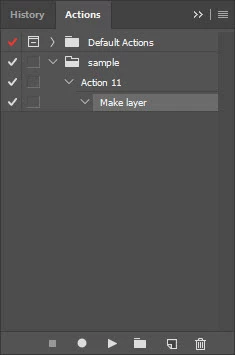
Can you describe the process of recording Make layer step? Photoshop is not recording dimensions when recording step to create new layer. You can try to expand that step and you will see what is recorded: nothing should be inside Make layer step, by the way.

Here is action recorded based on your description and similar to what I think you are trying to record sample.atn - Google Drive

4 replies

JJMack
Community Expert
Community Expert
September 12, 2019

http://www.mouseprints.net/old/dpr/RegistrationFrames.atn

I believe I posted this but it was lost during the change

JJMack
c.pfaffenbichler
Community Expert
Community Expert
August 21, 2019

Can you provide a screenshot of the fully expanded Action in the Actions Panel?

Ussnorway7605025
Legend
August 21, 2019

https://forums.adobe.com/people/J+Isner  wrote


Is there any way to have new layer use the current image size?

your best option is to resize the layer as part of the action i.e, open canvas and reset size to X, Y... it does not matter if the new size is the same as it was before

Bojan Živković11378569
Community Expert
Community Expert
August 21, 2019

Can you describe the process of recording Make layer step? Photoshop is not recording dimensions when recording step to create new layer. You can try to expand that step and you will see what is recorded: nothing should be inside Make layer step, by the way.

Here is action recorded based on your description and similar to what I think you are trying to record sample.atn - Google Drive

J IsnerAuthor
Inspiring
August 21, 2019

Thanks for making the sample.  Now I see the problem.

JJMack
Community Expert
Community Expert
August 21, 2019

It is easy to add a boarder inside the image area or outside the image area.  Making it a smart object is also easy. However,   You provided no information about the registration marks you want. What they should look like  how big they should be or where they should be.   If there locations are relative to the canvas size. Setting ruler units to Percentage can be used if the marks are always the same percent for all canvas sizes.

JJMack