Participant
December 17, 2016
Answered

Question about text effect in 3D tool

  • December 17, 2016
  • 4 replies
  • 551 views

Hi,

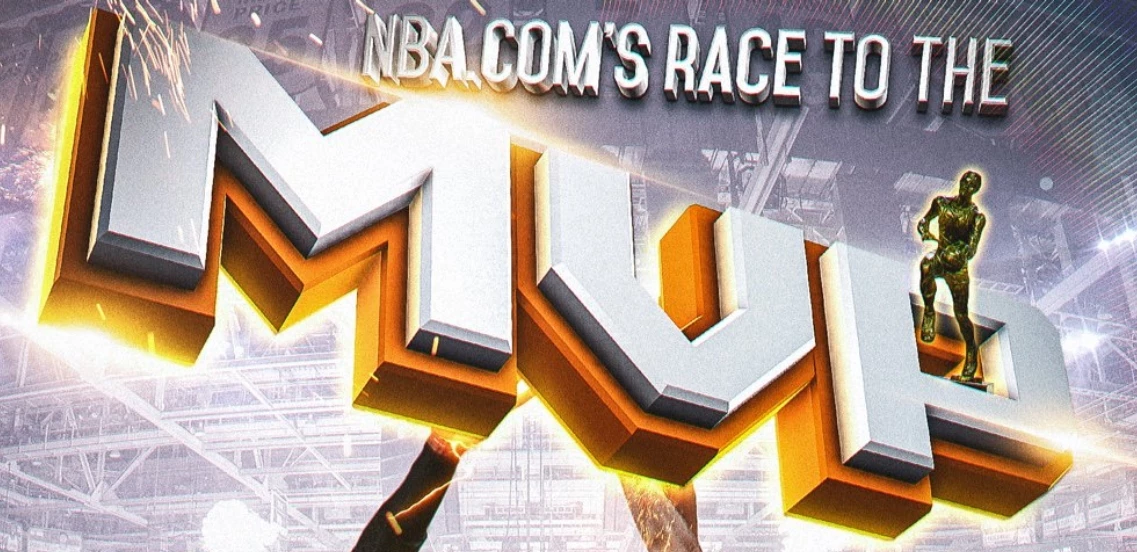
First of all, I wanted to ask if the word saying "MVP" in the image that I attached is made with Photoshop using 3D tool? And second, if it's not made with 3D tool is it at least possible to get similar type of effect via 3D tool in PS?

Basically I want to know how to make this "double layered" text type effect with 3D tool when, in this case, white letters in word "MVP" comes out of the bigger yellow letters that are below them. Is there an build in option to do something like this or it's like two, same type of words but just in different sizes put on top of each other and rendered?

Thanks.

This topic has been closed for replies.
Correct answer Mylenium

First of all, I wanted to ask if the word saying "MVP" in the image that I attached is made with Photoshop using 3D tool?

Only the original artist will know. Last time I looked, there were like 300 major 3D programs, 3D plug-ins and renderers on this planet and I'm sure there are equally as many lesser known ones in addition. It's simply impossible to determine the original creation program just by looking at the rendered output, especialyl after extensive post-processing like in your example.

is it at least possible to get similar type of effect via 3D tool in PS?

Yes/ No/ perhaps/ maybe/ whatever. The image uses radiosity-like gradients to simulate color bleed from indirect reflected light, which will be difficult to simulate even with the image based lighting. On the other hand the speckeld, splotchy (bad) render quality might suggest it was done in PS, after all, which is good news for you then. Either way, it's obviously possible.

it's like two, same type of words but just in different sizes put on top of each other and rendered?

Exactly that. You shouldn't expect complex bevels and edge profiles to be available at the click of a button. It's an illusion and as a matter of fact the image has at least 3 separate objects - the glowing rim at the back of the lettering being another separate item.

Mylenium

4 replies

PaulDokrAuthor
Participant
December 17, 2016

Thank you for all the responses, it was really helpful!

davescm
Community Expert
Community Expert
December 17, 2016

Can you do this in Photoshop 3D - yes.

Photoshop does allow bevelled edges but you will probably need to make the silver part and gold parts separate, and as Mylenium said, the back gold part as a third,  and then merge them onto a single 3D layer. This is not because of the colour - you can apply different textures across a single object, but because of the shape. Photoshop's tools to manipulate the mesh are fairly basic and therefore producing as two separate objects each with a bevel is the way to go.

The glows and highlight start filter effects are easier added later in 2D layers. That is where Photoshop is fairly good - at mixing up 3D and 2D layers, using all the familiar tools.

Good luck !

Dave

postrophe
Inspiring
December 17, 2016

Hi

Dave, my feeling was that this kind of work would "maybe" be used in different formats (size). - Web, flyers, billboard, etc -

As I repeat constantly, knowing the full production line of output, is the key for a good start.

Pierre

davescm
Community Expert
Community Expert
December 17, 2016

Pierre,

That is a very good point.

The 3D tools always output a rendered layer at a pixel based resolution not scalable vectors. If it is a poster with large dimensions and high ppi, press render and go on holiday !!! That said, as we often repeat in the forums - it is viewing distance that counts - don't set pixel dimensions too high.

Dave

Mylenium
MyleniumCorrect answer
Legend
December 17, 2016

First of all, I wanted to ask if the word saying "MVP" in the image that I attached is made with Photoshop using 3D tool?

Only the original artist will know. Last time I looked, there were like 300 major 3D programs, 3D plug-ins and renderers on this planet and I'm sure there are equally as many lesser known ones in addition. It's simply impossible to determine the original creation program just by looking at the rendered output, especialyl after extensive post-processing like in your example.

is it at least possible to get similar type of effect via 3D tool in PS?

Yes/ No/ perhaps/ maybe/ whatever. The image uses radiosity-like gradients to simulate color bleed from indirect reflected light, which will be difficult to simulate even with the image based lighting. On the other hand the speckeld, splotchy (bad) render quality might suggest it was done in PS, after all, which is good news for you then. Either way, it's obviously possible.

it's like two, same type of words but just in different sizes put on top of each other and rendered?

Exactly that. You shouldn't expect complex bevels and edge profiles to be available at the click of a button. It's an illusion and as a matter of fact the image has at least 3 separate objects - the glowing rim at the back of the lettering being another separate item.

Mylenium
postrophe
Inspiring
December 17, 2016

Hi

If I had to do this using Adobe software, I would do the lettering in Illustrator, then do the finishing part in Photoshop.

Pierre