Known Participant
January 3, 2020
Answered

Question on Hue/Saturation adjustment layer:

  • January 3, 2020
  • 2 replies
  • 1717 views

Hi all, lately I've been having troubles with layers as follows, where if I leave the layer control, then come back to it, it isn't in the state it was previously. Here are the details:


SCENARIO: (de-saturating parts of image)

  1. Create Hue/Saturation adjustment layer
  2. Click part of image that contains hue to adjust
  3. Adjust saturation (example: -25%)
  4. Invert Mask, use eraser to paint areas to de-saturate


So far so good.


The problem is when I go to another panel/layer to do something else, then come back to that adjustment layer, I find that the saturation is at 0 and the color range is at full (rather than the sub-range specified in step 2 above). If I adjust the saturation slider, it adjusts all hues for the entire image, even though the painted mask is still there on the layer.


I can click on the either icon of that layer in the layer panel and it doesn't seem to matter — I can't get back to where it was.


What I've been doing, if I want to make further hue adjustments, is to recreate layer and repaint the mask — a total PITA. What am I doing wrong?


(this may apply to other adjustment layers as well)


Thanks much, 

Chris
 

This topic has been closed for replies.
Correct answer Chuck Uebele

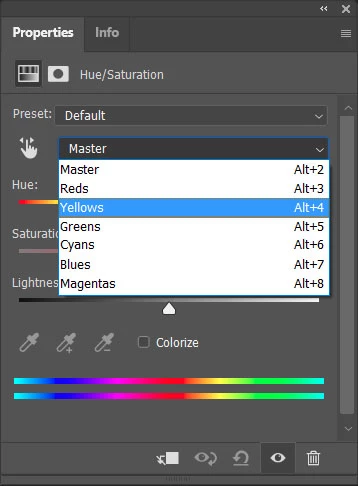
It sounds like you are only adjusting one of the colors and not the master correction, so you need to reselect that in the drop down list for the corrections to show again.

2 replies

Chuck Uebele
Community Expert
Chuck UebeleCommunity ExpertCorrect answer
Community Expert
January 3, 2020

It sounds like you are only adjusting one of the colors and not the master correction, so you need to reselect that in the drop down list for the corrections to show again.

Known Participant
January 3, 2020
Okay, that pans out.

I do not initially select a color from that drop-down, but use the dropper
on the image, then sometimes adjust that range.

I just tested and when I pull down the associated color in the drop down,
it does reflect the reduced value in the saturation slider I previously
set. It also remember the range (a sub-set of greens, rather than just
selecting the entire green range again), so that's good.

I cannot at this moment reproduce the scenario when the saturation slider
goes back to adjusting the entire image (rather than just the
masked portions), so we'll chalk that of to use error for now.

Thanks to all,
Chris
lambiloon
Community Expert
Community Expert
January 3, 2020

Hi one simple hack is when you apply adjust layer to few layers and want to restrict to only them convert to smart object layer...Regards

Ali Sajjad / Graphic Design Trainer / Freelancer / Adobe Certified Professional
Known Participant
January 3, 2020
Thanks, that sounds like a good tip.

One thing I may not have made clear: this is only a problem if I make an
adjustment, then want to go back and tweak that same adjustment (a little
more, a little less, etc.). I don't want to rescind it and am unhappy that,
if I want to make it just a little different, I have to do it all over
again.

Chris