christohperr47144812
Participant
December 9, 2019
Question

Question regarding adding fill for photo

  • December 9, 2019
  • 2 replies
  • 327 views

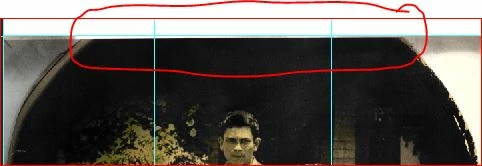
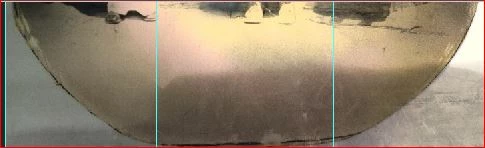
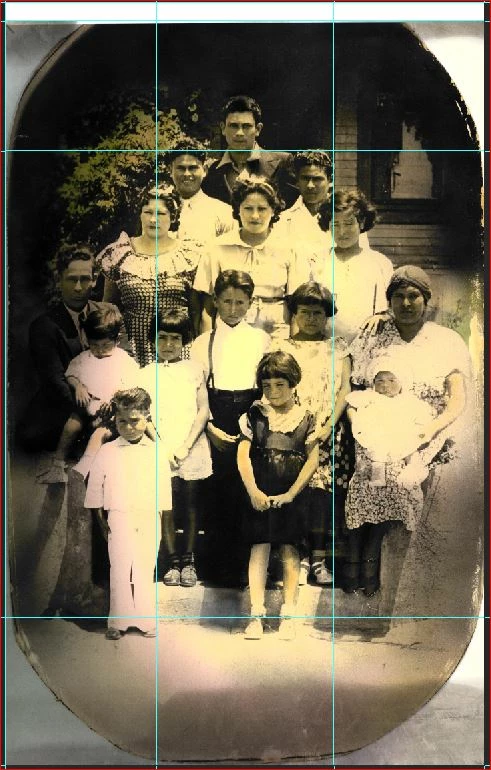
I have a question. I have an older photo that is missing a part of it. Scanned in part was missing. I am attempting to add the black part at the top to match the shape there but I am not sure how to do this. The way it appears at the bottom is waht I want to appear at the top (red pen marks area)? Any assistance is appreciated. 
This topic has been closed for replies.

2 replies

MarekMularczyk
Community Expert
Community Expert
December 9, 2019

As mentioned here, Clone Stamp tool will be useful here.


Sample the area you want to use with Clone Stamp tool holding Alt-key. Once sampled, start applying clones by clicking or clicking and dragging.


And, make a new layer first 😉  Always work on a separate layer 😉

Adobe Community ExpertAdobe Certified Professional
christohperr47144812
Participant
December 10, 2019

Thanks. I will try this today.

Legend
December 9, 2019

This should be pretty easy with the clone stamp. Search online for Photoshop tutorials, this is fairly basic stuff so there will be plenty of videos.